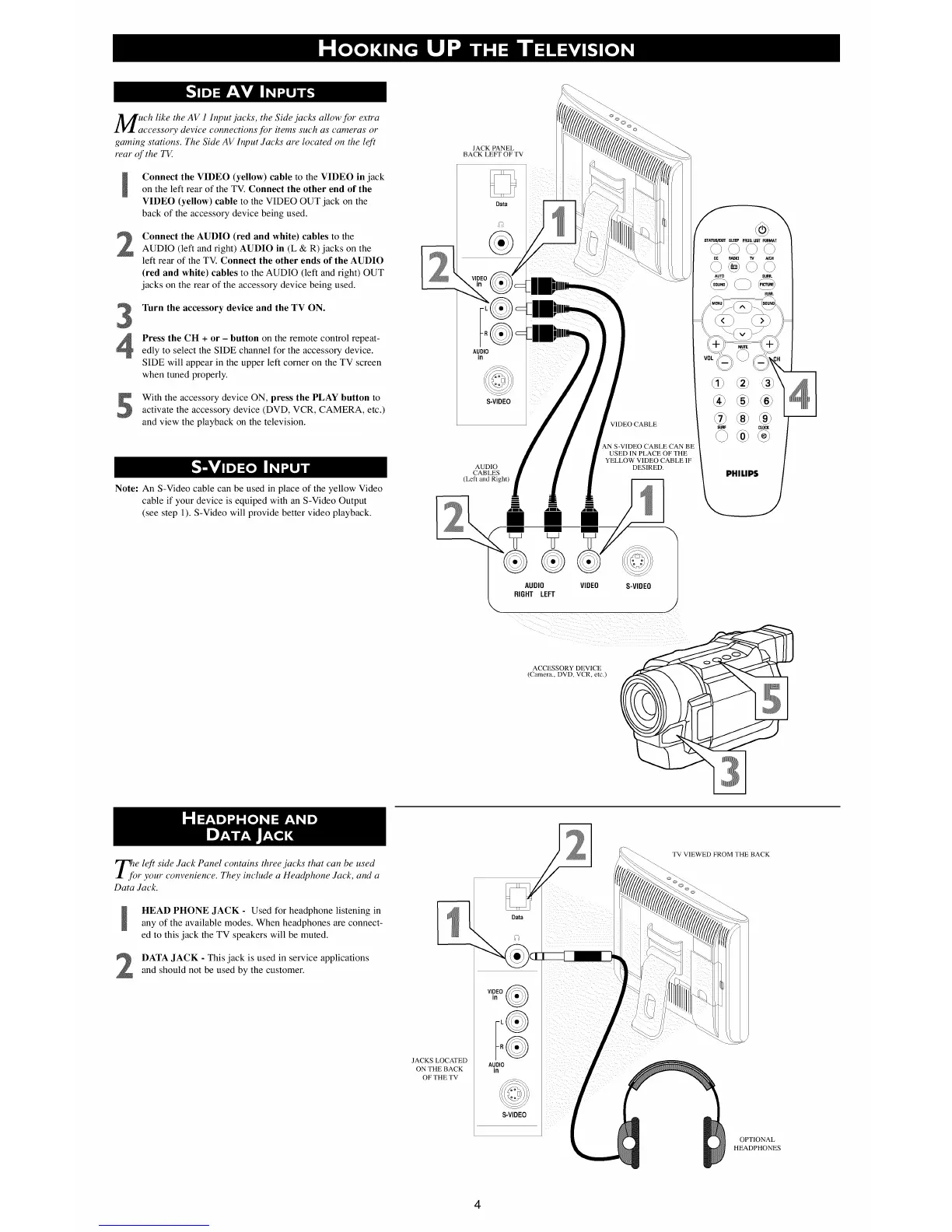
UCh like the AV 1 Input.jacks, the Side .jacks allow for extra
ccessory device connections for items such as cameras or
gaming stations. The Side AV Input ,lacks are located on the left
mar of the TV.
Connect the VIDEO (yellow) cable to the VIDEO in jack
on the left rear of the TV. Connect the other end of the
VIDEO (yellow) cable to the VIDEO OUT jack on the
back of the accessory device being used.
2
Connect the AUDIO (red and white) cables to the
AUDIO (left and right) AUDIO in (L & R) jacks on the
left rear of the TV. Connect the other ends of the AUDIO
(red and white) cables to the AUDIO (left and right) OUT
jacks on the rear of the accessory device being used.
3
Turn the accessory device and the TV ON.
Press the CH + or - button on the remote control repeat-
edly to select the SIDE channel for the accessory device.
SIDE will appear in the upper left corner on the TV screen
when tuned properly.
With the accessory device ON, press the PLAY button to
activate the accessory device (DVD, VCR, CAMERA, etc.)
and view the playback on the television.
Note: An S-Video cable can be used in place of the yellow Video
cable if your device is equiped with an S-Video Output
(see step 1). S-Video will provide better video playback.
JACK PANEL
BACK LEFT OF TV
E:$
AUDIO
in
S-VIDEO
AUDIO
CABLES
(Left and Right)
i
ii
V V
®
AUDIO
RIGHT LEFT
VIDEO
VIDEO CABLE
AN S-VIDEO CABLE CAN BE
USED IN PLACE OF THE
YELLOW VIDEO CABLE IF
DESIRED.
S-VIDEO
J
STA'FO_ff SLEEP PRO6. UST FORMAT
©©©©
RADIO NCH
AUTO SURR.
su_
@®®
®®
SURF CLOCK
@®
PHILIPS
ACCESSORY DEVICE
(Camera., DVD, VCR, etc.)
e left side ,lack Panel contains three.jacks that can be used
r your convenience. They include a Headphone ,lack, and a
Data ,lack.
HEAD PHONE JACK - Used for headphone listening in
any of the available modes. When headphones are connect-
ed to this jack the TV speakers will be muted.
DATA JACK - This jack is used in service applications
and should not be used by the customer.
JACKS LOCATED
ON THEBACK
OFTHETV
Data
v, o
AUDIO
in
S-VIDEO
TV VIEWED FROM THE BACK
OPTIONAL
HEADPHONES
4












 To Previous Page