For or Spanish- and French-speaking 1V
owners, an onscreen LANGUAGE option
is present, The LANGUAGE control enables
you to set the TV's onscreen menu to be
shown in either English, Spanish, or French,
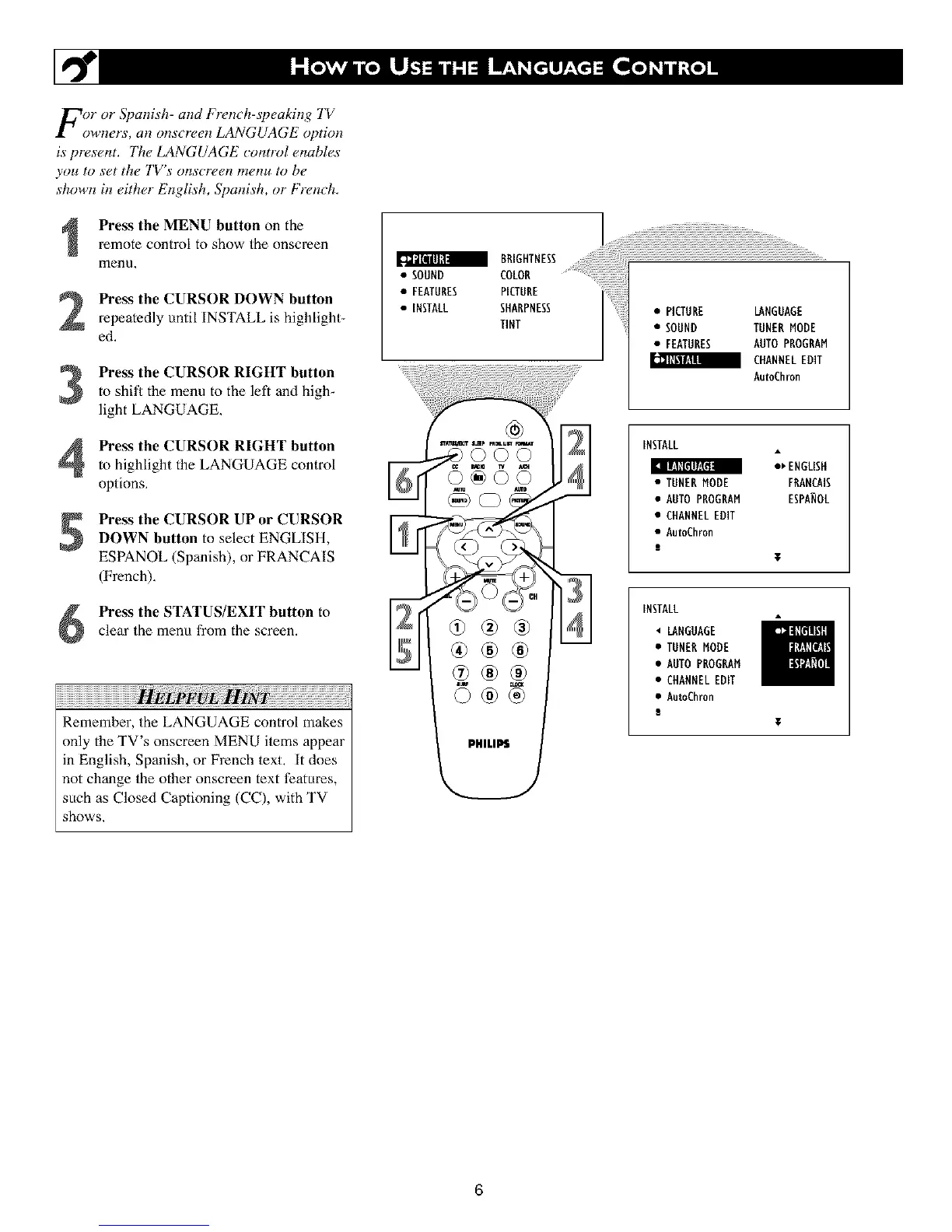
Press the MENU button on the
remote control to show the onscreen
menu,
Press the CURSOR DOWN button
repeatedly until INSTALL is highlight-
ed.
Press the CURSOR RIGHT button
to shit_ the menu to the left and high_
light LANGUAGE.
Press the CURSOR RIGHT button
to highlight the LANGUAGE control
options,
Press the CURSOR UP or CURSORDOWN button to select ENGLISH,
ESPANOL (Spanish), or FRANCAIS
(French),
Press the STATUS/EXIT button toclear the menu from the screen,
Remember, the LANGUAGE control makes
only the TV's onscreen MENU items appear
in English, Spanish, or French text, It does
not change the other onscreen text t?atures,
such as Closed Captioning (CC), with TV
shows,
•FEA HRESP,CTHHE
• INSTALL SHARPNESS • PICTURE LANGUAGE
TINT • SOUND TUNERMODE
• FEATURES AUTOPROGRAM
_ CHANNELEDIT
AutoChron
I_Alu,_ s_p rmmum i
INSTALL
_ ENGLISH
• TUNERMODE FRANCAIS
• AUTOPROGRAM ESPANOL
• CHANNELEDIT
• Au_Chron
T
INSTALL
LANGUAGE
• TUNERMODE
• AUTOPROGRAM
• CHANNELEDIT
• AutoChmn
l
6












 To Next Page