Tthe TUNER MODE allows you to change
he TV s siglzal input to CABLE, ANTEN-
NA, or AUTO mode,. It's" importa!_t for the TV
to know if you want to receive c halmels fr_)m
a cable TV sig!_al or a !_ormal a!_tenna signal,
NOTE: "l'tleAUTO mod¢_ setti!_g helps the TV
cl_,t¢_rmine the type qf signal or' chalmels being
received whe!_ AUTO PROGRAM is activat-
ed,
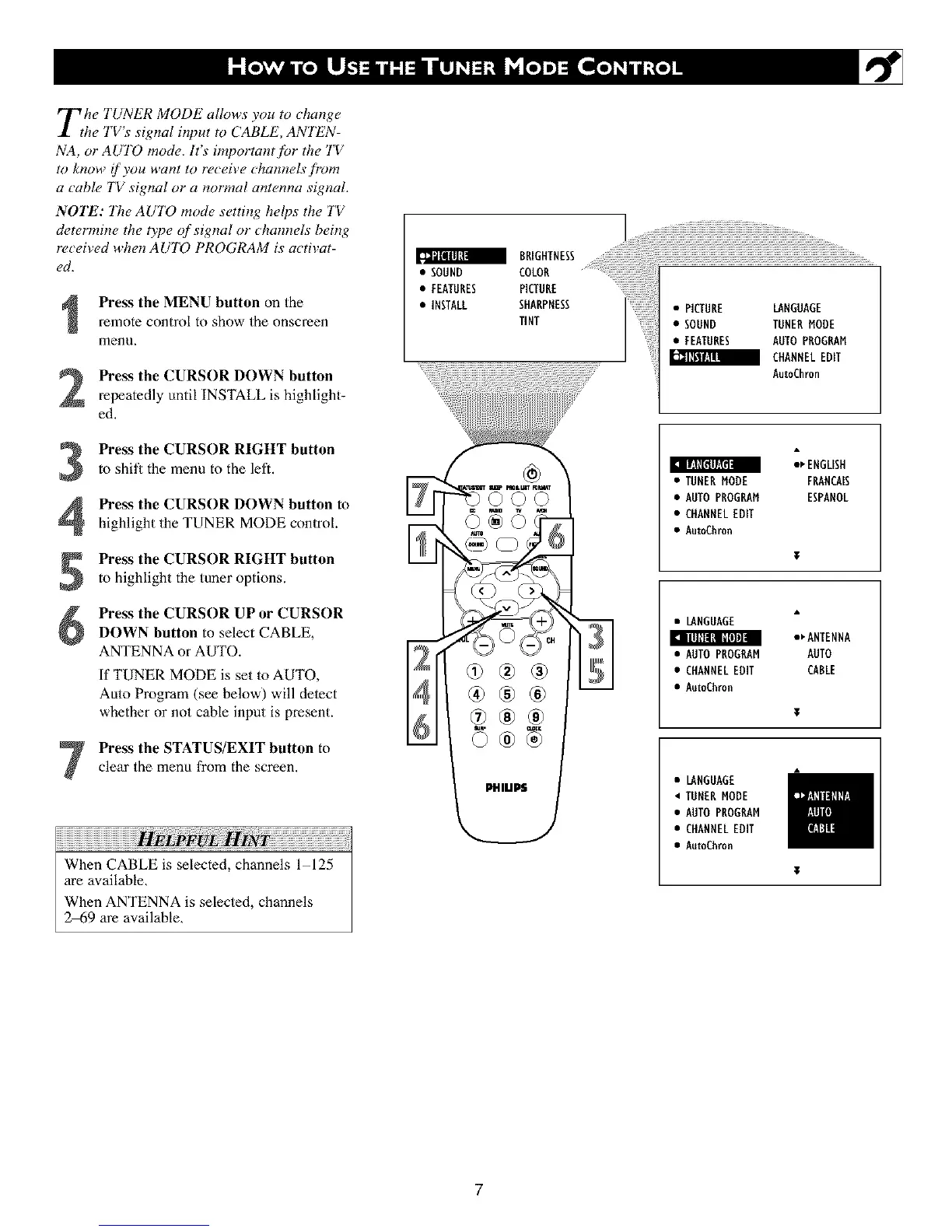
Press the MENU button on the
remote control to show the onscreen
menu,
Press the CURSOR DOWN button
repeatedly until INSTALL is highlight-
ed.
Press the CURSOR RIGHT buttonto shill the menu to the left.
II[:IZE_lY._IrlI
Press the CURSOR DOWN button to
highlight the TUNER MODE control.
Press the CURSOR RIGHT buttonto highlight the tuner options.
6
Press the CURSOR UP or CURSOR
DOWN button to select CABLE,
ANTENNA or AUTO.
If TUNER MODE is set to AUTO,
Auto Program (see below) will delect
whether or not cable input is present.
I_ illllll_l [_'[i]1]II
Press the STATUS/EXIT button to
clear the menu from the screen,
When CABLE is selected, channels l 125
are available,
When ANTENNA is selected, channels
2_9 are available,
i!!i!!i!iiililililili iiiililili................
• SOUND #iiiilBEE
• FEATURES
• INSTALL
AutoChron
_ ENGLISH
• TUNERMODE FRANCAIS
• AUTOPROGRAM ESPANOL
• CHANNELEDIT
• AutoChron
• LANGUAGE
•_ANTENNA
• AUTOPBOGRAM AUTO
• CHANNELEDIT CABLE
• Au_Chron
• LANGUAGE
• TUHEBMODE
• AUTOPBOGRAM
• CHANNELEDIT
• Au_Chron
7












 To Next Page