Bmr TV can automatically set itse!f.f!>r
ocal area (ol- cable TV) channels, This
makes it easy f!)r you to select only the TV
stations in your area by pressing the CHAN-
NEL (+) ol- (-) button,
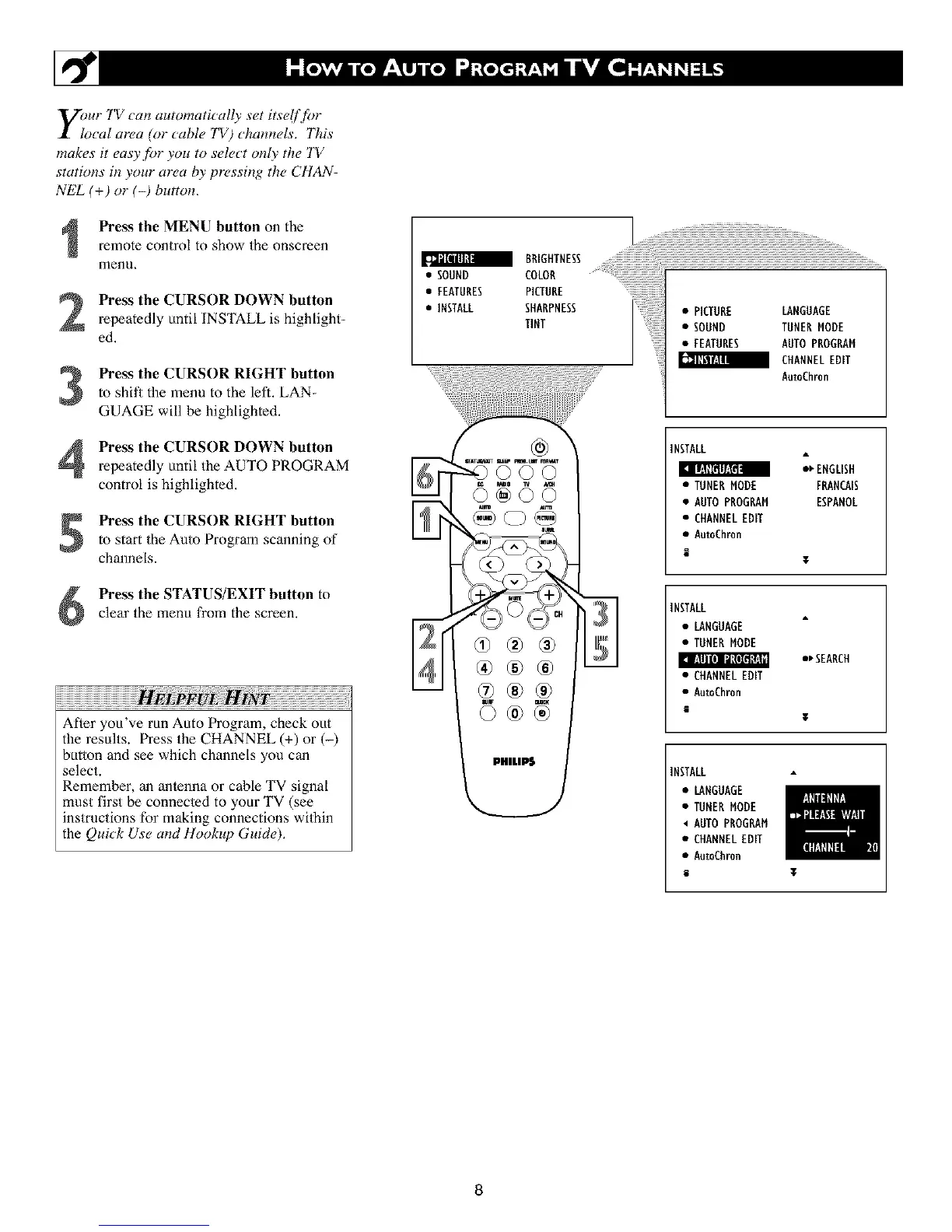
Press the MENU button on the
remote control to show the onscreen
menu,
Press the CURSOR DOWN button
repeatedly until INSTALL is highlight-
ed.
Press the CURSOR RIGHT button
to shit_ the menu to the left. LAN-
GUAGE will be highlighted.
Press the CURSOR DOWN button
repeatedly until the AUTO PROGf_,AM
control is highlighted.
Press the CURSOR RIGHT button
to start the Auto Program scanning of
channels.
Press the STATUS/EXIT button to
clear the menu from the screen,
Afler you've mn Auto Program, check out
the results. Press the CHANNEL (+) or (-)
button and see which channels you can
select.
Remember, an anlenna or cable TV signal
must first be connecmd to your TV (see
instructions for making connections wiihin
the Qui_k Use and Hookup Guide),
BRIGHTNESS i!i
• SOUND COLON
• FEATURES PICTURE iiiiiiiiiiiiiiiiiiiiiiiiiiiiiiiiiiii;_
• INSTALL SHARPNESS • PICTURE LANGUAGE
TINT • SOUND TUNERMODE
• FEATURES AUTOPROGRAM
CHANNELEDIT
AutoEhron
03®®
®®®
INSTALL
_ ENGLISH
• TUNERMODE FRANCAIS
• AUTO PROGRAM ESPANOL
• CHANNELEDIT
• AutoCh_n
E
¥
INSTALL
• LANGUAGE
• TUNENMODE
I_ !._lll[*! II!*I_l i!,.li
*_SEANCH
• CHANNEL EDIT
• AutoCh_n
i
T
INSTALL
• LANGUAGE
• TUNER MODE
AUTO PROGRAM
• CHANNELEDIT
• AutoCh_n
i I
8












 To Next Page