M
any times while watching movies
from a DVD player the image is
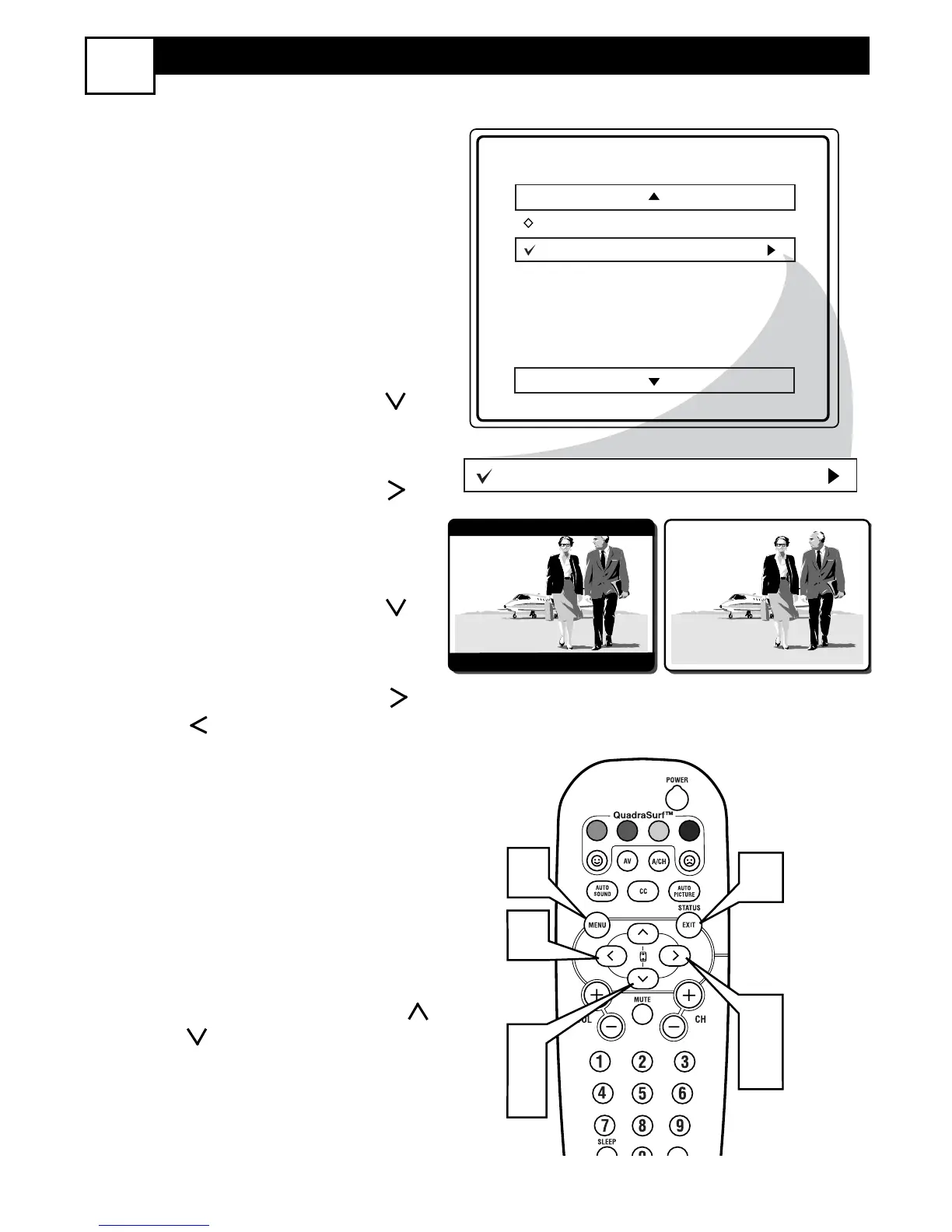
shown in “letter box” format. This is the
format that is shown in movie theaters.
when shown on a TV screen, the image
will have areas of black on top and bot-
tom of the screen.
1
Press the MENU button on the
remote to display the on-screen
menu.
2
Press the CURSOR DOWN
button until the word Features is
highlighted.
3
Press the CURSOR RIGHT
button to display the Features
menu options (AutoLock or
Format).
4
Press the CURSOR DOWN
button until the word Format is
highlighted.
5
Press the CURSOR RIGHT or
LEFT buttons to select one of
the two options 4:3 or Expand 4:3.
4:3 - Standard format for the TV.
Expand 4:3 - Enlarges the picture
to fill out the entire screen area,
eliminating the “letter box” effect.
6
When finished, press the STATUS
/EXIT button to remove the menu
from the TV’s screen.
Note: The Expand 4:3 format can also
be activated using the CURSOR UP
or DOWN buttons when the
onscreen menu is not being displayed.
Pressing these buttons will toggle the
standard 4:3 format and the Expand 4:3
format.






 To Next Page