EasyManua.ls Logo

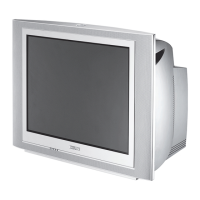
Philips 20PT424A/77B - User Manual

Philips 20PT424A/77B
58 pages
Print Icon
To Next Page IconTo Next Page
Loading...
1
Published by JvR 9965 Service Department Printed in the Netherlands Subject to modification
5
4822 727 21684
Copyright reserved 1999 Philips Consumer Electronics B.V. Eindhoven, The
Netherlands. All rights reserved. No part of this publication may be reproduced,
stored in a retrieval system or transmitted, in any form or by any means, electronic,
mechanical, photocopying, or otherwise without the prior permission of Philips.
Colour Television Chassis
L9.2E
AA
CL 96532028_front.eps
190499
Contents Page
1. Technical Specifications 2
2. Safety- and maintenance instructions, 3
warnings and notes. 4
3. Directions for use 5
4. Mechanical instructions 8
5. Faultfinding and repair tips 8
6. Faultfinding trees 15
Supply voltage diagram 19
Blockdiagram 20
Testpointsoverview and oscillograms 21
7.
Electrical diagram’s en PWB’s Diagram PWB
Power supply (Diagram A1) 22 31,32
Diversaty table A1 23
Horizontal deflection (Diagram A2) 24 31,32
Vertical deflection (Diagram A3) 25 31,32
Synchronisation (Diagram A4) 25 31,32
Tuner en video IF (TDA 8844) (Diagram A5) 26 31,32
Tuner en video IF (TDA 8845) (Diagram A5) 27 31,32
Diversaty table A5 28
Front control (Diagram A8) 28 31,32
Video processing (Diagram A6) 29 31,32
Control (Diagram A7) 30 31,32
AM Mono demodulator (Diagram A9) 33 31,32
Smart sound & mono amplifier (Diagram A10) 34 31,32
Front cinch and headphone (Diagram A11) 35 31,32
Rear IO Scart (Diagram A13) 36 31,32
CRT Panel (Diagram B) 37 38
ITT Audio decodering (Diagram D1) 39 38
ITT Audio amplifier (Diagram D2) 40 38
Side AV panel (Diagram E) 41 41
8. Alignments 43
9. Circuit description new circuits and 47
list of abbreviations 52
10. Spareparts list 55
Question and Answer IconNeed help?

Do you have a question about the Philips 20PT424A/77B and is the answer not in the manual?

Overview

This document describes the Philips L9.2E AA Colour Television chassis, covering its technical specifications, usage, maintenance, and repair procedures.

Function Description

The Philips L9.2E AA is a colour television chassis designed for various display sizes (14", 20", 21"). It incorporates a switch-mode power supply (SMPS) for efficient power management, video processing for different signal standards, and audio processing for various sound systems. The TV supports multiple input sources, including aerial, Cinch (audio/video), and SCART, and provides audio output through internal speakers or headphones.

The video processor (TDA8844/8845) handles IF demodulation, chroma processing, RGB processing, and synchronization. It supports PAL, SECAM, and NTSC colour standards, with automatic system management. The audio section supports FM Mono, NICAM (L/L', I, B/G, DK), and 2CS (two carrier stereo) systems, with digital sound processing for volume, bass, treble, balance, mute, spatial sound, and source selection.

The television includes a micro-controller (SAA5564PS/M2A) for overall control, managing user interface, channel tuning, and service modes. Protection circuits are integrated to safeguard against high beam current, vertical/frame protection, and over/under voltage conditions.

Important Technical Specifications

Mains:

  • Voltage: 150V - 276Vac
  • Frequency: 50 - 60Hz

Power Consumption:

  • 14": 40W +/- 10%
  • 20": 56W +/- 10%
  • 21": 58W +/- 10%
  • Standby: 10W +/- 10%

Audio Output:

  • Stereo: 2 * 3W; 2 * 1W
  • Mono: 2 * 2W; 4W; 3W; 2W; 1W
  • Headphone impedance: 8-600Ω (4mW)

Tuners:

  • UV 1316/AI-2 (PAL)
  • UV 1316/AIU-2 (PAL)
  • UV 1356C/AI (PAL)

Signal Input/Output (EXT1 CVBS + RGB):

  • Audio Out R/L: 0.5VRMS (1KΩ)
  • Audio In R/L: 0.2-2VRMS (10KΩ)
  • RGB (Blue, Green, Red): 0.7Vpp/75
  • CVBS status (INT = 0-2V, EXT (16:9) = 4.5-7V, EXT(4:3) = 9.5-12V)
  • CVBS (in/out): 1Vpp/75

Signal Input/Output (EXT2 CVBS + SVHS):

  • Audio Out R/L: 0.5VRMS (1KΩ)
  • Audio In R/L: 0.2-2VRMS (10KΩ)
  • C (Chrominance): 300mVpp/75
  • CVBS (in/out): 1Vpp/75

Usage Features

The television offers a user-friendly interface for tuning channels, adjusting picture and sound settings, and utilizing various features.

Channel Tuning:

  • Quick Installation: Automatic tuning and storage of channels upon first use. Users select language and country, and the TV scans for available programmes.
  • Manual Tuning: Allows users to store programmes one by one by searching for frequency, fine-tuning, and assigning a programme number.

Picture and Sound Adjustment:

  • Picture Settings: Adjustments for Brightness, Colour, Contrast, Sharpness, Tint (Cold, Normal, Warm), Contrast+, and Noise Reduction.
  • Sound Settings: Controls for Volume, Balance, Treble, Bass, and Automatic Volume Leveller (AVL) to prevent sudden volume increases.
  • Storing Settings: Personal picture and sound settings can be saved.

Additional Features:

  • TV Lock: Locks the set completely or partially (programme lock) using a confidential access code.
  • Timer Function: Sets the TV to switch on at a programmed time, functioning as an alarm clock.
  • Teletext: Access to information pages, subtitles, and interactive content. Features include page selection, temporary on/off, page enlargement, sub-page sequence control, and reveal hidden information.
  • External Connections: Supports video recorders, satellite receivers, decoders, DVD players, and game consoles via euroconnector (SCART) sockets (EXT1 for RGB, EXT2 for S-VHS) and front Cinch/headphone inputs.

Maintenance Features

The document provides detailed instructions for safety, maintenance, and repair, emphasizing the importance of qualified service personnel.

Safety Instructions:

  • Isolation Transformer: Always connect the set to mains via an isolating transformer during repair.
  • Component Replacement: Safety components (marked with ▲) must be replaced with identical parts.
  • CRT Replacement: Safety goggles must be worn when replacing the CRT.
  • Resoldering: Advised for solder joints in the horizontal deflection circuit, especially for older sets, to prevent metal fatigue.
  • Cable Routing: Wire trees and EHT cable must be routed correctly and fixed with clamps.
  • Mains Lead Check: Inspect insulation and strain relief of the mains lead.
  • DC Resistance Check: Verify electrical DC resistance between mains plug and secondary side (4.5 MΩ to 12 MΩ).
  • ESD Precautions: Use wristbands and ensure components/tools are at the same potential to prevent damage to ICs and semiconductors.
  • Picture Tube Discharge: Discharge the picture tube using a high-voltage probe and multimeter before handling.
  • Flat Square Picture Tubes: Deflection and multipole units are optimally set at the factory; adjustment is not recommended.
  • High-Voltage Section: Exercise caution during measurements in high-voltage areas.
  • Module Replacement: Do not replace modules or components while the unit is switched on.
  • Plastic Tools: Use plastic tools for settings to prevent short circuits and instability.

Maintenance Instruction:

  • Periodic Inspection: Recommended every 3-5 years for normal use, or annually for high-dust/moisture environments (e.g., kitchens).
  • General Repair Instruction: Includes resoldering critical solder joints, cleaning power supply and deflection circuitry, and cleaning the picture tube panel and neck.

Service Modes and Tools:

  • Service Default Mode (SDM): Provides predefined settings for measurements, overrides 5V protections, starts blinking LED procedure for error codes, and allows inspection of the error buffer.
  • Service Alignment Mode (SAM): Used for tuning adjustments, white tone alignment, picture geometry, and sound adjustments.
  • Dealer Service Tool (DST) RC7150: Facilitates programming presets and displaying error codes via the blinking LED procedure.
  • ComPair (Computer Aided Repair): A diagnostic tool that guides technicians through repair procedures, provides detailed I2C-level diagnostics, and integrates with electronic manuals (SearchMan).
  • Customer Service Mode (CSM): A read-only mode for identifying the set's status, accessible by the customer upon request.

Philips 20PT424A/77B Specifications

General IconGeneral
BrandPhilips
Model20PT424A/77B
CategoryTV
LanguageEnglish

Related product manuals