6
CABLE BOX CONNECTIONS
I
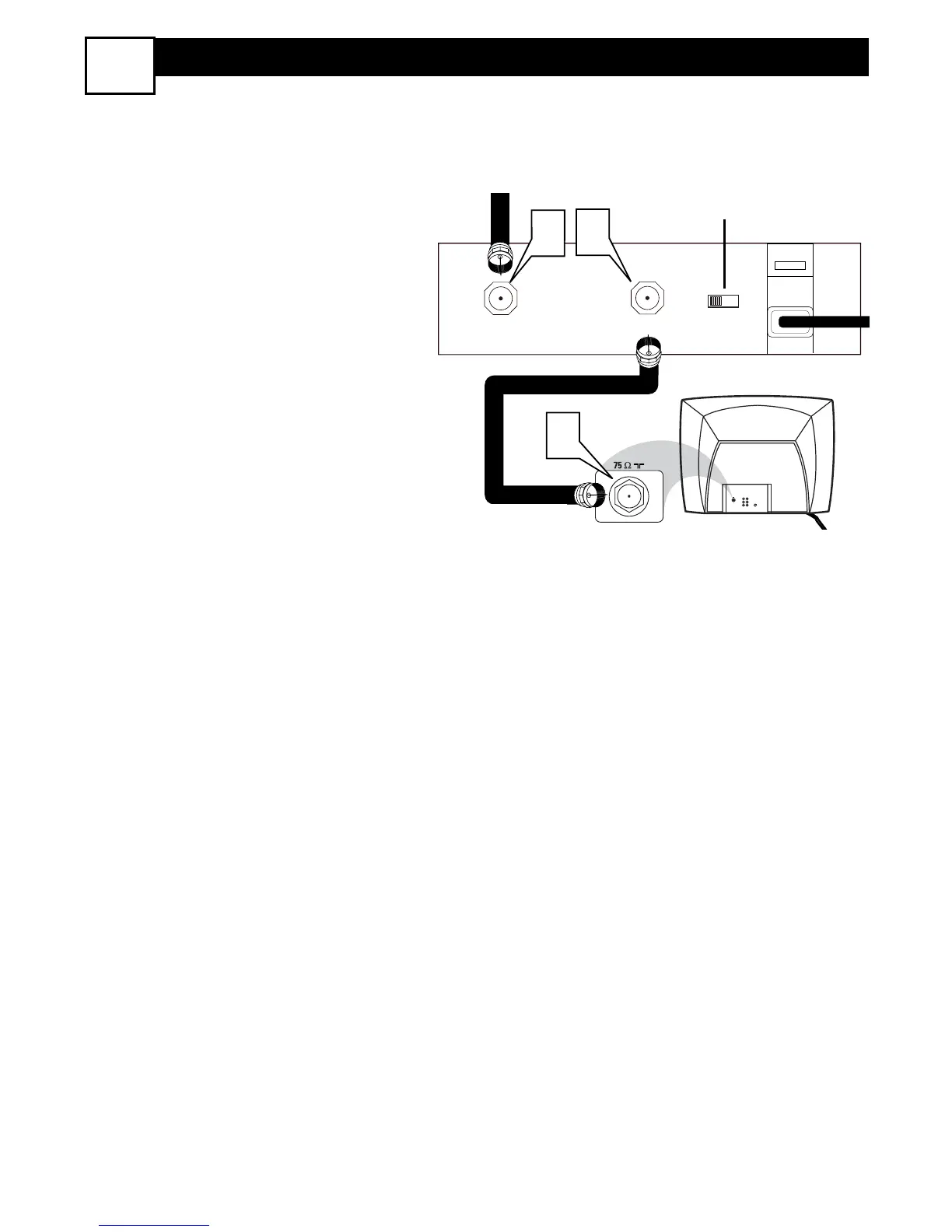
f you cable signal uses a cable box or
decoder, follow the easy steps below to
complete the connection.
Cable Box (w/RF In/Outputs):
This connection will be mono.
1
Connect the Cable Company sup-
plied cable to
the signal IN(put)
plug on the back of the Cable Box.
2
Using a separate round coaxial cable,
connect one end to the OUT(put)
(TO TV) plug on the back of the
Cable Box.
3
Connect the other end of the round
coaxial cable to the 75Ω input on the
back of the television. Screw it down
finger tight.
NOTE: Set the OUTPUT CHANNEL
SWITCH on the back of the cable box to
CH 3 or 4. Tune the TV to the same chan-
nel and change channels at the cable box.





 To Next Page