!
50
Meridian 3
13. DDC Instruction
General
DDC Data Re-programming
In case the main EEPROM with Software DDC which store all factory settings were replaced because a defect
repaired monitor’ the serial numbers have to be re-programmed.
It is advised to re- soldered the main EEPROM with Software DDC from the old board onto the new board if circuit
board have been replaced, in this case the DDC data does not need to be re-programmed.
Additional information about DDC (Display Data Channel) may be obtained from Video Electronics Standards
Association (VESA). Extended Display Identification Data (EDID) information may be also obtained from VESA.
1. An i486 (or above) personal computer or compatible.
2. Microsoft operation system Windows 95/98/2000/XP.
3. LPT port driver “PORT95NT.exe” and EDID tool “VgaSinglePort.exe”
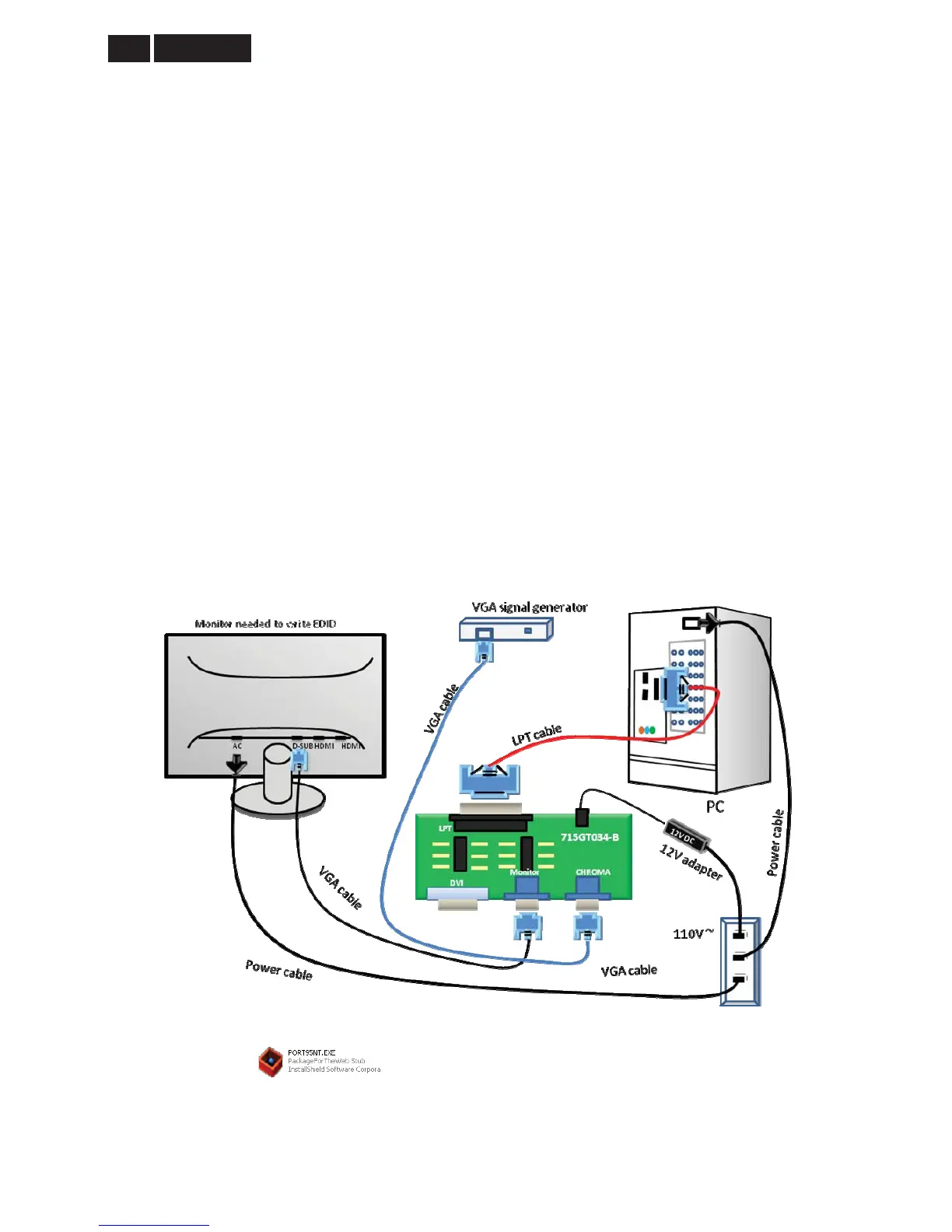
4. EDID Board (715GT034-B) x1,
5. LPT cable (male to male) x1, VGA cable x 1
6. 12V DC power source
7. EDID data
13.1 Connect the ISP board, PC and monitor as follow:
13.2 Install the LPT drive
1. Double click the icon to install the driver.
2. Restart the PC after the LPT driver installation



 To Next Page