4
2. Setting up the monitor
2. Setting up the monitor
2.1 Installation
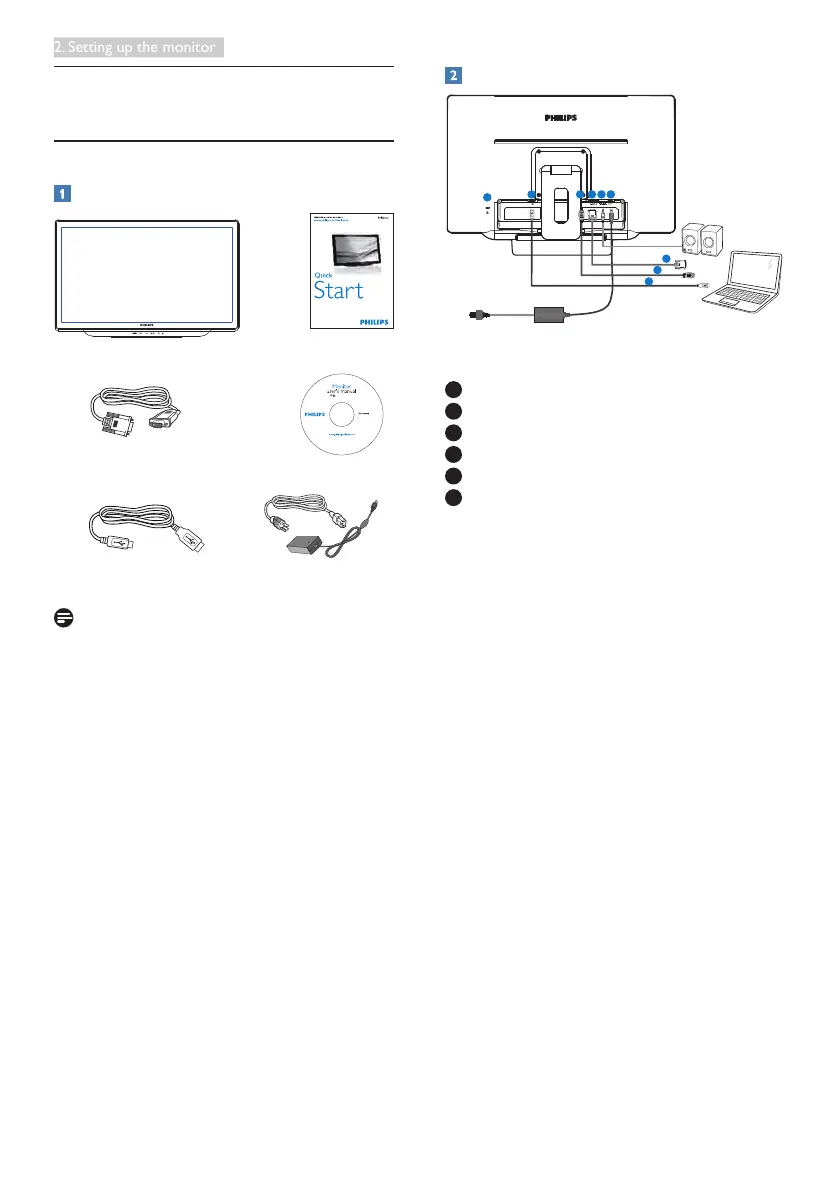
Package contents
VGA Cable
Power CableUSB Cable
©
2
0
1
4
K
o
n
i
n
k
l
i
j
k
e
P
h
i
l
i
p
s
N
.
V
.
A
l
l
r
i
g
h
t
s
r
e
s
e
r
v
e
d
.
U
n
a
u
t
h
o
r
i
z
e
d
d
u
p
l
i
c
a
t
i
o
n
i
s
a
v
i
o
l
a
t
i
o
n
o
f
a
p
p
l
i
c
a
b
l
e
l
a
w
s
.
M
a
d
e
a
n
d
p
r
i
n
t
e
d
i
n
C
h
i
n
a
.
V
e
r
s
i
o
n
Philips and the Philips’ Shield Emblem are registered trademarks of
Koninklijke Philips N.V. and are used under license from Koninklijke
Philips N.V.
Monitor drivers
SmartControl software
User’s Manual
使用
前请阅读使用说明
保留备用
226V4
Note
Use only the AC/DC adapter model: Philips
ADPC1936
Connecting to your computer
1
DC power input
2
HDMI audio out
3
VGA input
4
HDMI input
5
USB uptream
6
Kensington anti-theft lock
Connect to PC
1. Connect the power cord to the back of
the monitor rmly.
2. Turn off your computer and unplug its
power cable.
3. Connect the monitor signal cable to the
video connector on the back of your
computer.
4. Plug the power cord of your computer and
your monitor into a nearby outlet.
5. Connect the USB upstream port on
the monitor and the USB port on your
computer with a USB cable.
6. Turn on your computer and monitor. If the
monitor displays an image, installation is
complete.


 To Next Page