_vtetheF yot_ 'Fe watching a
ovie or a sporting event.
four TVhas automati_ video _on-
trol settings' mat_ hedjbr yot_r _t_r-
rent program source or content,
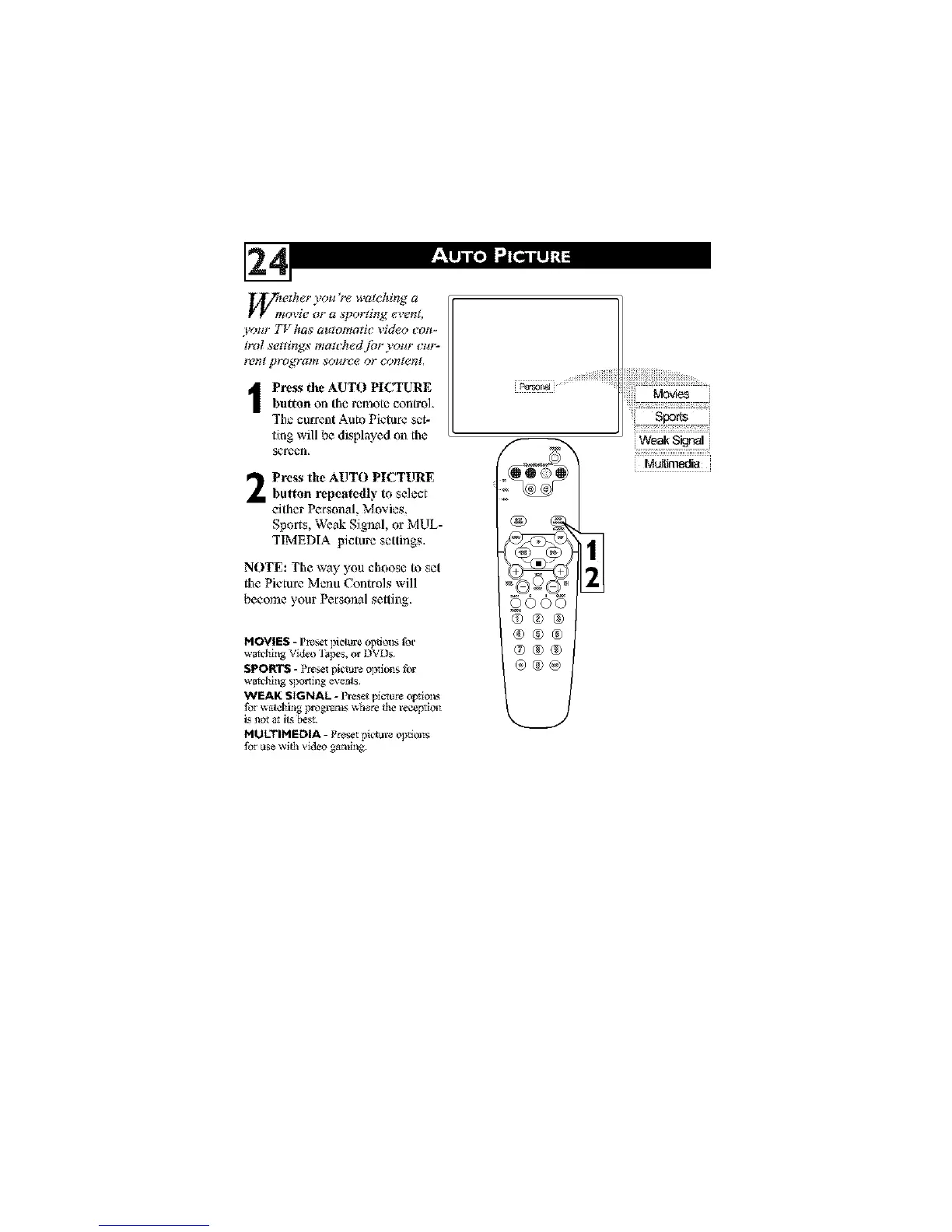
I Press the AUTO PICTUREbutton on the remote control
The current Auto Picture set-
ting will be displayed on the
_reen,
Press the AUTO PICTURE
button repeatedly to select
either Personal, Movies,
Sports, Weak Signal, or MUL-
TIMEDIA picture settings,
NOTE: The way you choose to set
the PmtureMenu Control, will
become}our Personal setting,
MOVIES - Preset ]fieture oplions for
watchhlg Video t;_]_s, or DVDs.
SPORTS - P_t plctuxe o]_i_s
watd_I_g _ol_i_g ev_ts
WEAK SIGNAL - l_'eset picture opt_o_
for watchillg programs where the reception
i.<not _t its be_.
MULTIMEDIA - P_t pk't are o]_i_s
ase wifl_ video gaa_g.
ooo
_®
®®®
®®®
®@@





 To Next Page