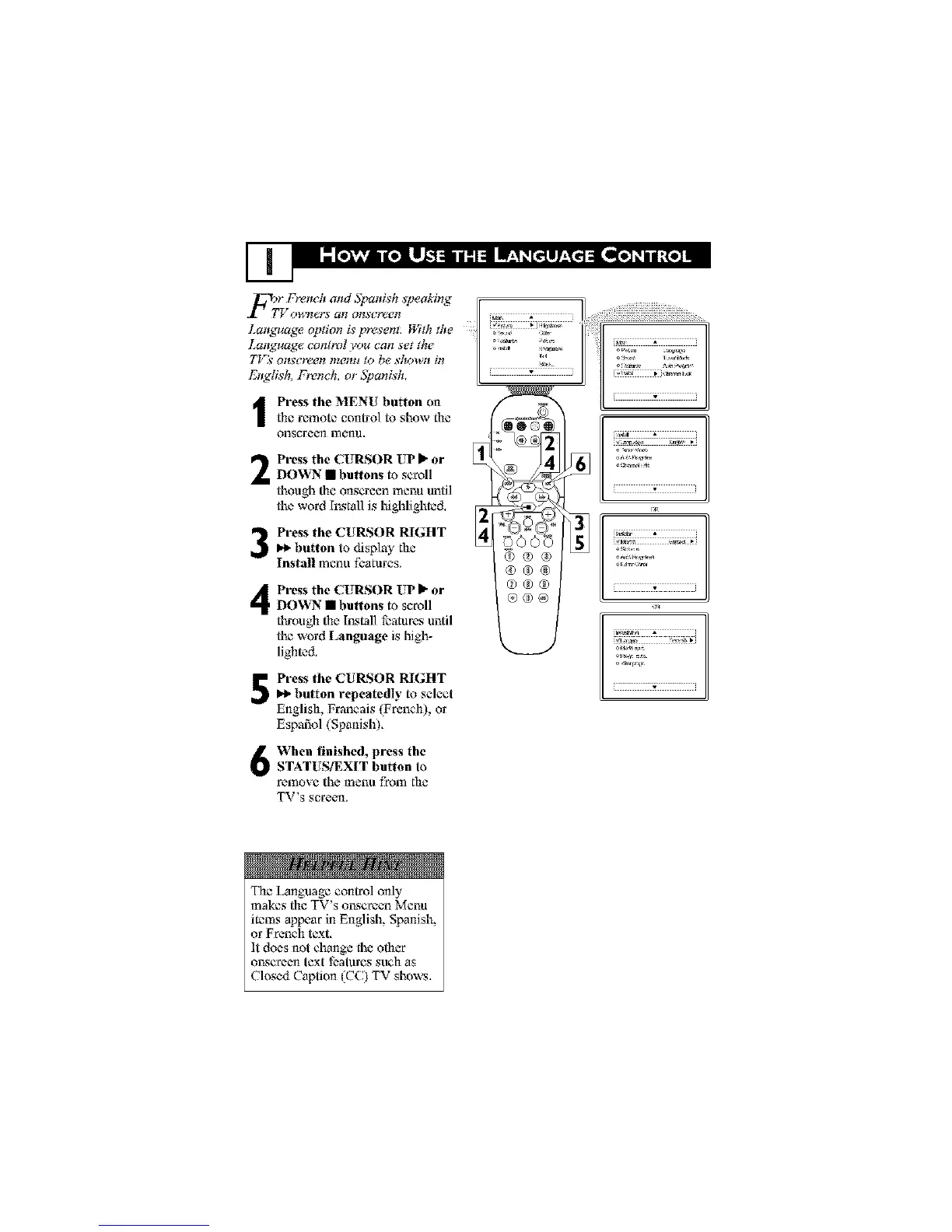
I ress the MENU button onthe remote control to show the
onscreen menu.
Press the CUIZSOR UP P"or
I)OWN • buttons to scroll
though the onscroen menu until
the word hx_tal] is highlighted,
Press the CURSOR RIGHT
t_ button to display the
Install menu fbatares.
Press the CUIZSOR UP I_ or
I)OWN • buttons to scroll
through the hx_tal] featur_ until
the word Language is high-
lighted.
Press the CURSOR RIGHT
button repeatedly to select
English, Francais IFrench), or
Espafiol (Spanish).
@ooo
@®®
@@@
@@@
®@@
[ w i
illllllli_illllllll
When finished, press the
i STATUS/EXIT button to
remove the mena from the
TV*s screen_
The Language control only
makes the TV's or_croen Menu
items appear in English, Spanish,
or French text.
It does not change the other
o_x_croentext features such as
Closed Caption |CC) TV shows.



 To Next Page