Home
Philips
Monitor
276B1
Page 28
Philips 276B1 - Page 28
44 pages
Manual
Save Page as PDF
To Next Page
To Next Page
To Previous Page
To Previous Page
Loading...
26
8.
D
ais
y
-chain function
T
o sel
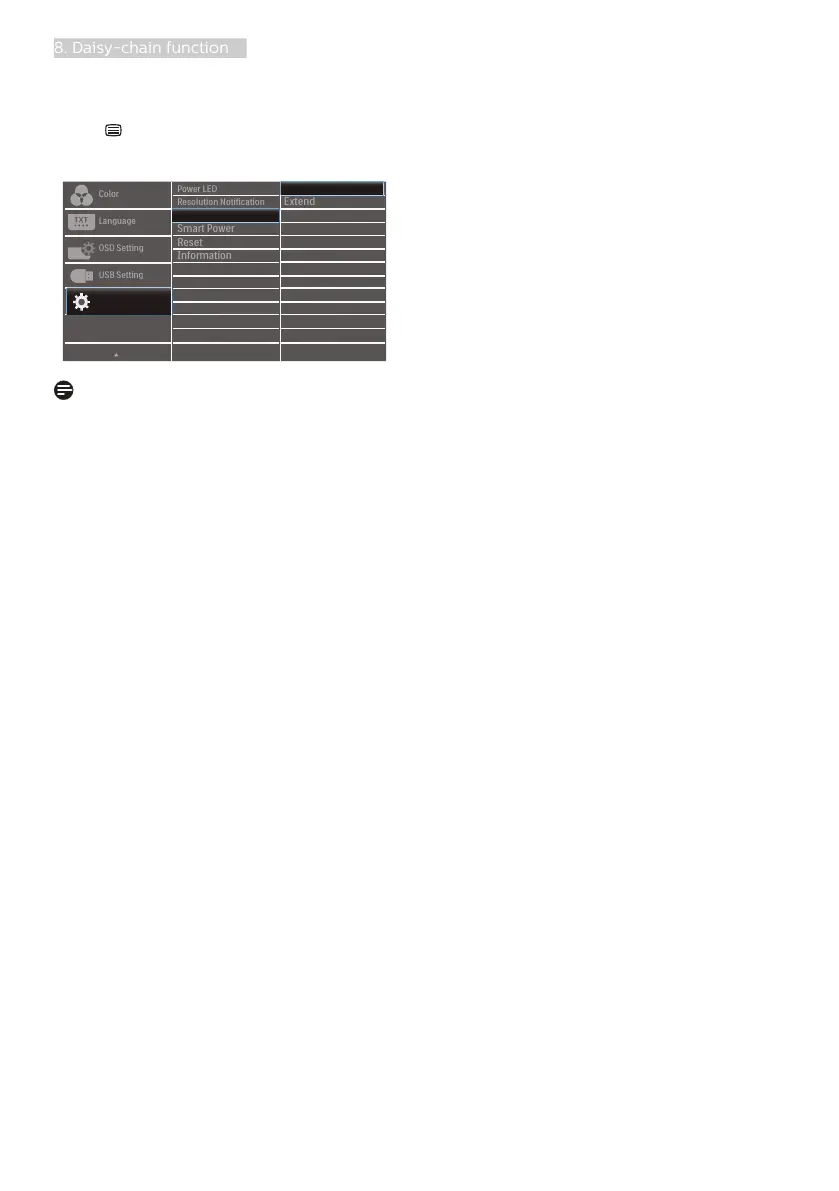
ect one of DP
Out Multi-stream
modes:
Press
button, sel
ect Setup > DP Out
Multi-str
eam > Extend
.
Note
The secondary
monitor in the chain
must support DisplayP
ort multi-
streaming, and the maximum resolution
support is 2560 x 1440@60Hz.
27
29
Table of Contents
Main Page
Default Chapter
2
Table of Contents
2
1 Important
3
Safety Precautions and Maintenance
3
Notational Descriptions
5
Disposal of Product and Packing Material
6
2 Setting up the Monitor
7
Installation
7
Operating the Monitor
10
Remove the Base Assembly for VESA Mounting
13
3 Image Optimization
14
Smartimage
14
Smartcontrast
15
Lightsensor
16
4 Built-In Windows Hello™ Pop-Up Webcam
17
5 USB Docking Display Introduction
19
How to Operate USB Docking Display through USB-C to C Cable
19
How to Operate USB Docking Display through USB-C to a Cable
19
6 Power Delivery and Smart Power
23
Power Delivery through DC Output
23
Smart Power
23
7 Powersensor
25
8 Daisy-Chain Function
27
9 Designs to Prevent Computer Vision Syndrome (CVS)
29
10 Technical Specifications
30
Resolution & Preset Modes
33
11 Power Management
34
12 Customer Care and Warranty
35
Philips' Flat Panel Monitors Pixel Defect Policy
35
Customer Care & Warranty
38
13 Troubleshooting & Faqs
39
Troubleshooting
39
General Faqs
40
Related product manuals
Philips 276B9
31 pages
Philips 276E9
29 pages
Philips 276E8
23 pages
Philips 276E6
35 pages
Philips 276E7
32 pages
Philips E Line 276E8
28 pages
Philips E Line 276E8VJSB/57
28 pages
Philips 271E1
41 pages
Philips 272P4
35 pages
Philips 271V8
32 pages
Philips 273V7
29 pages
Philips 272S1MH
33 pages


 To Next Page