25
8. Daisy-chain function
DisplayPort Multi-Stream feature
enables multiple monitor connections.
This Philips display is equipped with
DisplayPort interface and DisplayPort
over USB-C which enables daisy-
chaining to multiple displays.
Now you can daisy chain and use
multiple monitors via a single cable
from one display to the next.
To daisy-chain monitors, first to check
below:
Make sure the GPU on your PC support
DisplayPort MST (Multi-stream
transport).
Note
• The maximum number of
connectible monitors may vary
depending on GPU performance.
• Please check with your graphic card
vendor and always update your
graphic card driver.
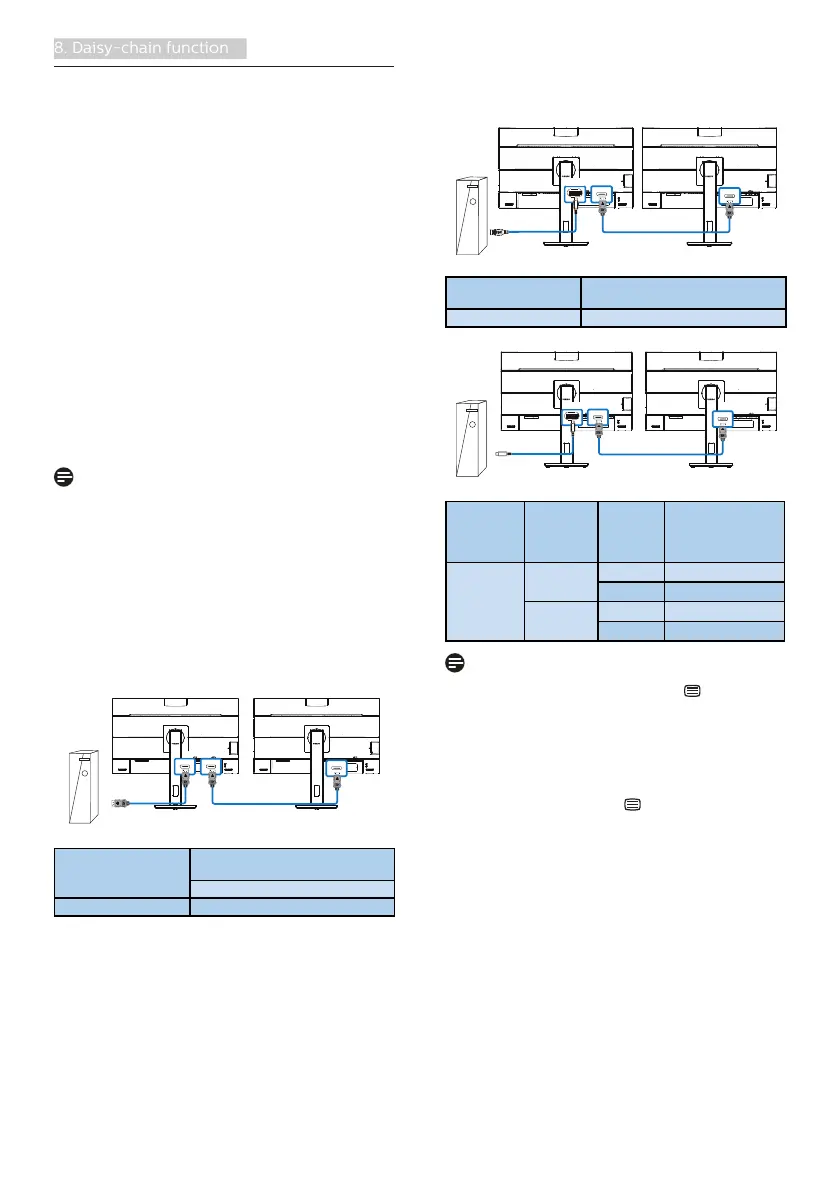
DisplayPort multi-streaming over
DisplayPort
PC
DP
DP
DP OUT
Display Resolution Maximum number of external
monitors that can be supported
Extend mode (DisplayPort)
2560 x 1440 @ 60Hz 2
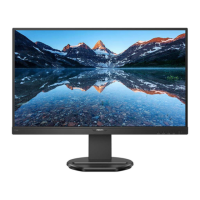
DisplayPort multi-streaming over USB
Type-C
PC
USB-C1
DP
DP OUT
USB Type-A + Dirver
Display Resolution Maximum number of external
monitors that can be supported
2560 x 1440 @ 60Hz 2
PC
USB-C1
USB-C
DP
DP OUT
Display
Resolution
Link Rate
*1
USB
Settings
*2
Maximum number
of external
monitors that can
be supported
2560 x 1440
@60Hz
HBR2 USB 2.0
2
*3
USB 3.2
1
HBR3 USB 2.0
2
USB 3.2
2
Note
1. To check link rate: press button,
select Setup > information. The
screen will show HBR3, otherwise,
the link rate is HBR2.
2. We recommend to set USB Setting
to USB 3.2, press button, select
USB Settings > USB, then select USB
3.2 which supports the LAN speed
to 1G.
3. Depends on the graphic card
capability, you may connect
maximum 3 external monitors.


 To Next Page