EasyManua.ls Logo

Philips E Line 276E8VJSB/57 - User Manual

Philips E Line 276E8VJSB/57
28 pages
Print Icon
To Next Page IconTo Next Page
Loading...
www.philips.com/welcome
E Line
276E8
EN User manual 1
Customer care and warranty 17
Troubleshooting & FAQs 21
Question and Answer IconNeed help?

Do you have a question about the Philips E Line 276E8VJSB/57 and is the answer not in the manual?

Overview

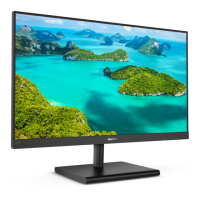
This document describes the Philips E Line 276E8 monitor, a flat panel display designed for various computing tasks, including gaming and professional use.

Function Description:

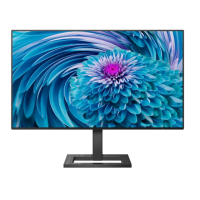
The Philips 276E8 is a 27-inch W-LED system monitor from the E Line series. It is designed to provide optimal visual performance with a native resolution of 3840x2160 at 60Hz. The monitor supports multiple input sources and offers advanced image optimization features like SmartImage and SmartContrast. It also includes MultiView functionality, allowing users to display content from two different sources simultaneously. The monitor is Plug-and-Play compatible with Windows 10/8.1/8/7 and Mac OSX.

Important Technical Specifications:

  • Monitor Panel Type: IPS technology
  • Backlight: W-LED system
  • Panel Size: 27” W (68.6cm)
  • Aspect Ratio: 16:9
  • Pixel Pitch: 0.155 x 0.155 mm
  • SmartContrast: 20,000,000:1
  • Response Time (typ.): 14ms (GtG)
  • SmartResponse Time: 5ms (GtG)
  • Optimum Resolution: 3840x2160 @ 60Hz
  • Viewing Angle: 178° (H) / 178° (V) @ C/R > 10 (typ.)
  • Picture Enhancement: SmartImage
  • Flicker free: Yes
  • Display Colors: 1.07B
  • Vertical Refresh Rate: 59Hz-61Hz (HDMI, DP)
  • Horizontal Frequency: 30KHz-83KHz (HDMI, DP)
  • sRGB: Yes
  • LowBlue Mode: Yes
  • Signal Input: HDMI 2.0x2, DisplayPort(Digital)
  • Audio In/Out: Audio out
  • Input Signal: Separate Sync, Sync on Green
  • MultiView: PIP (2 x devices), PBP (2 x devices)
  • OSD Languages: English, German, Spanish, Greek, French, Italian, Hungarian, Dutch, Portuguese, Brazil Portuguese, Polish, Russian, Swedish, Finnish, Turkish, Czech, Ukrainian, Simplified Chinese, Traditional Chinese, Japanese, Korean
  • Other Convenience: Kensington Lock
  • Plug & Play Compatibility: DDC/CI, Mac OSX, sRGB, Windows 10/8.1/8/7
  • Tilt: -5° / +20°
  • Power Consumption (Normal Operation): 38.80 W (typ.) at 100VAC, 50Hz; 38.90 W (typ.) at 115VAC, 60Hz; 39.00 W (typ.) at 230VAC, 50Hz
  • Power Consumption (Sleep mode): <0.5 W (typ.)
  • Power Consumption (Off mode): <0.3 W (typ.)
  • Heat Dissipation (Normal Operation): 132.42 BTU/hr (typ.) at 100VAC, 50Hz; 132.76 BTU/hr (typ.) at 115VAC, 60Hz; 133.11 BTU/hr (typ.) at 230VAC, 50Hz
  • Dimension (with stand WxHxD): 613 x 466 x 189 mm
  • Dimension (without stand WxHxD): 613 x 374 x 41 mm
  • Weight (with stand): 4.84 kg
  • Weight (without stand): 4.23 kg
  • Operating Condition Temperature: 0°C to 40°C
  • Operating Condition Relative humidity: 20% to 80%
  • Operating Condition Atmospheric pressure: 700 to 1060hPa
  • Storage Temperature: -20°C to 60°C
  • Storage Relative humidity: 10% to 90%
  • Storage Atmospheric pressure: 500 to 1060hPa
  • ROHS: YES
  • Packaging: 100% recyclable
  • Specific Substances: 100% PVC BFR free housing
  • Cabinet Color: Black
  • Cabinet Finish: Glossy

Usage Features:

  • OSD Menu Navigation: The monitor features a single toggle button on the backside of the display bezel for navigating the On-Screen Display (OSD) menu. This joystick-like control allows users to move the cursor in four directions and press the button to select desired options.
  • SmartImage: This exclusive Philips technology offers presets to optimize display settings (brightness, contrast, color, sharpness) in real-time based on content type (e.g., FPS, Racing, RTS, Gamer 1, Gamer 2, LowBlue Mode, Off). It enhances the viewing experience for various applications, from text to video and gaming.
  • SmartContrast: This unique technology dynamically analyzes displayed content and automatically optimizes the LCD monitor's contrast ratio. It adjusts backlighting for clearer, crisper, and brighter images or dims it for better display of dark backgrounds, enhancing visual clarity and viewing comfort while also reducing power consumption.
  • LowBlue Mode: Designed for eye well-being, this mode uses smart software technology to reduce harmful shortwave blue light, which studies have shown can cause eye damage and affect vision over time.
  • MultiView (PIP/PBP): The monitor supports Picture-in-Picture (PIP) and Picture-by-Picture (PBP) modes, enabling simultaneous display of content from two different signal sources. This is ideal for multitasking, allowing users to view content from a PC and a Notebook side-by-side, for example. PIP offers small, middle, and large sub-window sizes and four sub-window positions (Top-Right, Top-Left, Bottom-Right, Bottom-Left). The SWAP function allows users to interchange the main and sub-picture sources, including their audio.
  • Resolution Notification: The monitor is optimized for 3840x2160@60Hz. If operated at a different resolution, an alert will be displayed, which can be turned off via the OSD menu.
  • Power Management: The monitor is VESA DPM compliant, automatically reducing power consumption when not in use and "waking up" upon detecting input from a keyboard, mouse, or other devices.
  • Physical Adjustment: The monitor stand allows for a tilt angle from -5° to +20°. Users are advised not to tilt the monitor downward by more than -5 degrees to prevent potential screen damage.
  • Hot Key Lock/Unlock: The hot key can be locked or unlocked by pressing it for 10 seconds, preventing accidental adjustments.

Maintenance Features:

  • Cleaning: For normal cleaning, a clean, soft cloth is recommended. For extensive cleaning, isopropyl alcohol can be used. Organic solvents like alcohol, ethanol, acetone, or hexane should be avoided.
  • Protection: To prevent damage, avoid putting excessive pressure on the LCD panel. When moving the monitor, grasp the frame, not the LCD panel itself.
  • Storage: Store and operate the monitor within specified temperature and humidity ranges (0-40°C operating, -20-60°C non-operating; 20-80% RH operating, 10-90% RH non-operating) to maintain optimal performance and extend its lifetime. Avoid direct sunlight, extreme heat, cold, dust, rain, water, or excessive moisture.
  • Burn-in/Ghost Image Prevention: To prevent "burn-in" or "ghost imaging" (a common phenomenon in LCD panels from prolonged display of static images), users should always activate a moving screen saver program when leaving the monitor unattended and use a periodic screen refresh application if displaying unchanging static content. Failure to do so may result in permanent damage not covered under warranty.
  • Service and Warranty: Philips provides a warranty for monitors with an unacceptable number of pixel defects. Users should contact their local service center for repairs or if the monitor does not operate normally after following troubleshooting steps. Warranty information and support requirements are available on www.philips.com/support. Extended warranty packages are also offered via Certified Service Centers.

Philips E Line 276E8VJSB/57 Specifications

General IconGeneral
BrandPhilips
ModelE Line 276E8VJSB/57
CategoryMonitor
LanguageEnglish

Related product manuals