19
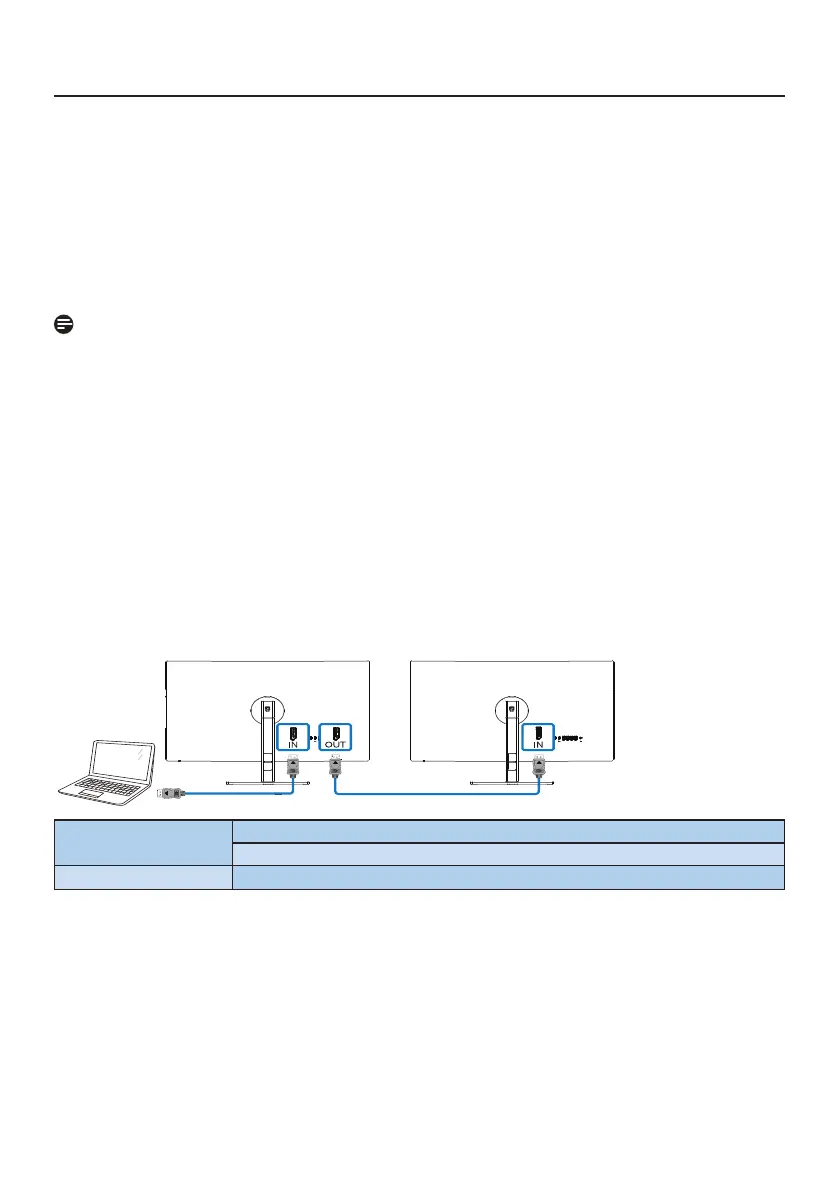
3.5 Daisy-chain function
DisplayPort Multi-Stream feature enables multiple monitor connections.
This Philips display is equipped with DisplayPort interface and DisplayPort over USBC
which enables daisy-chaining to multiple displays.
Now you can daisy chain and use multiple monitors via a single cable from one display
to the next.
To daisy-chain monitors, rst to check below:
Make sure the GPU on your PC support DisplayPort MST (Multi-stream transport).
Note
• The maximum number of connectible monitors may vary depending on GPU
performance.
• Please check with your graphic card vendor and always update your graphic card
driver.
• If the Daisy Chain Function is not showing, please proceed to the On Screen
Display (OSD) menu and change the input from "Auto" to "DisplayPort" or "USB-C"
according to the port that connects to your computer.
In addition, another option is to update the monitor's firmware and download the
SmartControl software from the Philips website. If you choose to go this route, it
is necessary to have a strong network connection when updating the firmware on
SmartControl.
DisplayPort multi-streaming over DisplayPort
Display Resolution
input
Maximum number of external monitors that can be supported
Extend mode (DisplayPort)
3840 x 2160 @ 60Hz 1






 To Next Page