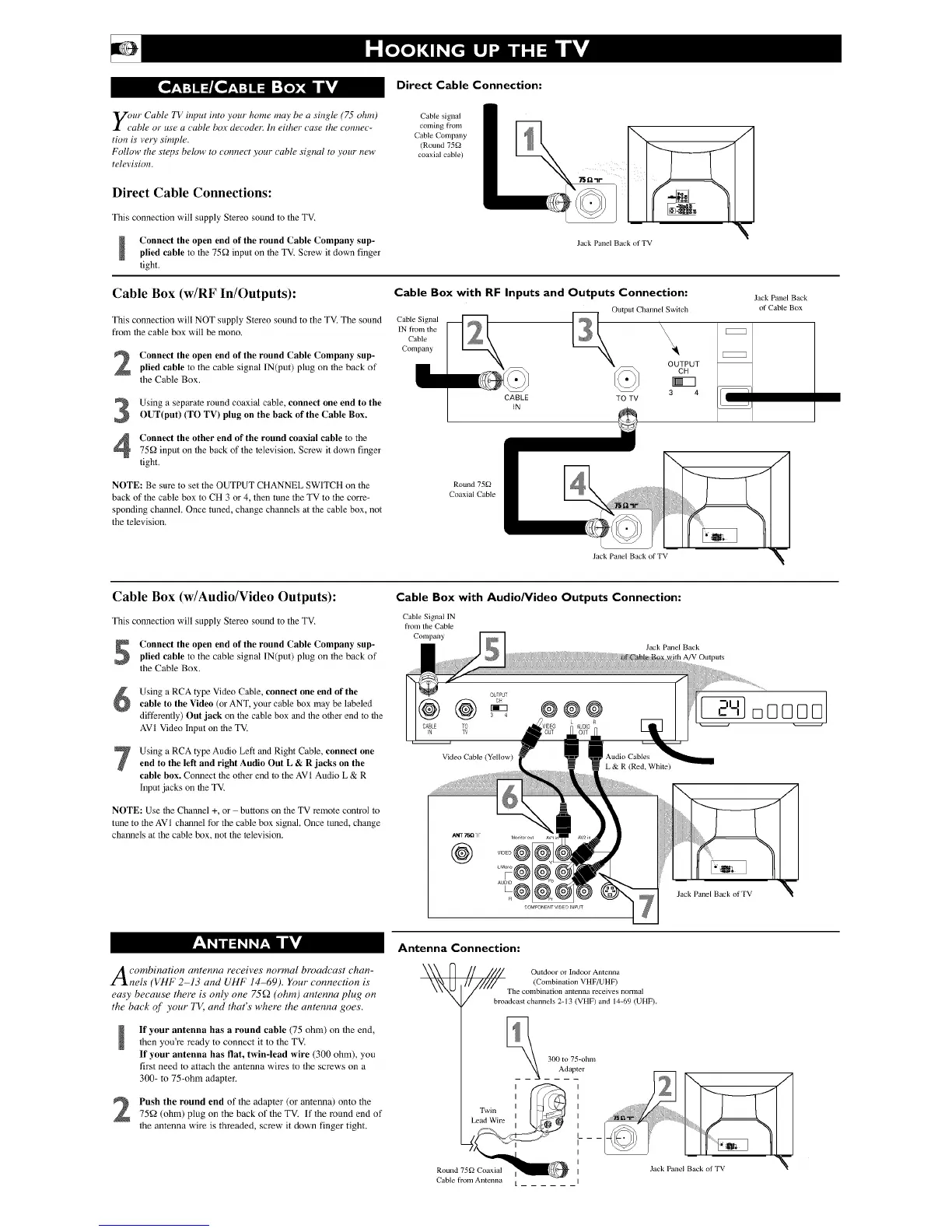
Direct Cable Connection:
y_/ur Cable TV input into your home may be a single (75 ohm)
"able or use a cable box decoder: In either case the _onnec-
tion is vely simple.
Follow the steps below to _onnect your cable signal to your new
television.
Direct Cable Connections:
This connection will supply Stereo sound to the TV.
Connect the open end of the round Cable Company sup-
plied cable to the 75_2 input on the TV. Screw it down finger
tight.
CaNe signal
coming from
Cable Company
(Round 75_
coaxial cable)
Jack Pane[ Back ot TV
1
Cable Box (w/RF In/Outputs): Cable Box with RF Inputs and Outputs Connection:
This connection will NOT supply Stereo sound to the TV. The sound Cable Signal
fi'OlIl the cable box will be mono. IN lrom the
Cable
Company
Connect the open end of the round Cable Company sup-
plied cable to the cable signal IN(put) plug on the back of
the Cable Box.
Using a separate round coaxial cable, connect one end to the
OUT(put) (TO TV) plug on the back of the Cable Box.
Connect the other end of the round coaxial cable to the
75_2 input on lhe back of the television. Screw it down finger
tight.
NOTE: Be sure to set the OUTPUT CHANNEL SWITCH on the
back of the cable box to CH 3 or 4, then tune the TV to the corre-
sponding channel. Once tuned, change channels a/the cable box, not
the television,
CABLE
_)utput Cbanne_cb
TO TV
Jack Panel Back
of Cable Box
Round 75g2
Coaxial Cable
Jack Panel Back of TV
Cable Box (w/Audio/Video Outputs):
This connection will supply Stereo sound to the TV.
Connect the open end of the round Cable Company sup-
plied cable to the cable signal IN(put) plug on the back of
the Cable Box.
Using a RCA type Video Cable, connect one end of the
cable to the Video (or ANT, your cable box may be labeled
differently) Out jack on the cable box and the oilier end to file
AVI Video input on the TV.
Using a RCA type Audio Left and Right Cable, connect oneend to the left and right Audio Out L & R jacks on the
cable box. Connect file other end to the AVI Audio L & R
input jacks on file TV.
NOTE: Use the Channel +, or buttons on the TV remote con/rol to
tune to the AVI channel for the cable box signal. Once tuned, change
channels at the cable box, not the television.
Cable Box with Audio/Video Outputs Connection:
Cable Signal IN
from the Cable
Company
CABLE
N
@
TO
TV
@@@
Jack Panel Back
A/V Outputs
Vide() Cable (Yellow)
ANT 75[lqF
@
VIDEO @
Au @ Jack Pane[ Back ot TV
!
Acombination antenna receives normal broadcast chan-
nels (VHF 2-13 and UHF 14-69). Your connection is
easy because there is only one 75f2 (ohm) antenna plug on
the back of you_ T1/) and that s whele the antenna goes
!
If your antenna has a round cable (75 ohm) on the end,
then you're ready to connect it to the TV.
If your antenna has flat, twin-lead wire (300 ohm), you
first need to attach the antenna wires to the screws on a
300- to 75-ohm adapter,
Push the round end of the adapter (or antenna) onto the
75_2 (ohm) plug on the back of the TV. If the round end of
the antenna wire is threaded, screw it down finger tight.
Antenna Connection:
Outdoor or Indoor Antenna
_ n ////#_/1 (Combination VHF/UHF)
_N_ / The combination antenna receives normal
broadcast channels 2-13 (VHF) and 14_69 (UHF).
Twin
Lead Wire
Round 7592 Coaxial
Cable from Antenna
300 to 75-ohm
Adapter
Jack Panel Back ot TV
A


 To Next Page
 Loading...


