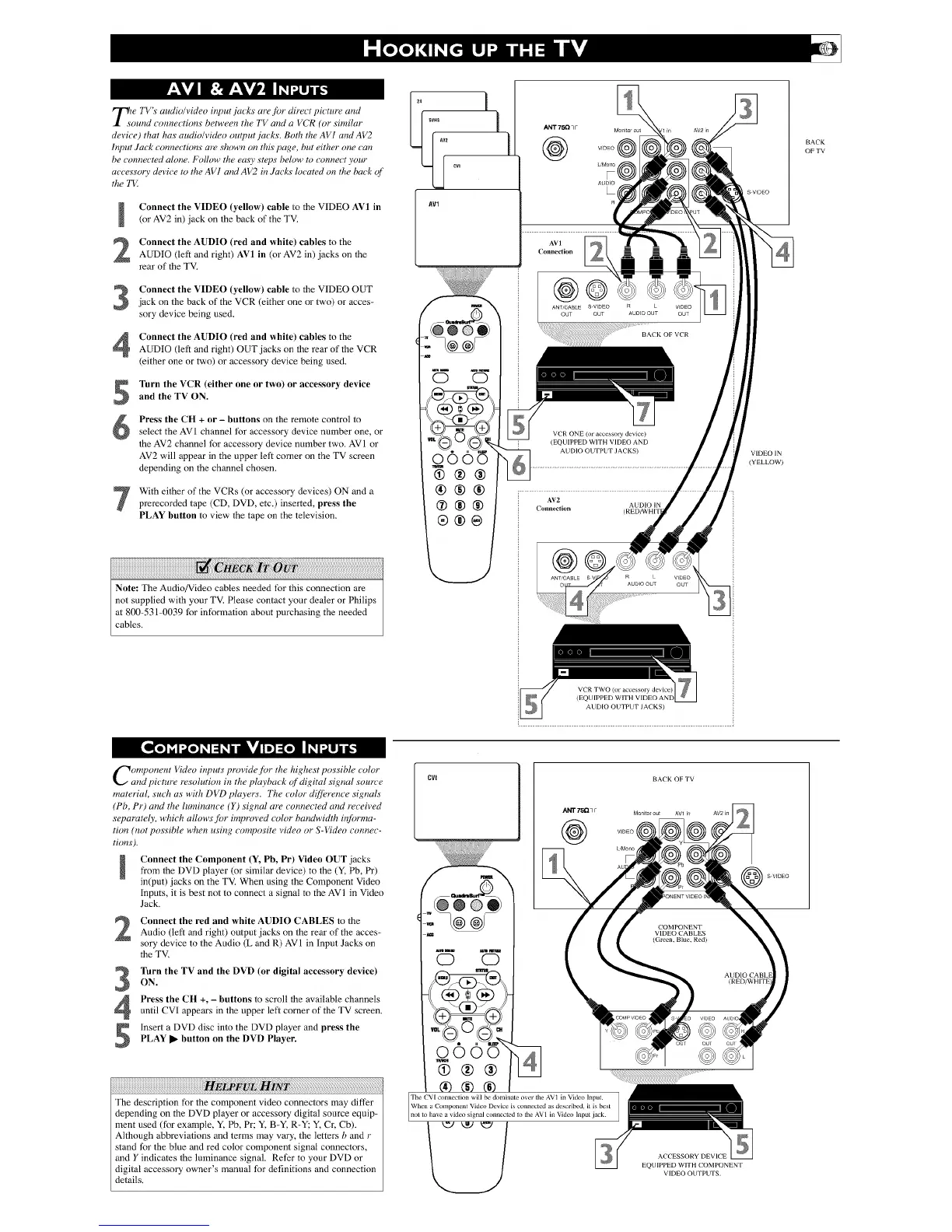
Tie l'V s audio/video input r]aCks are,f!)r direct picture and
ound connections between the TV and a VCR (or similar
dm ice) that has audio/video output jacks. Both the AV l and AV2
Input ,luck connections arY_shown on this page, but either one can
be connec n_d alone. Follow the easy stq)s below to connect your
ac cY<_sor_"dm ice to the AV I and AV2 in Jucks Iocat_d on the back of
the "I'VI
Connect the VIDE() (yellow) cable to the VIDEO AV1 in
(or AV2 in) jack on the back of the TV,
Connect the AUDIO (red and white) cables to the
AUDIO (left and right) AV1 in (or AV2 in) jacks on the
rear of the TV,
Connect the VIDE() (yellow) cable to the VIDEO OUT
jack on the back of the VCP, (either one or two) or acces-
sory device being used.
Connect the AUDIO (red and white) cables to the
AUDIO (left and right) OUT jacks on the rear of the VCR
(either one or two) or accessory device being used.
Turn the VCR (either one or two) or accessory device
and the TV ON.
Press the CH + or - buttons on the remote control to
select the AV 1 channel tbr accessory device number one, or
the AV2 channel tbr accessory device number two, AVI or
AV2 will appear in the upper left comer on the TV screen
depending on the channel chosen.
With either of the VCRs (or accessory devices) ON and a
prerecorded tape (CD, DVD, etc.) inserted, press the
PLAY button to view the tape on the television,
Note: The Audio/Video cables needed tbr this connection are
not supplied wflh your TV. Please contact your dealer or Philips
at 800-531-0039 for information about purchasing the needed
cables.
AV1
0005
d)®®
®®®
@®®
®®@
ANT 75Q q F Monitor oal
VIDEO
L'Mono
AUDIO
R
AVI
Connection
ANT/CABLE S VIDEO
OUT OUT
VCR ONE (or accessory de_ice)
i (EQUIPPED WITH VIDEO AND
ALDIO Ob TPUT JACKS)
AV2
AUDIO IN
Connection (REDAVHPI
in AV2 in
R L VIDEO
AUDIO OUT OUT
BACK OF VCR
VIDEO
OUT
S VIDEO
BACK
OF TV
VIDEO IN
(YELLOW)
Y
AUDIO OL,TP[ T JACKS)
Component Video inputs provide for the highest possible color
and picture resolution in the playback of digital signal source
manorial, such as with DVD pluyers. The color diffi_rc,nce signals
(Pb, Pr) and the luminance (Y) signal are connecn, d and received
scT)arately, which allows for improved color bandwidth informa-
tion (not possible when using composite video or S-Video connec-
tions),
Connect the Component (Y, Pb, Pr) Video OUT jacks
from the DVD player (or similar device) to the (Y, Pb, Pr)
in(put) jacks on the TV, When using the Component Video
Inputs, it is best not to connect a signal to the AVI in Video
Jack.
Connect the red and white AUDIO CABLES to theAudio (left and right) output jacks on the rear of the acces_
sory device to the Audio (L and P.) AV1 in input Jacks on
the TV,
3
4
5
Turn the TV and the DVD (or digital accessory device)
ON.
Press the CH +, - buttons to scroll the available channels
until CVI appears in the upper left corner of the TV screen.
Insert a DVD disc into the DVD player and press the
PLAY • button on the DVD Player.
The description for the component video connectors may differ
depending on the DVD player or accessory digital source equip-
ment used (for example, Y; Pb, Pr; Y; B-Y; R-Y_ Y, Cr, Cb).
Although abbreviations and terms may vary, the letters b and r
stand for the blue and red color component signal connectors,
and Y indicates the luminance signal, Refer to your DVD or
digital accessory owner's manual for definitions and connection
details,
CVI
_Lm_Iml0 toni _mtll_
0 0
o005
_n
(i)@@
The CV[ conneclion will be donanate o_er the AV1 in Vide() Input.
When a Component Vide() Device is connected as described, it is best
nol to have a _ideo signal coJmected to the AV 1 in Video Input jack.
7?
BACK OF TV
ANT 7!i_ q F Monitor out AVI in
VIDEO
AV2in
ACCESSORY DEVICE
EQUIPPED WITH COMPONENT
VIDEO OUTI iTS.
S VIDEO


 To Next Page
 Loading...


