y_ur television comes with an
n-screen clock. During nor-
mal operation, the clock appears
on the screen when the
STATUS/EXIT button is pres'sed or
i[the l_mer Diwlay control i_
turned On.
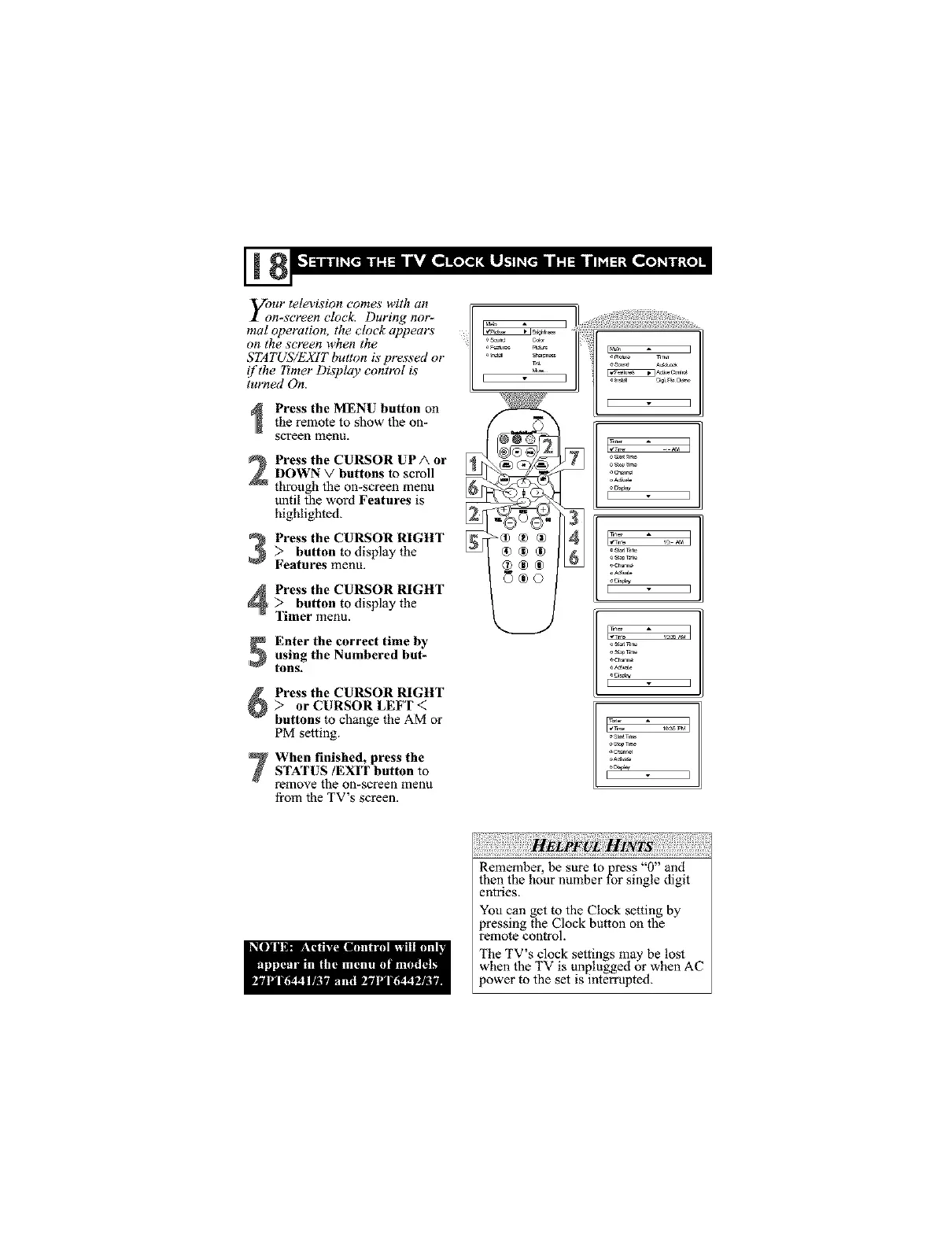
Press the MENU button on
the remote to show the on-
screen menu.
Press the CURSOR UPA or
DOWN V buttons to scroll
through the on-screen menu
until the word Features is
highlighted.
Press the CURSOR RIGHT> button to display the
Features menu.
Press the CURSOR RIGHT:> button to display the
Timer menu.
Enter the correct time by
using the Numbered but-
tolls.
Press the CURSOR RIGHT
> or CURSOR LEFT <:
buttons to change the AM or
PM setting.
When finished, press the
STATUS/EXIT button to
remove the on-screen menu
from the TV's screen.
o_i_
I ]
[ 3
Remember, he sure to press "0" and
then the hour number for single digit
entries.
You can get to the Clock setting by
pressing the Clock button on the
remote control.
The TV s clock settings may be lost
when the TV is unplugged or when AC
ower to the set is interrupted.



 To Next Page