A utoLock TM offers the viewer other block-
ing [batures as well. With these Blocking
Optiohk, the censoring can be turned ON or
OFE
Once you've entered your access code and
the AittoLock'rMJOatures are displayed on the
Screen."
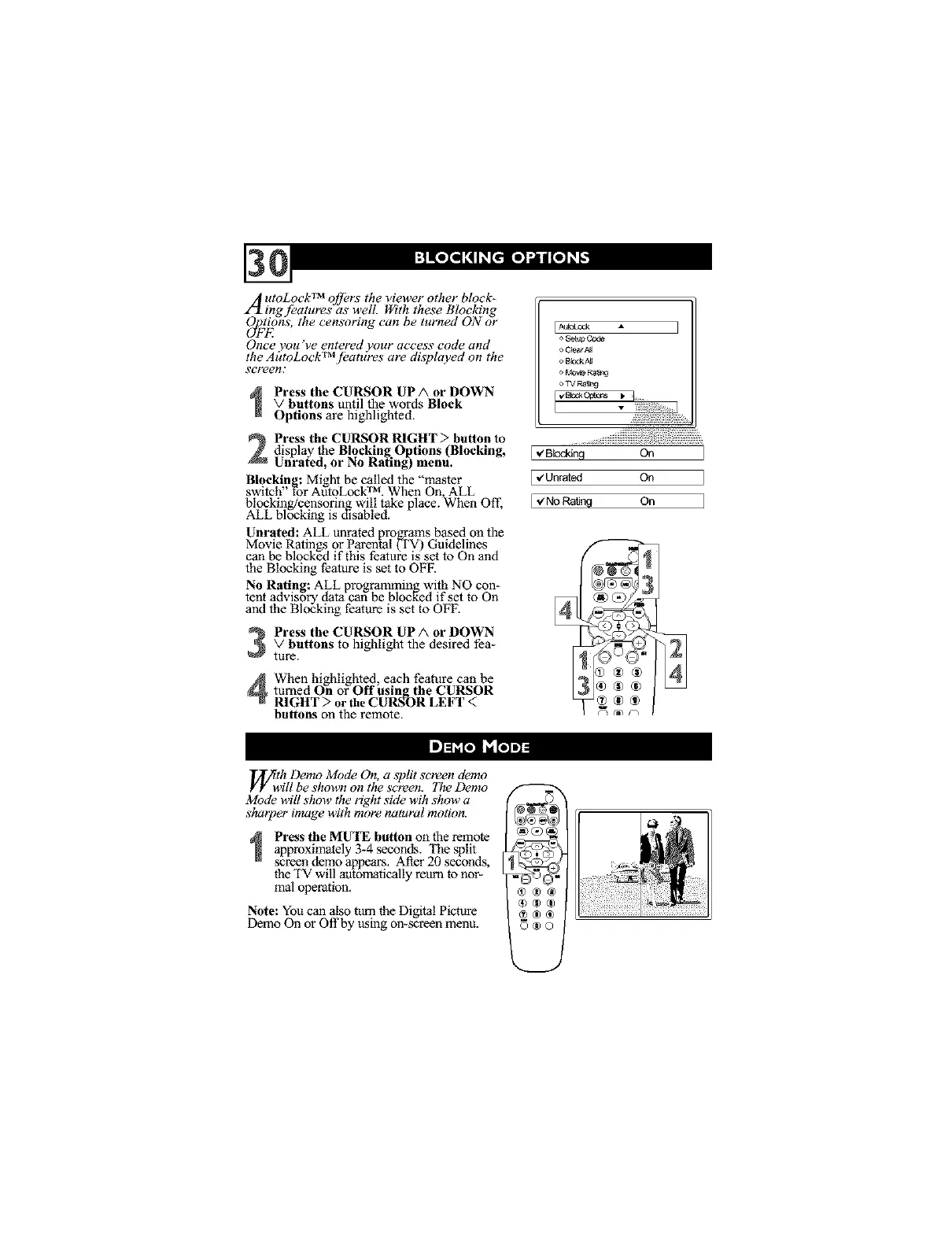
Press the CURSOR UP/k or DOWN
v buttons until the words Block
Options are highlighted.
Press the CURSOR I_GHT :> button todisplay the Blocking.Options (Blocking,
Unrated, or No Raling) menu.
Blocking: Might be called the "master
switch for AutoLock TM. When On ALL
blocking/censoring will take place. When Off,
ALL blocking is d_sabled.
Unrated: ALL unrated programs based on the
Movie Ratings or Parental (TV) Guidelines
can be blocked if this feature is set to On and
the Blocking feature is set to OFF.
No Rating: ALL programming with NO con-
tent advisory data can be blocked if set to On
and the Blocking feature is set to OFF.
Press the CURSOR UP A or DOWN
V buttons to highlight the desired fea-
ture.
When highlighted, each feature can be
turned On or Off using the CURSOR
I_GHT > or the CURSOR LEFT <
buttons on the remote.
EAU_Lock
o BbskA_
,> MOV_ Ra_r_
_ _Ra_n 9
I_o,_._ _"7¸¸¸¸.....
I_ Blocking On
I ,€Unrated On
.,zNoRating On
f
_/Ytwh Demo Mode On, a split screen demo
ill be shown on the semen. 71re Demo
Mode will show the right side wih show a
sharper image with more natural motion.
Press the MU'I_ button on the remote
approximately 3-4 seconds. The split
screen demo appears. Al_er20 seconds,
the TV will automatically reurn to nor-
mal operation.
Note: You can also turn the Digital Picture
Demo On or Offby using on-screen menu.



 To Next Page