osed Captioning (CC) allow_
ou to read the voice content of
television programs on the TV
screen. Designed to help the hear-
ing impaired, this Jeature uses on-
screen "text boxes" to show dia_
Iogue and conversations while the
TV program is in progress.
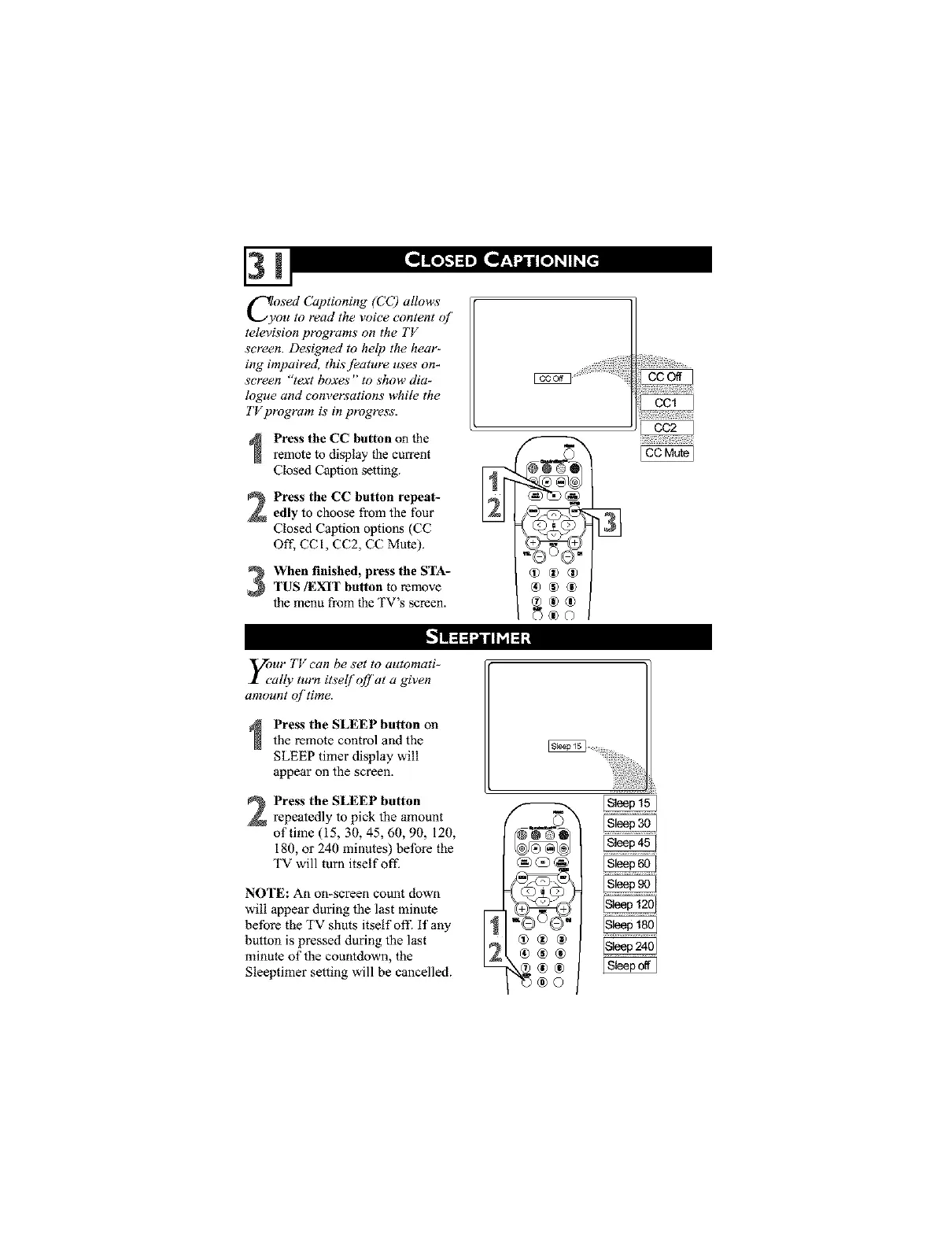
Press the CC button on the
remote to display the current
Closed Caption setting.
Press the CC button repeat-
edly to choose from the four
Closed Caption options (CC
Off. CCI, CC2, CC Mute).
When finished, press the STA-TUS/EXIT button to remove
the menu from the TV's screen.
®®®
2®®
©_©
y_ur TV can be s'et to automati-
ally turn itsel!off at a given
amount of time.
Press the SLEEP button on
the remote control and the
SLEEP timer display will
appear on the screen.
Press the SLEEP button
repeatedly to pick the amount
of time (15, 30, 45, 60, 90, 120,
180, or 240 minutes) before the
TV will turn itself oft ]
NOTE: An on-screen count down
will appear during the last minute
before the TV shuts itself off. if any I_
button is pressed during the last
minute of the countdown, the
Sleeptimer setting will be cancelled.
®®®




 To Next Page