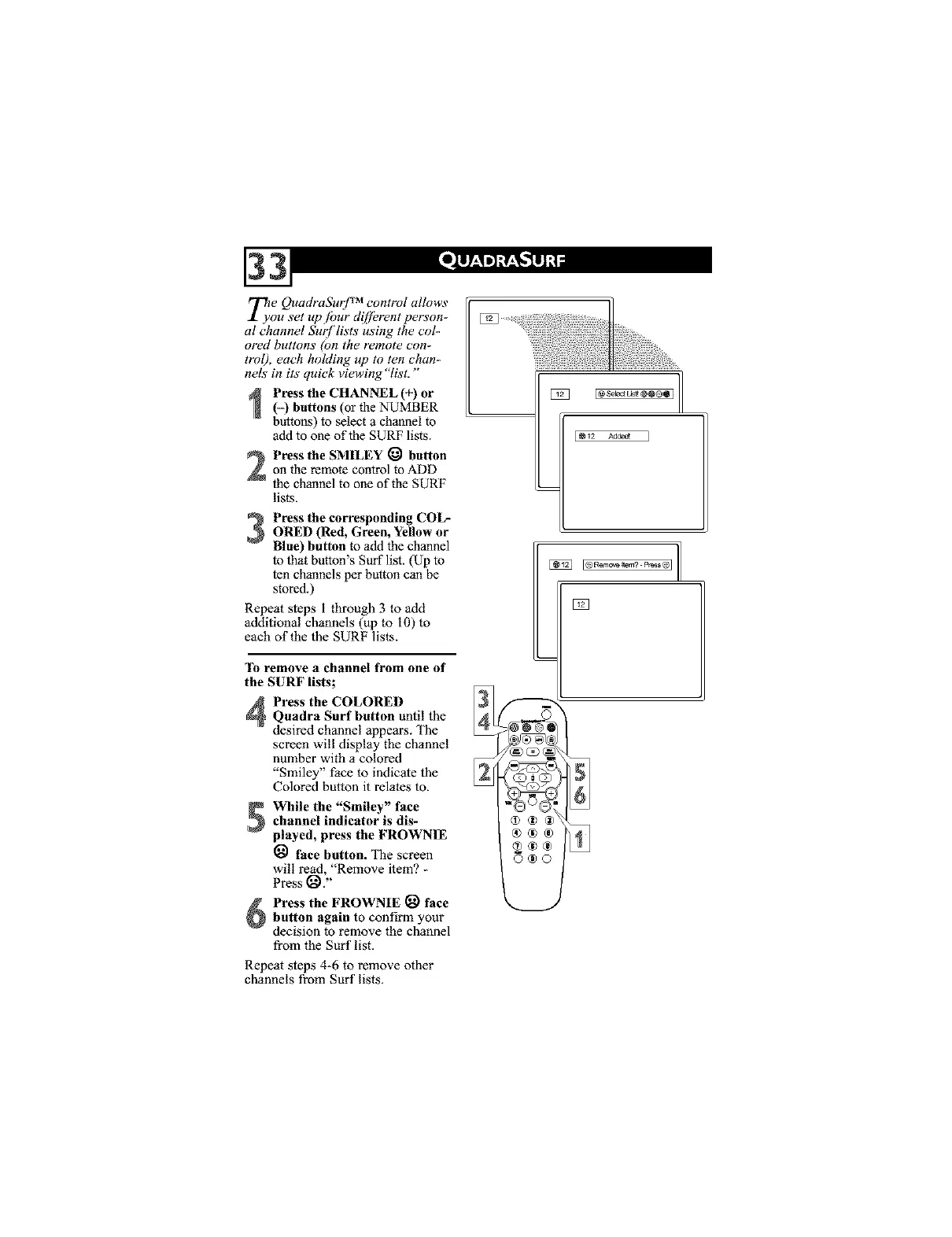
_e QuadraSurJ TM control allows
ou set up.[bur diffbrent person-
al channel Surf lists using the col-
ored buttons (on the remote con-
trol), each holding up to ten chan-
nels in its quick viewing "list."
Press the CHANNEL (+) or
(-) buttons (or the NUMBER
buttons) to select a channel to
add to one of the SURF lists.
Press the SMILEY _ buttonon the remote control to ADD
the channel to one of the SURF
lists.
Press the corresponding COL-ORED (Red, Green, Yellow or
Blue) button to add the channel
to that button's Surf list. (Up to
ten channels per button can be
stored.)
Repeat steps i through 3 to add
additional channels (up to I0) to
each of the the SURF lists.
'lb remove a channel from one of
the SURF lists;
Press the COLOREDQuadra Surf button until the
desired channel appears. The
screen will display the channel
number with a colored
"Smiley" face to indicate the
Colored button it relates to.
While the "Smiley" face
channel indicator is dis-
played, press the FROWNIE
face button. The screen
will read, "Remove item? -
Press _,"
Press the FROWNIE _ face
button again to confirm your
decision to remove the channel
from the Surf list.
Repeat steps 4-6 to remove other
channels from Surf lists.



 To Next Page