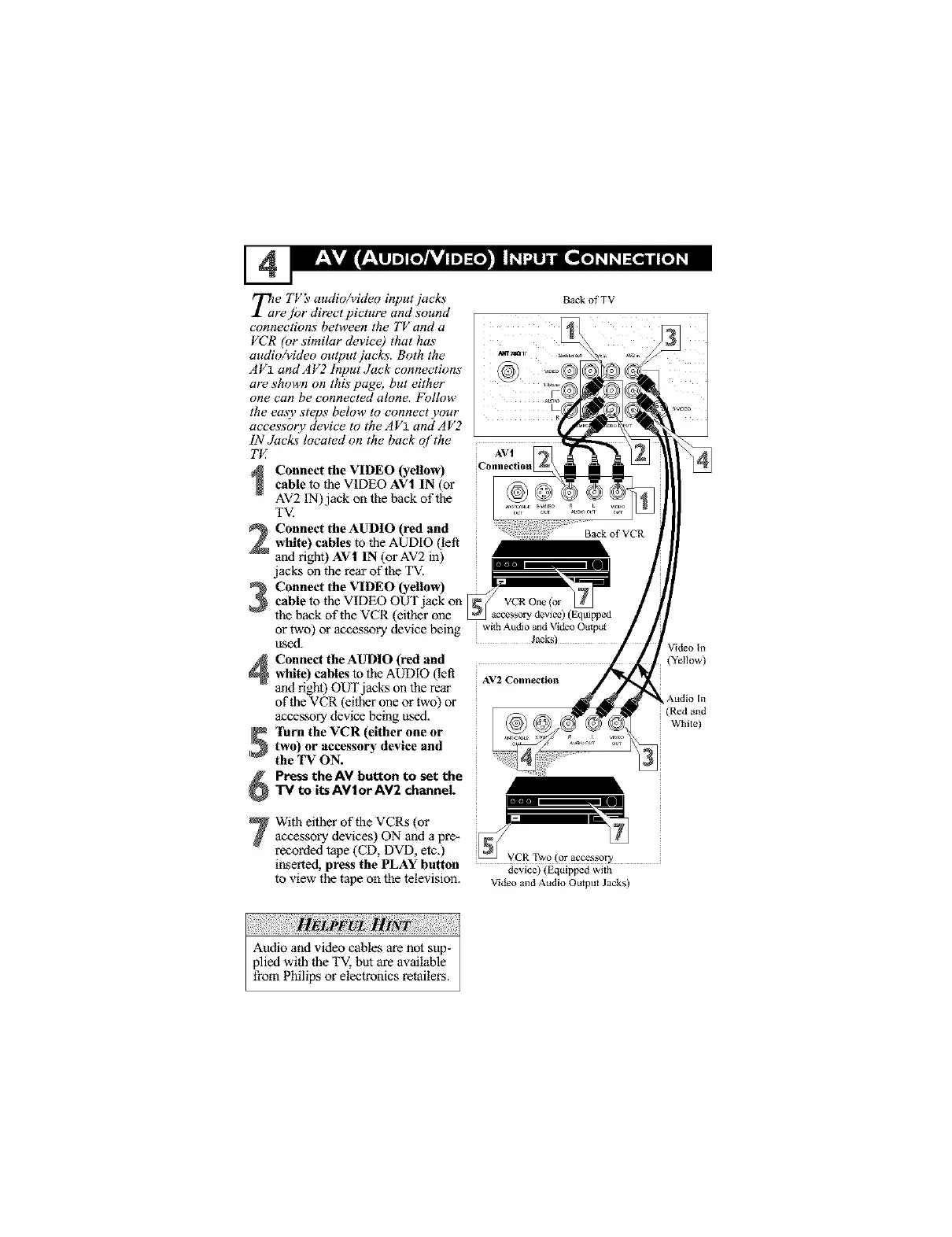
_e TV _ audioA4deo input jacks
re./br direct picture and sound
connections between the TV and a
VCR (or similar device) that has
audio/video output jacks. Both the
A V1 and A V2 Input Juek connections
are shown on this page, but either
one can be connected alone. Follow
the easy steps below to connect your
accessory device to the A V1 and A V2
IN Jacks located on the back of the
TI4
Connect the VIDEO (yellow)cable to the VIDEO AV| IN (or
AV2 IN) jack on the back of the
TV.
Connect the AUDIO (red and
white) cables to the AUDIO (left"
and right) AV| IN (or AV2 in)
jacks on the rear of the TV,
Connect the VIDEO (yellow)
cable to the VIDEO OUT jack on
the back of the VCR (either one
or two) or accessory device being
used.
Connect the AUDIO (red and
white) cables to the AUDIO (left
and right) OUT jacks on the rear
of the VCR (either one or two) or
accessory device being used.
_ lttrn the VCR (either one ortwo) or accessory device and
the TV ON.
Press the AV button to set the
TV to its AV|or AV2 channel.
BackofTV
AVt
Connec(ion
Back of VCR
withAudio andVideoOutptt(
Jack_)
AV2 Connection
With either of the VCRs (or
accessory devices) ON and a pre-
recorded _e (CD, DVD, etc.) VCRTwo(oraccessory
inserted, press the PLAY button device)(Equippedwire
to view the tape on the television. VideoandAudioOmputJacks)
lideo In
(Yellow)
Audio In
(Red and
White)





 To Next Page