_'t£ remind you which ratings you have
locked and which Block Options you
have selected, a review screen is available to
review your AutoLocU _settings. To access
this screen follow the steps below.
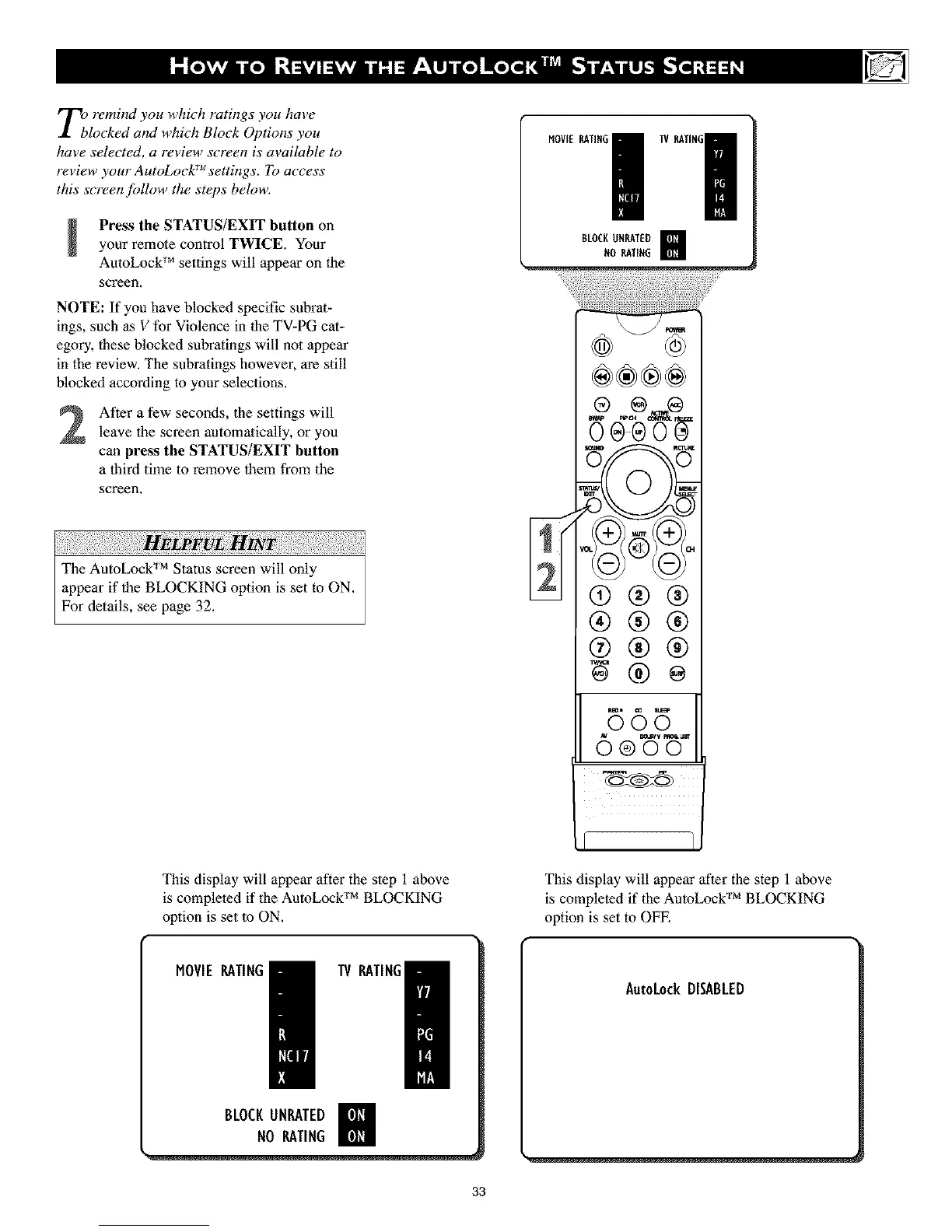
Press the STATUS/EXIT button on
your remote control TWICE. Your
AutoLock r_ settings will appear on the
screen.
NOTE: If you have blocked specific subrat-
ings, such as V for Violence in 1he TV-PG cat-
egory, these blocked subratings will not appear
in the review. The subratings however, are still
blocked according to your selections,
After a few seconds, the settings will
leave the screen automatically, or you
can press the STATUS/EXIT button
a third time to remove them from the
screen.
BLOCKUHRATED m
N0 RATING
®
(9@@
®®®
®®®
B6B
This display will appear after the step 1 above
is completed if the AutoLock TM BLOCKING
option is set to ON,
MOVIERATING
IV RATING/
BLOCKUNRATED
NORATING
This display will appear after the step 1 above
TM
is completed if the AutoLock BLOCKING
option is set to OFE
33



 To Next Page