Vour TV can automatically set itself fbr
$_ local area (o1"cable TV) channels. This
makes it easy fin" you to select only the TV
stations in your area by pressing the CHAN-
NEL (+) or (-) button.
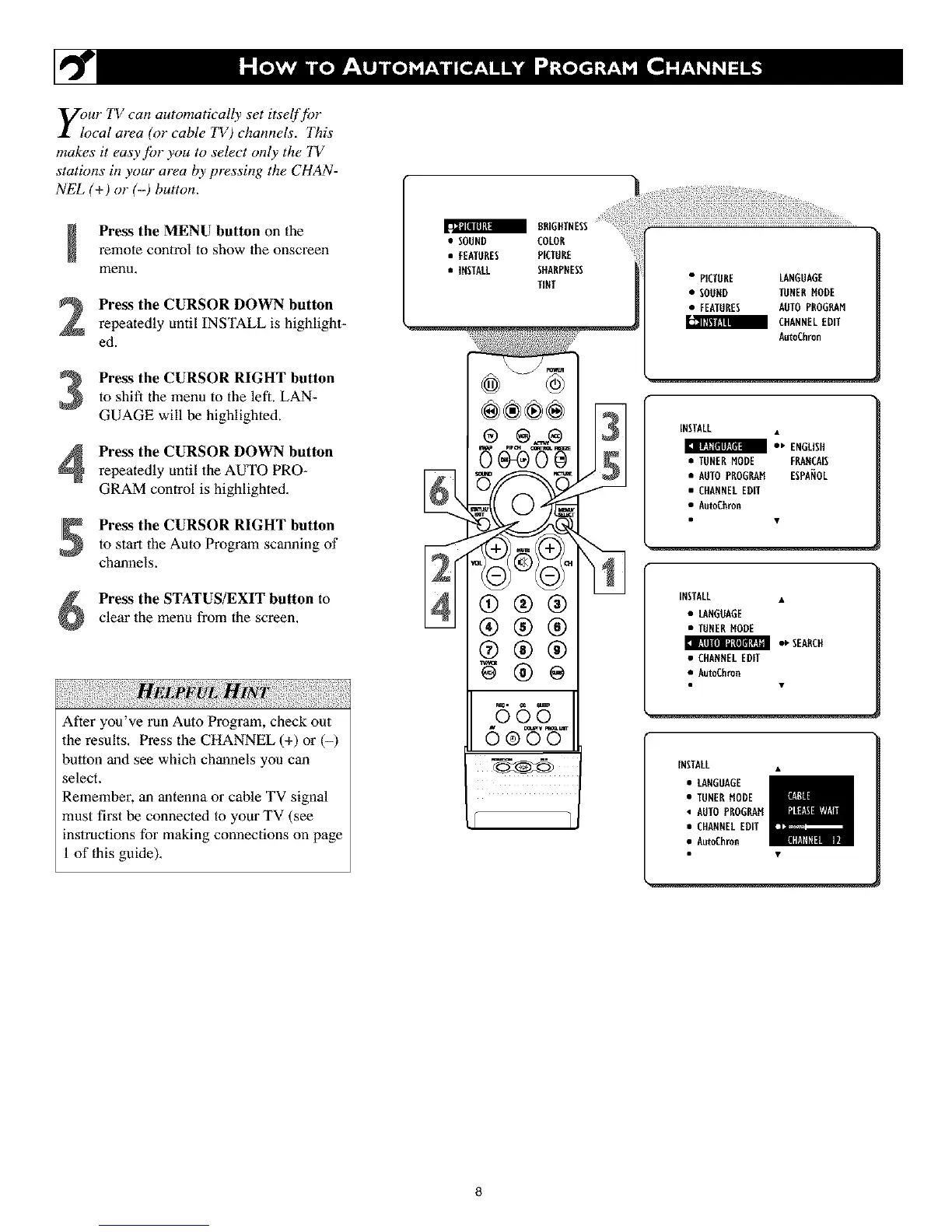
Press the MENU button on the
remote control to show the onscreen
menu.
Press the CURSOR DOWN button
repeatedly until INSTALL is highlight-
ed.
Press the CURSOR RIGHT button
to shift the menu to the left. LAN-
GUAGE will be highlighted.
Press the CURSOR DOWN button
repeatedly until the AUTO PRO-
GRAM control is highlighted.
Press the CURSOR RIGHT button
to start the Auto Program scanning of
channels.
Press the STATUS/EXIT button to
clear the menu from the screen.
After you've run Auto Program, check out
the results. Press the CHANNEL (+) or (-)
button and see which channels you can
select.
Remember, an antenna or cable TV signal
must first he connected to your TV (see
instructions for making connections on page
1 of this guide).
a 8RIGFITNESS
• SOUND COLOR
• FEATURES PICTURE
• INSTALL SffARPRESS
TINT
®®®÷
®
®®®
®®®
595
6e 'W
• PICTURE LANGUAGE
• SOORD TORERMODE
• FEATURES AOTOPROGRAM
_ CItANNELEDIT
AutoChron
INSTALL •
• ' ENGLISH
• TUNERMODE FRARCA[S
• AUTOPROGRAM ESPANOL
• CHANNELEDff
• AutoChron
INSTALL •
• LANGUAGE
• TUNERMODE
• ' SEARCH
• CHANNELEDIT
• AutoChron
INSTALL •
• LANGOAGE
• TUNERMODE
• AUTOPROGRAM
• CHANNELEDIT
• AutoChron
8



 To Next Page