5
Smart Installation
Note
• As part of the Smart Install, there is PC application to
support the installation.
Smart Install for PC is an application that can be
downloaded at www.philips.com/hospitality or contact
Philips agent representative, this tool is subject to
availability.
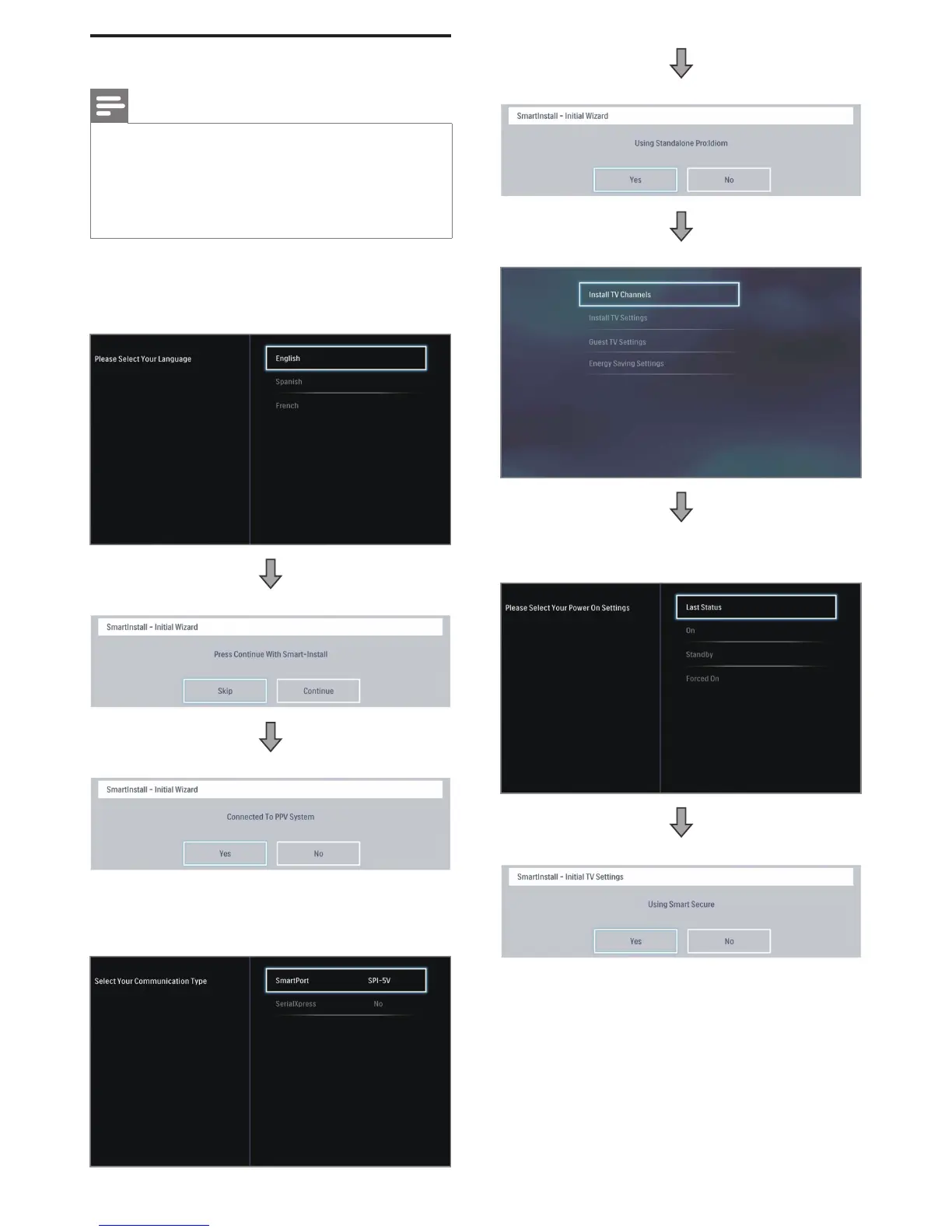
In the 1st time (Virgin) installation, the OSD will instruct you
step by step to do the TV installation setting.
1. Please select your Language.
2. SmartInstall – Initial Wizard.
3. SmartInstall – PPV System selection.
• If PPV System is selected as Yes. The Screen Menu will
request for selection of Communication Type which
includes SmartPort (select No, SPI-5V, SPI-3V3) and
Serial Express.
4. SmartInstall – Standalone Proidiom selection.
5. SmartInstall - Install TV Channels.
6. SmartInstall - Install TV Settings: Select this option, you can
start to Install TV setting Power ON Setting. Keyboard and
RC Lock Setting, CEC Communication.
7. SmartInstall – Using Smart Secure.



 To Next Page