Mechanical Instructions
EN 24 Q522.1HE LA4.
2009-Dec-04
4.3.11 LCD Panel
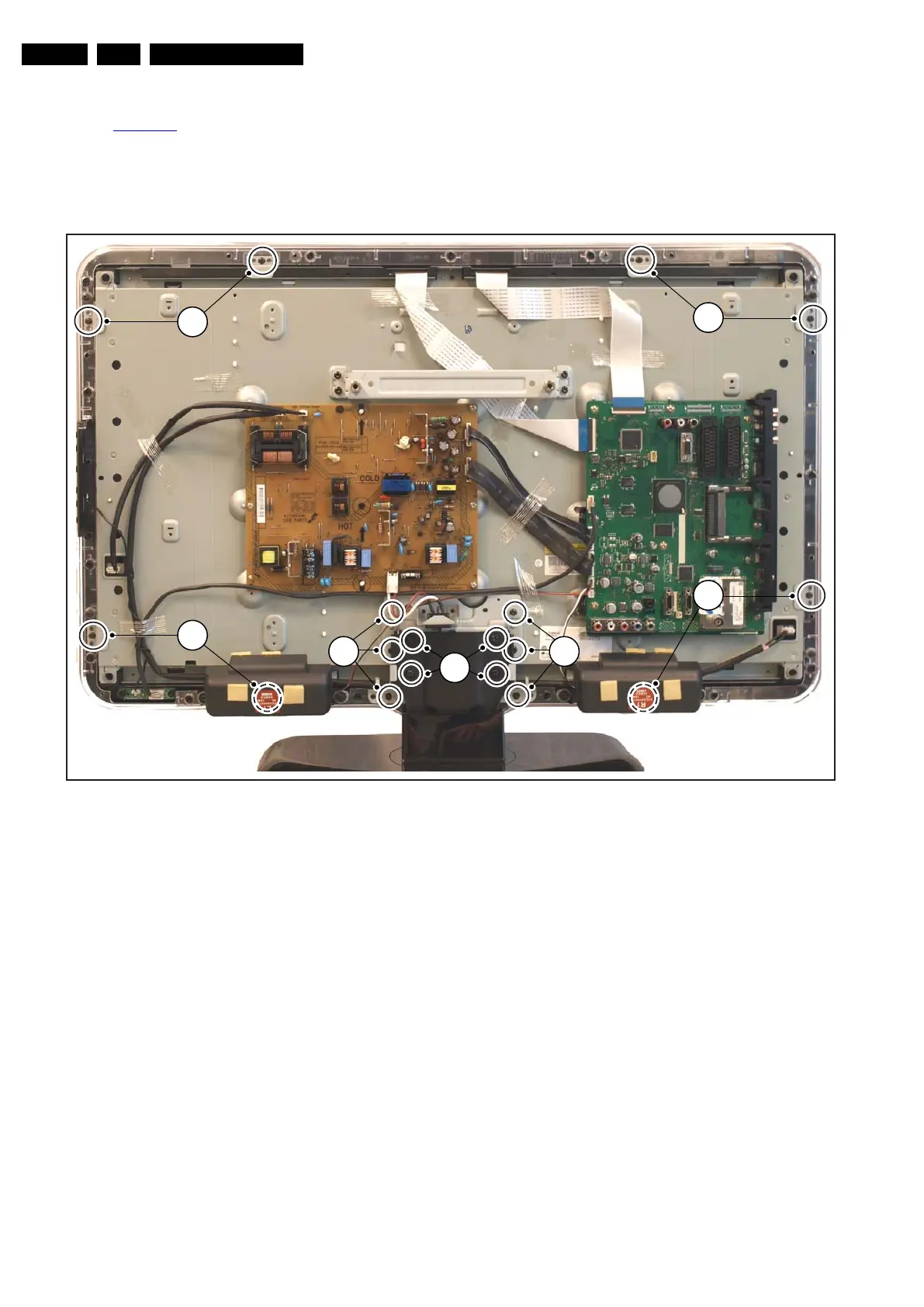
Refer to Figure 4-23
for details. As every screen size has a
(slightly) different mechanical construction (some have the
panels directly mounted on the LCD display, others use
brackets), we only describe one model. Disassembly method of
other LCD panels is similar to the one described below (see
also cable dressing pictures for more details).
1. Unplug all connectors.
2. Remove all panels as earlier described.
3. Remove the speakers as earlier described.
4. Remove the stand [1].
5. Remove all subframes from the LCD panel (e.g. [2]).
6. Remove the brackets [3] that secure the LCD Panel.
7. The LCD panel can now be lifted from the front cabinet.
Figure 4-23 LCD Panel removal (example model without iTV panels)
4.4 Set Re-assembly
To re-assemble the whole set, execute all processes in reverse
order.
Notes:
• While re-assembling, make sure that all cables are placed
and connected in their original position.
See Cable Dressing pictures.
• Pay special attention not to damage the EMC foams in the
set. Ensure that EMC foams are mounted correctly.
18440_103_090223.eps
090709
1
2
3
3
3
3
2



 To Next Page