Alignments
EN 50 Q522.1HE LA6.
2009-Dec-04
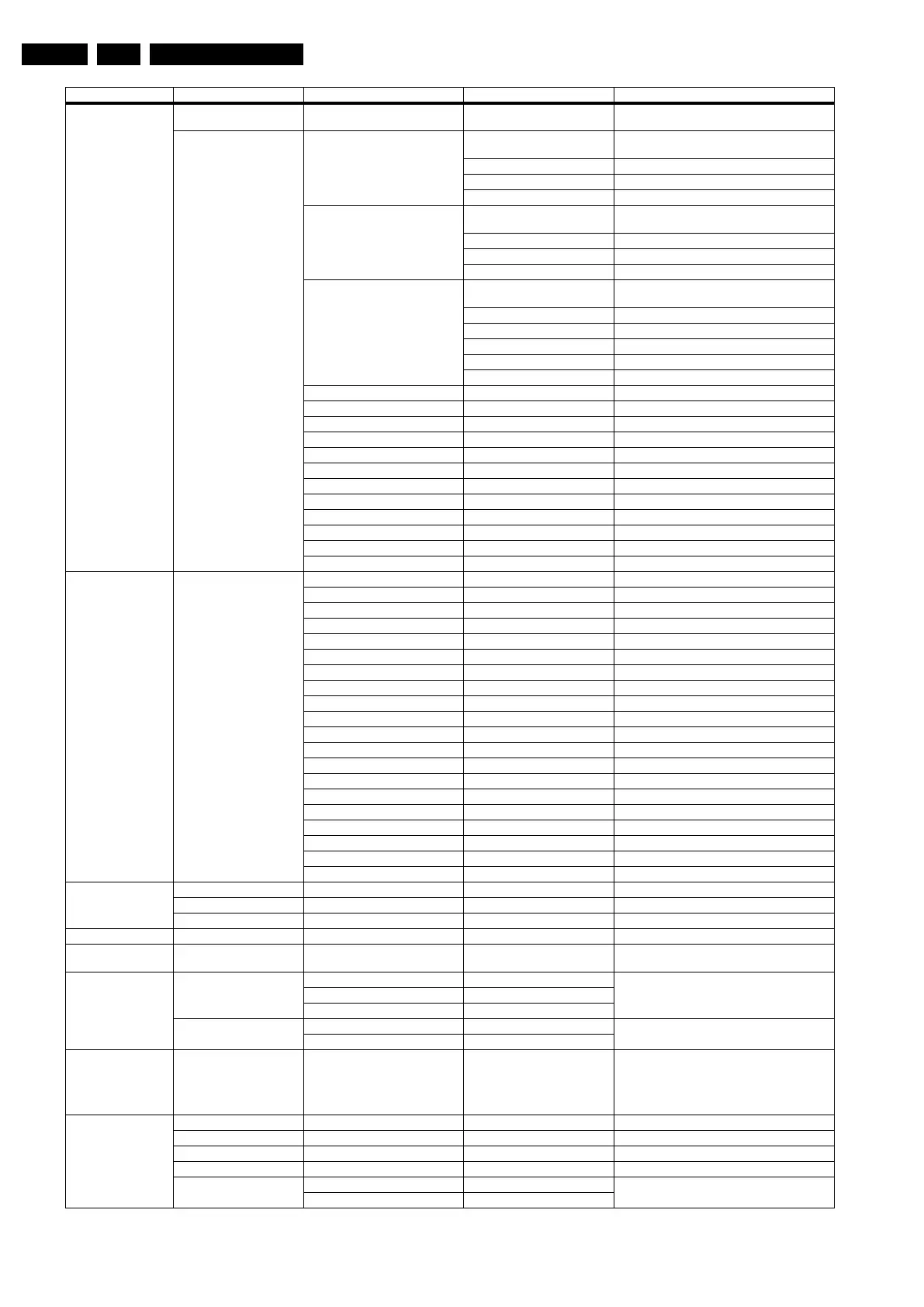
Audio reproduction Acoustic system Cabinet design used for setting dynamic audio
parameters
Source selection EXT1/AV1 type SCART CVBS RGB LR Select input source when connected with external
equipment
CVBS Y/C YPbPr LR
CVBS Y/C YPbPr HV LR
(CVBS) YPbPr LR
EXT2/AV2 type SCART CVBS RGB LR Select input source when connected with external
equipment
CVBS Y/C LR
(CVBS) YPbPr LR
CVBS Y/C LR
EXT3/AV3 type None Select input source when connected with external
equipment
CVBS
CVBS LR
YPbPr
YPbPr LR
YPbPr HV LR
VGA Off/On Select VGA On/Off
SIDE I/O Off/On Select SIDE I/O On/Off
HDMI 1 Off/On Select HDMI 1 On/Off
HDMI 2 Off/On Select HDMI 2 On/Off
HDMI 3 Off/On Select HDMI 3 On/Off
HDMI 4 Off/On Select HDMI 4 On/Off
HDMI side Off/On Select HDMI side On/Off
HDMI CEC Off/On Select HDMI CEC On/Off
HDMI CEC RC pass through Off/On Select HDMI CEC RC pass through On/Off
HDMI CEC Pixel Plus link Off/On Select Pixel Plus link On/Off
USB version USB 1.0/USB 2.0 Select USB version
S/PDIF inputs None/1 connector Select no. of inputs
Miscellaneous Region Europe/AP-PAL-MULTI/Australia Select Region/country
ATSC/DVB-T Off/On Select feature On/Off
Over the air download (AOD) Off/On Select feature On/Off
DVB-T installation Off/Country dependent/On Select feature On/Off
DVB-C Off/On Select feature On/Off
DVB-C installation Off/Country dependent/On Select feature On/Off
MPEG4 Off/On Select feature On/Off
Tuner type HD1816-MK1/TD1716-MK4/etc. Select type of Tuner used
Nyquist SAW filter Off/On Select feature On/Off
I2C configuration With PCA9540/9515/channel dec. Select configuration
Channel decoder TDA10048/etc. Select channel decoder
System RC support Off/On Select System RC support On/Off
Embedded user manual Off/On Select Embedded user manual On/Off
Start-up screen Off/On Select Start-up screen On/Off
Wallpaper Off/On Select Wallpaper On/Off
Hotel mode Off Hotel mode is Off
Video playback Off/On Select feature On/Off
Update assistant Off/On Select feature On/Off
Board identifier TV520/82 / TV520/82M Select chassis
Light guide Off/On Select feature On/Off
Option number Group 1 e.g. “08192.02181.01387.45160” The first line (group 1) indicates HW options 1 - 4
Group 2 e.g. “10185.12448.00164.00000” The second line (group 2) indicates SW options 5 - 8
Store - go right Store after changing
Initialise NVM N.A.
Store - go right Select Store in the SAM root menu after making any
changes
SW maintenance Software events Display Displayed information is for development purposes
Clear
Test reboot
Hardware events Display Displayed information is for development purposes
Clear
Operation hours display 0003 In case the display must be swapped for repair, you
can reset the “”Display operation hours” to “0”. So,
this one does keeps up the lifetime of the display
itself (mainly to compensate the degeneration
behaviour)
Test settings Digital info Displayed information is for development purposes.
Install start frequency 000 Install start frequency from “0” MHz
Install end frequency 999 Install end frequency as 999 MHz
Default install frequency
Installation Digital only Select Digital only or Digital + Analogue before
installation.
Digital + Analogue
Main Menu Sub-menu 1 Sub-menu 2 Sub-menu 3 Description




 To Next Page