20
To enhance the sound reproduction of your TV you can connect an externally
powered subwoofer (between 20 and 250 Hz).
& Connect the audio cable of the external subwoofer to the SUBWOOFER
socket at the rear of your TV.
é Select Subwoofer in the Setup, General menu, p. 9.
“ Adjust the frequency of the external subwoofer to 100-120 Hz (according
to your personal preference) if present on the subwoofer.
‘ Adjust the volume level of the external subwoofer, presumed this control is
present on the subwoofer.
See also the instruction manual of the external subwoofer.
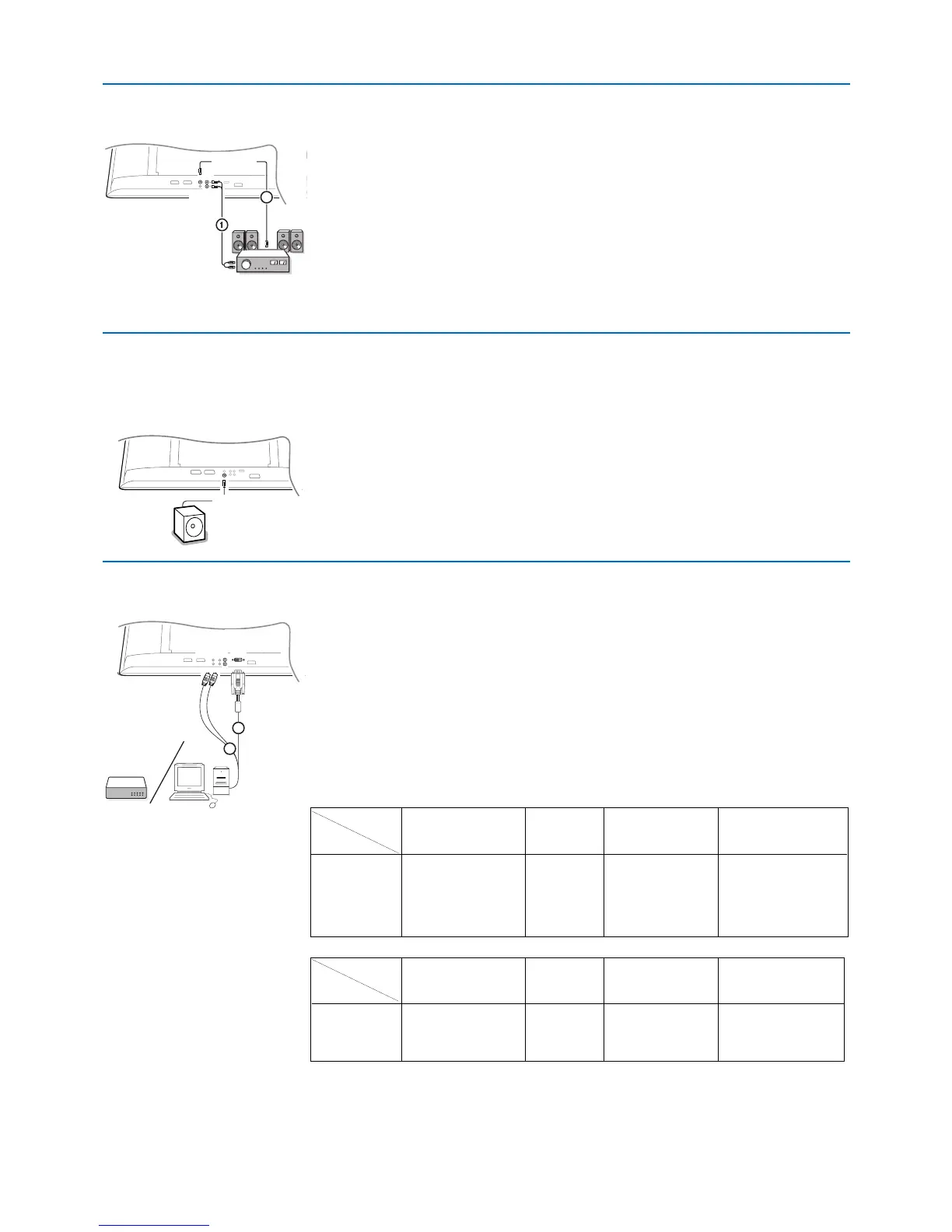
& Connect the audio cable to the multi channel Surround receiver and to
AUDIO OUT L and R at the bottom of your TV 1.
é If you want the loudspeakers of your TV to act as centre speaker, also
connect an audiocable to the multi channel Surround receiver and to the
CENTRE IN at the bottom of your TV 2.
“ Select Centre Input On in the Source menu. See p. 9.
The loudspeakers of the TV will now only produce centre sound, the
loudspeakers connected to the audio receiver will produce Surround
Sound.The volume has to be controlled via the multi channel Surround
receiver.
Note: No sound will be heard when a TV channel or external source is blocked via
the Child lock menu (see p. 14).
The DVI connector allows the following TV and monitor display modes:
EDTV 640/720 x 480p
720p x 576p
HDTV 1920 x 1080i
1920 x 1152i
1280 x 720p
VGA 640 x 480 60 Hz
SVGA 800 x 600 60 Hz
XGA 1024 x 768 60 Hz (not for 42PF9966)
(black bars will appear on the sides of the screen)
Note: If necessary, you can adjust the picture position to the center of the screen
with the cursor left/right, up/down.
& Select the type of connector of the device (DVD, HDTV, STB, PC, ...) you
want to connect with the DVI connector of your TV.
é If necessary, use an appropriate adapter.
“ Connect your device with the DVI connector at the bottom of the TV 1.
‘ Connect the audio cable 2 to the AUDIO R (right) and L (left) inputs of
the TV.
Connector
type: YPbPr VGA DVI HDMI
Device: digital stream digital
DVD DVD with YPbPr --- DVD with DVI DVD with HDMI
HDTV STB Euro 1080i --- (future) (future)
Computer --- PC PC ---
Connector
type: YPbPr VGA DVI HDMI
Device: digital stream digital
Adaptor (cable) 3 cinch to VGA cable VGA to DVI HDMI to DVI
+ VGA to DVI (supplied)
(supplied)
Connect your DVI connector
Connect extra subwoofer
Multi channel Surround receiver







 To Next Page