
 Need help?
Do you have a question about the Philips 32PHS6808 and is the answer not in the manual?
Run tests to check TV condition and configurations.
Identifies buttons and functions of the remote control.
Essential safety information before using the TV.
Information on HDMI connections for best picture and sound.
Instructions for sharing your mobile device screen on the TV.
Setting up a CI+ module for conditional access to premium channels.
How to open, select, and view device information in the sources menu.
How to watch channels, switch between them, and use channel lists.
Guide to installing channels via Antenna, Cable, or Satellite.
How to open, update, and search programmes in the TV Guide.
Viewing photos, playing music and videos from USB devices.
Streaming media files from a home network.
Accessing common TV settings and functions quickly.
Comprehensive guide to all available TV configuration options.
Instructions for establishing wired and Wi-Fi connections.
Step-by-step guide to setting up and using Alexa voice control.
How to search for and install software updates from the internet or USB.
Essential safety instructions to prevent electric shock, fire, injury, or damage.
 General
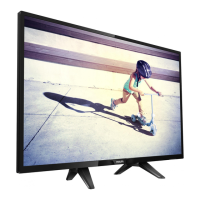
| Screen Size | 32 inches |
|---|---|
| Resolution | 1366 x 768 pixels |
| Display Technology | LED |
| HD Type | HD |
| Smart TV | Yes |
| Operating System | SAPHI |
| HDMI Ports | 2 |
| USB Ports | 1 |
| Energy Efficiency Class | F |
| Display diagonal | 80 cm |
| Screen shape | Flat |
| Internet TV | Yes |
| VESA mounting | Yes |
| VESA mounting interfaces | 100 x 100 mm |
| Product colour | Black |
| High Dynamic Range (HDR) support | No |
| Refresh Rate | 60 Hz |
| Built-in Wi-Fi | Yes |
| Sound Output | 16 W |



 To Next Page