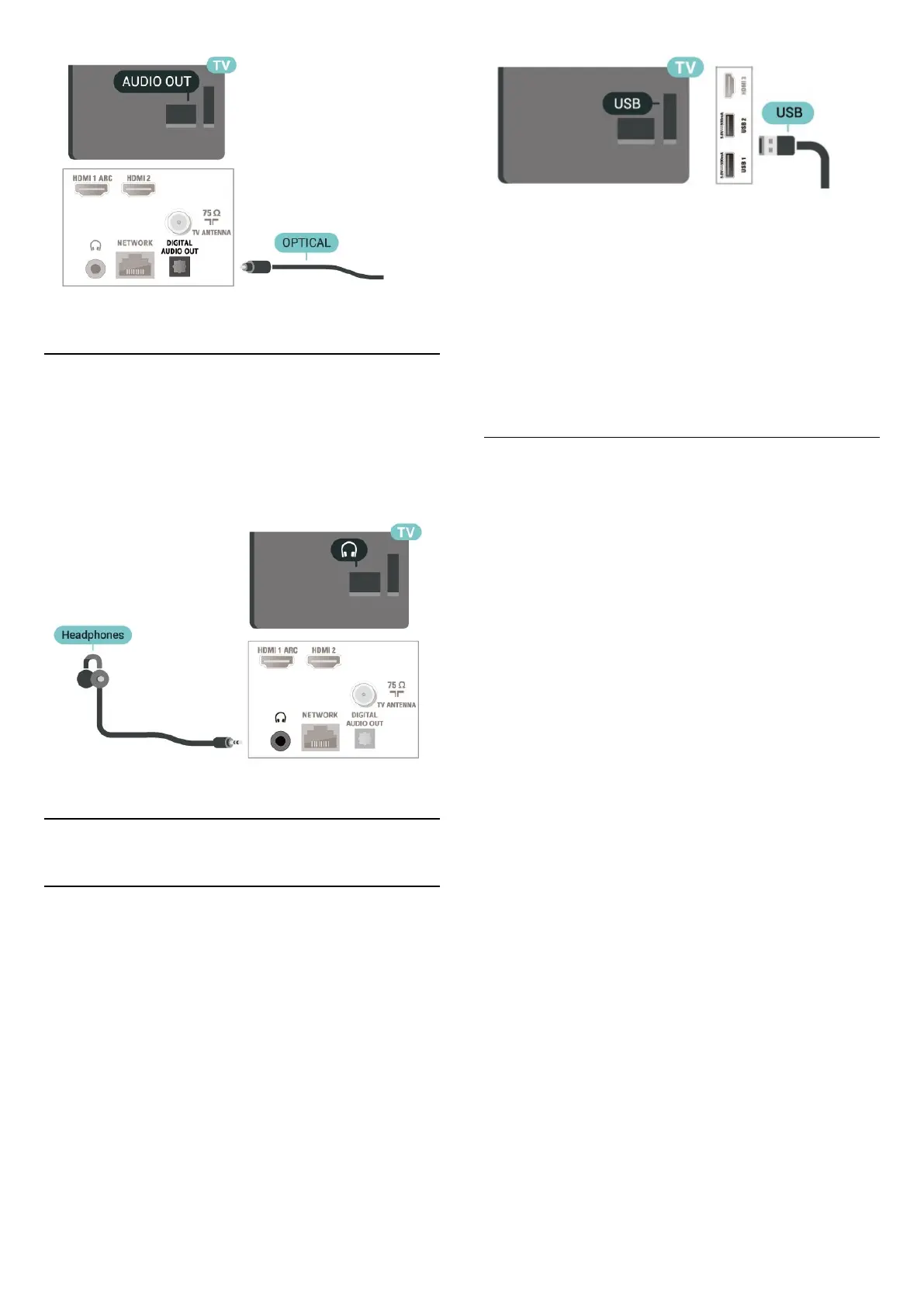
Headphones
You can connect a set of headphones to the
headphone connector on the back of the TV. The
connection is a mini-jack 3.5mm.
* Note: TV Speakers will be muted when the
Headphones are plugged in.
7.5
USB Hard Drive
Installation
Before you can pause or record a broadcast, you
must connect and format a USB Hard Drive.
Formatting removes all files from the USB Hard Drive.
1 - Connect the USB Hard Drive to one of
the USB connections on the TV. Do not connect
another USB device to the other USB ports when
formatting.
2 - Switch on the USB Hard Drive and the TV.
3 - When the TV is tuned to a digital TV channel,
press Pause. Trying to pause will start the formatting.
Follow the instructions on screen.
When the USB Hard Drive is formatted, leave it
connected permanently.
Warning
The USB Hard Drive is formatted exclusively for this
TV, you cannot use the stored recordings on another
TV or PC. Do not copy or change recording files on
the USB Hard Drive with any PC application. This will
corrupt your recordings. When you format another
USB Hard Drive, the content on the former will be lost.
A USB Hard Drive installed on your TV will need
reformatting for use with a computer.
Formatting
Before you can pause or record a broadcast, or store
apps, you must connect and format a USB Hard
Drive*. Formatting removes all files from the USB Hard
Drive.
Warning
The USB Hard Drive is formatted exclusively for this
TV, you cannot use the stored recordings on another
TV or PC. Do not copy or change recording files on
the USB Hard Drive with any PC application. This will
corrupt your recordings.
* Connect the USB Hard Drive with size less than 2TB
and make sure the available space is more than 1
GB.
To format a USB Hard Drive…
1 - Connect the USB Hard Drive to one of the USB
connections on the TV. Do not connect another USB
device to the other USB ports when formatting.
2 - Switch on the USB Hard Drive and the TV.
3 - Press MENU while watching TV, then
press Navigation keys down to Record > Device info.
4 - Select the device you want to format and press
OK.
5 - Select Format to star the formatting. All files and
data will be removed after formatting.
6 - When the USB Hard Drive is formatted, it is
recommended to leave it connected permanently.
To assign the storage device for PVR and Time
shift…
1 - Once the formatting is done, you can assign the
storage device for PVR or Time shift functions.
2 - Press MENU while watching TV, then
press Navigation keys down to Record > Device info.
20




 To Next Page