3
4
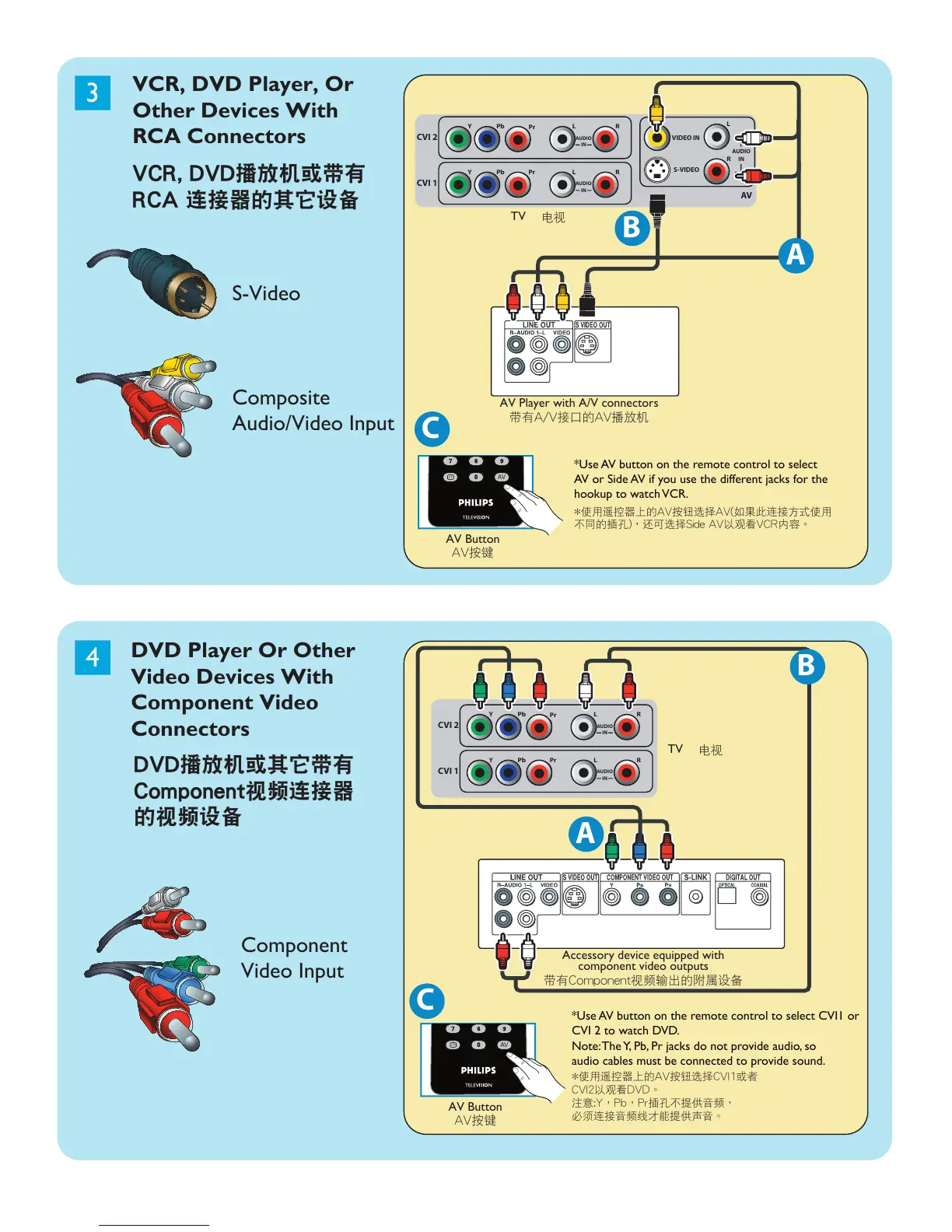
VCR, DVD Player, Or
Other Devices With
RCA Connectors
DVD Player Or Other
Video Devices With
Component Video
Connectors
TV
AV Player with A/V connectors
Accessory device equipped with
component video outputs
C
A
Component
Video Input
S-Video
VCR, DVD播放機或帶有
RCA 連接器的其它設備
DVD播放機或其它帶有
Component視頻連接器
的視頻設備
帶有A/V接口的AV播放機
帶有Component視頻輸出的附屬設備
電視
TV
電視
*Use AV button on the remote control to select
AV or Side AV if you use the different jacks for the
hookup to watch VCR.
*Use AV button on the remote control to select CVI1 or
CVI 2 to watch DVD.
Note: The Y, Pb, Pr jacks do not provide audio, so
audio cables must be connected to provide sound.
Composite
Audio/Video Input
AV按鍵






 To Next Page