EasyManua.ls Logo

Philips 40PFL8008S - User Manual

Philips 40PFL8008S
8 pages
Print Icon
To Next Page IconTo Next Page
Loading...
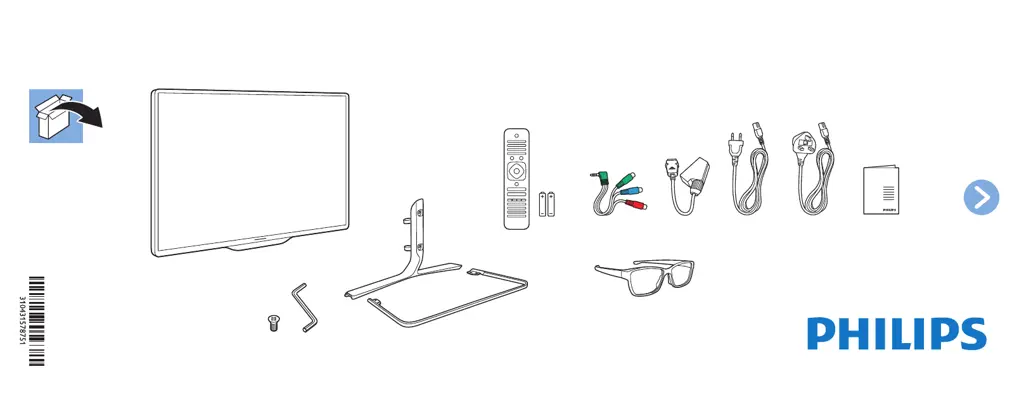
(UK)(EU)
4x 1x
3D Max
x2
Easy 3D
x4
6000 / 7000 / 8000 series 3D Smart LED TV
285 x 110
Register your product and get support at
www.philips.com/welcome

Questions and Answers

  • V
    vincentpittmanAug 28, 2025
    How to improve poor Bluetooth audio quality on Philips Speaker System?
    • X
      xwallaceAug 28, 2025
      If the audio quality from a connected Bluetooth device is poor, it might be due to poor Bluetooth reception. Try moving the device closer to the soundbar or removing any obstacles between them.
  • T
    Terrence CookAug 28, 2025
    What to do if the buttons on my Philips Speaker System do not work?
    • C
      Christopher FloresAug 28, 2025
      If the buttons on the main unit of your Philips Speaker System do not work, disconnect it from the power supply for a few minutes, then connect it again.
  • B
    Brandon FlemingAug 31, 2025
    Why don't the lights turn on on my Philips Pasta Maker?
    • K
      Katie AndersonSep 1, 2025
      If the indicators on your Philips Pasta Maker do not light up, check if the power plug is correctly plugged into a working outlet.
  • J
    Johnny ArnoldAug 27, 2025
    What to do if my Philips Speaker System is making distorted sound or echo?
    • B
      Brenda ProctorAug 27, 2025
      If you are experiencing distorted sound or an echo with your Philips Speaker System, and you're playing audio from your TV through the system, ensure that the TV is muted.
  • R
    rbrownAug 27, 2025
    Why can't a device connect with my Philips Speaker System soundbar?
    • D
      Dr. Robin Hoffman MDAug 27, 2025
      If a device cannot connect with the Philips soundbar: * The device may not support the compatible profiles required for the soundbar. * You have not enabled the Bluetooth function of the device. See the user manual of the device on how to enable the function. * Connect the device correctly. * Disconnect the connected device, and then try again.
  • N
    nicoleallisonAug 27, 2025
    What to do if my Philips Speaker System has no power?
    • E
      Elizabeth GeorgeAug 27, 2025
      If your Philips Speaker System has no power, check the following: * Ensure that the AC cord is properly connected. * Ensure that there is power at the AC outlet. * Press the power button on the remote control or soundbar to turn the soundbar on.
  • J
    Jason IngramAug 26, 2025
    How to fix Philips Speaker System buttons on the main unit that are not working?
    • J
      James Hansen DDSAug 26, 2025
      If the buttons on your Philips Speaker System main unit do not work, disconnect the system from the power supply for a few minutes, and then connect it again.
  • R
    Randy FryAug 26, 2025
    What to do if my Philips Speaker System remote control does not work?
    • B
      Brian SpencerAug 26, 2025
      If your Philips Speaker System remote control isn't working, try these steps: * First, select the correct source before pressing any playback control button. * Reduce the distance between the remote and the unit. * Ensure the battery is inserted correctly, aligning the polarities (+/-) as indicated. * Replace the battery with a new one. * Aim the remote directly at the sensor on the front of the unit.
  • A
    Anthony Buchanan Jr.Aug 25, 2025
    What to do if a device cannot connect with Philips Speaker System soundbar?
    • N
      nancy28Aug 26, 2025
      If a device can't connect, it might not support the compatible profiles required for the soundbar. Ensure you've enabled the Bluetooth function on the device by checking its user manual. Make sure the device is correctly connected. Also, the soundbar might already be connected to another Bluetooth device; disconnect that device and try again.
  • K
    Kevin BushAug 25, 2025
    Why can't my device connect to my Philips Speaker System soundbar?
    • N
      Neil DiazAug 25, 2025
      A device might fail to connect to the soundbar for several reasons: * The device may not support the compatible profiles required for the soundbar. * The Bluetooth function of the device may not be enabled. Refer to the device's user manual to enable it. * The device may not be connected correctly. Ensure the device is correctly connected. * The soundbar may already be connected to another Bluetooth device. Disconnect the connected device and try again.

Philips 40PFL8008S Specifications

General IconGeneral
BrandPhilips
Model40PFL8008S
CategoryElectric Shaver
LanguageEnglish

Related product manuals