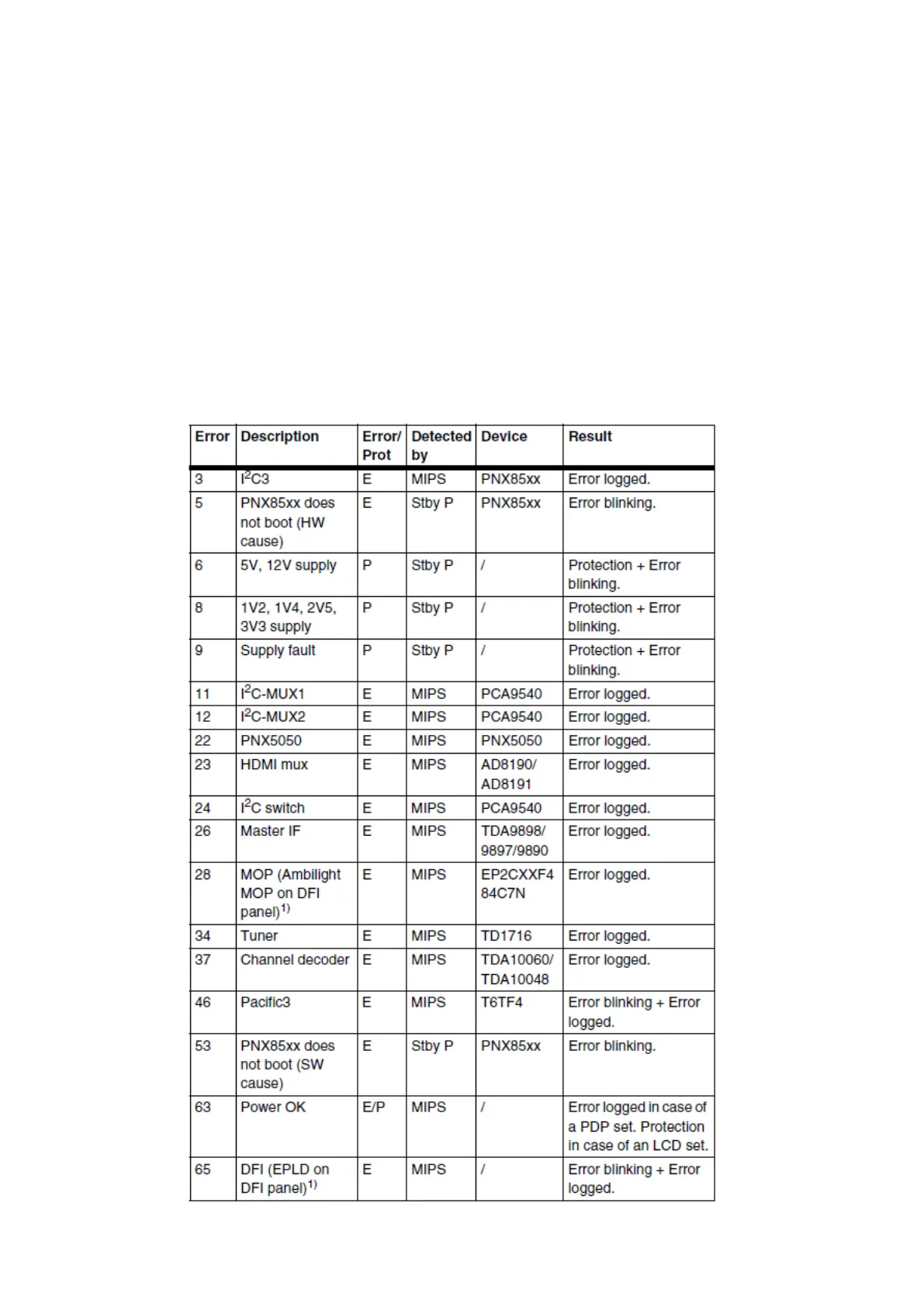
• Error 63 (POWER OK).
When this error occurs, it means that the POWER-OK line did not became “high”. This error
is only applicable for TV’s with an LCD display. For PDP displays there will be no protection
during a POWER-OK line failure, but error 63 will be logged in the error buffer.
Caution: in case a PDP TV ends up into power-ok protection, it can indicate that the display
option code is set to “LCD”. To change the display option code to “PDP” you need to activate
SDM via the service pads (see figure “Service mode pads”). Then change the display option
code blindly via a standard RC: key in the code “062598” directly followed by the “MENU”
button and “XXX” (where XXX is the 3 digit decimal display option code as mentioned in figure
“Display option code overview”).
• Error 65 (DFI EPLD error). When this error occurs it means that there is a problem with the
I2C communication towards the EPLD (picture processing EPLD, not the Ambilight EPLD) on
the DFI panel.






 To Previous Page