11
1
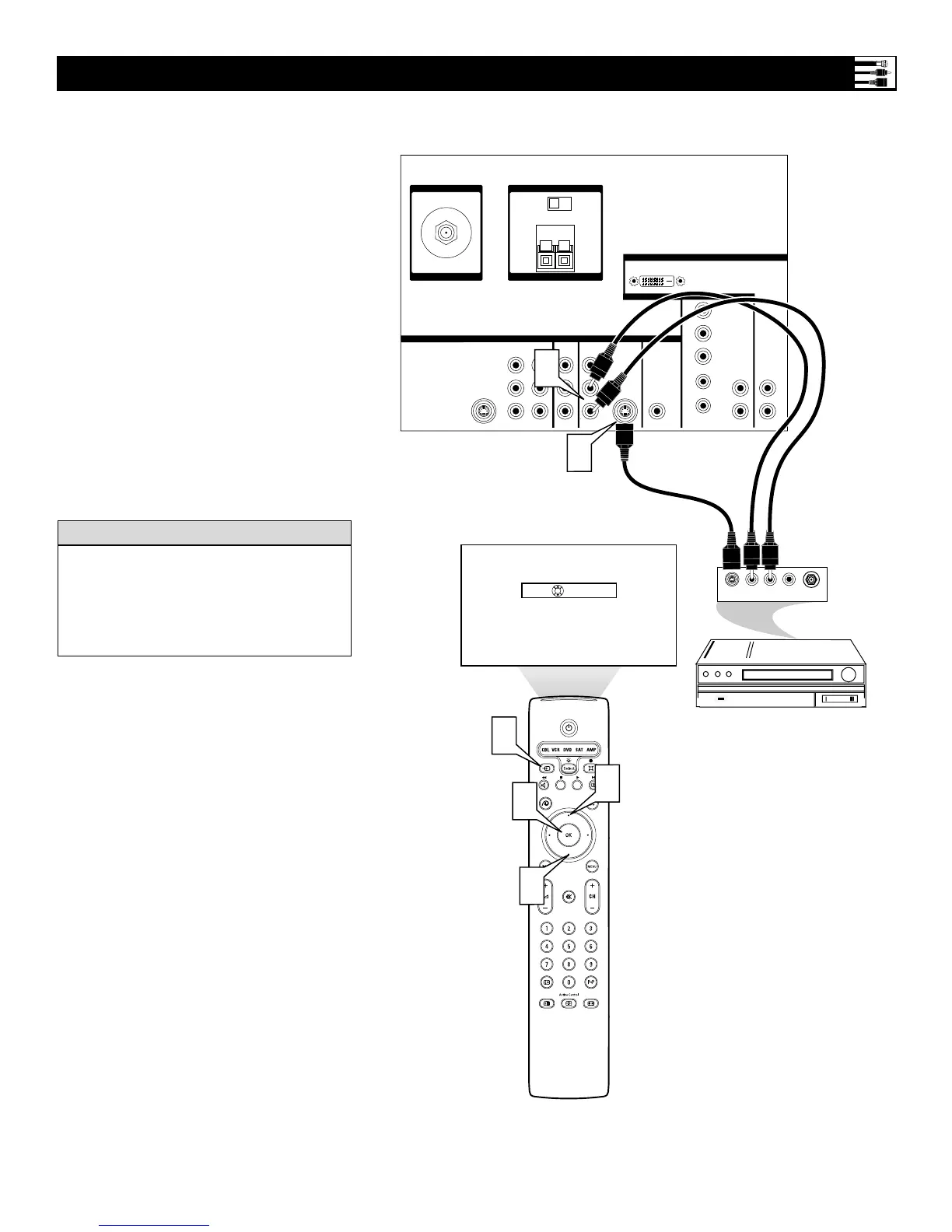
Using an S-Video cable, connect the
S-Video output on the back of the
S-Video device to the INPUT-
AV 2 S-VIDEO input.
2
Using Stereo Audio cables, connect the
AUDIO OUT jacks on the back of the
S-Video device to the corresponding
INPUT-AV 2 audio inputs
(L and R).
3
Press the Source button on the remote
control to access the Source list.
4
Press the Cursor Up or Down button to
select the AV2 input source.
5
Press the OK button to confirm your
choice. The set is now switched to the
AV2 input source for the viewing of
programs from the S-Video device.
Connecting an S-Video Device
Back of Standard S-Video Device
(example only)
Back of TV
Color Coding Used on Jacks and Plugs to
simplify connections:
Red: Right AUDIO
White: Left AUDIO.
An S-Video cable must be used to make the
S-Video connection.
HELPFUL
HINT




 To Next Page