4.9
Game Consoles
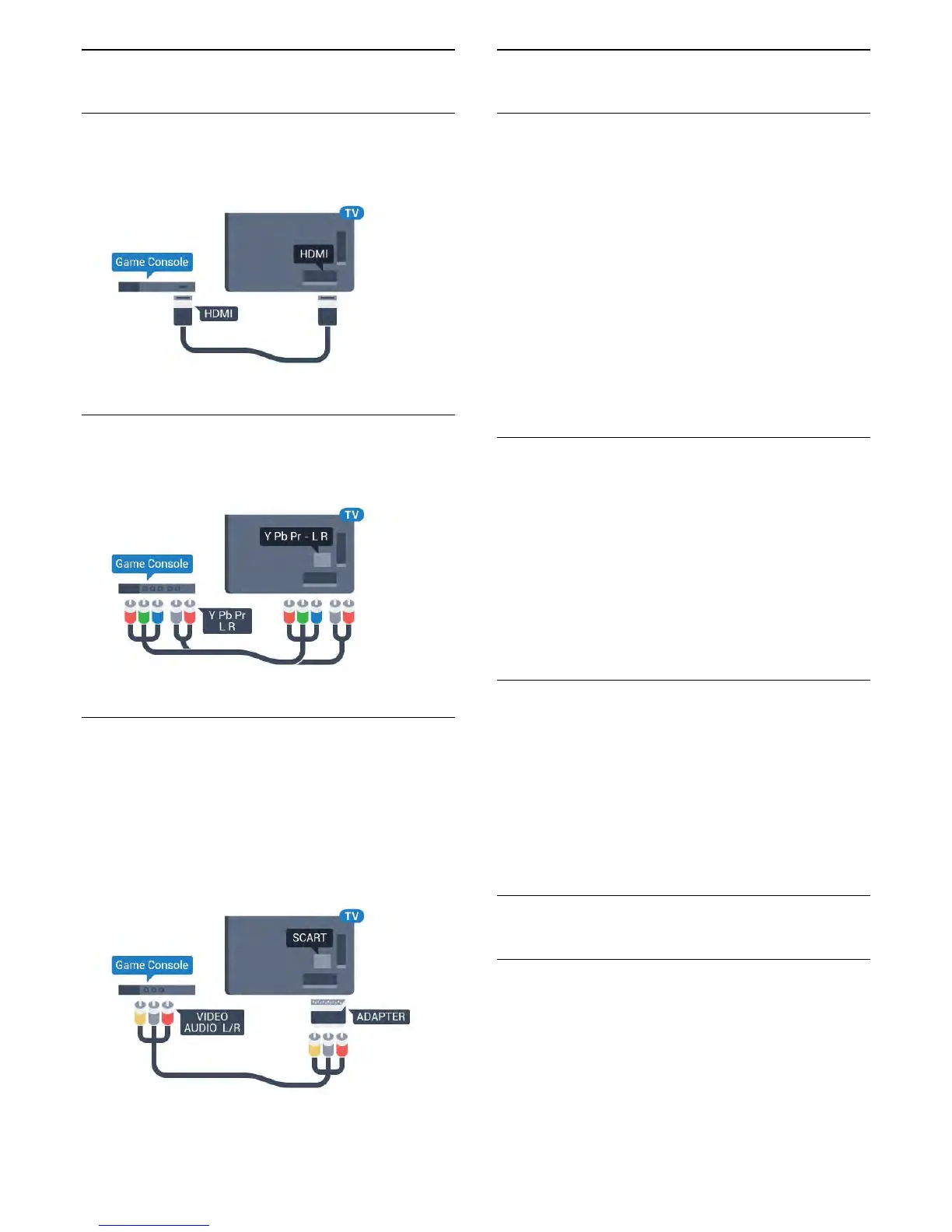
HDMI
For best quality, connect the game console with a
High speed HDMI cable to the TV.
YPbPr
Connect the game console with a component video
cable (Y Pb Pr) and an audio L/R cable to the TV.
Video-Audio LR / Scart
Connect the game console to the TV with a
composite cable (CVBS) and an audio L/R cable to
the TV.
If your game console only has Video (CVBS) and
Audio L/R output, use a Video Audio L/R to SCART
adapter (sold separately) to connect to the SCART
connection.
4.10
Gamepad
Connect a Gamepad
To play games from the Internet on this TV, you can
connect a selected range of wireless Gamepads.
When you connect the Gamepad, you can use it
immediately.
To connect a Gamepad…
1 - Plug in the small nano receiver in one of the USB
connections on the side of the TV. The wireless nano
receiver comes with the Gamepad.
2 - If the Gamepad is switched on, you can use the
Gamepad.
You can connect a second Gamepad in the second
USB connection on the side of the TV.
Suitable Gamepads
A selected range of wireless Gamepads are suited
and tested for use on this TV. Other Gamepads might
not be fully compatible.
The suited Gamepads are…
• Logitech F710
• Logitech F510
• Xbox 360 Wireless Controller for Windows
• Speedlink Strike FX Wireless Gamepad
Trouble with Interference
To solve possible interference with other wireless
devices on TV…
• Use a USB extension cord and move the nano
receiver about 1 meter away from the TV.
• Alternatively, you can use a powered USB hub
connected to the TV and plug in the nano receivers in
the USB hub.
4.11
USB Hard Drive
What You Need
If you connect a USB Hard Drive, you can pause or
record a TV broadcast. The TV broadcast must be a
digital broadcast (DVB broadcast or similar).
To Pause
To pause a broadcast, you need a USB 2.0
compatible Hard Drive with a minimum of 4GB disk
18



 To Next Page