Discover your phone 7
Multimedia Side key
How to...
All operations described below must be performed
from the idle mode.
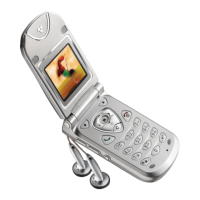
Your mobile phone features a W80 x H48 pixels, black
and white external screen, which display is always on.
When the flip is closed, long press any side key to acti-
vate the external screen backlight, which will remain
activated for a preset duration (the backlight will also
be activated when plugging/unplugging the headset).
When you receive a call, the seven colour backlight of
the external screen changes colour in time with the mu-
sic of the ringer.
Flip opened, in
idle mode
-Press to display the FM
radio channel selection
screen,
- long press to activate the
voice command.
Flip closed
- Long press to access the
FM radio / Stopwatch
selection menu.
-press to confirm your
choice after selection.
When the radio
is on
- Long press to switch the
radio off.
Access the main menu
Press or the
[
Menu
] left softkey.
Access the
Dialled
calls list
Press .
Access the
Call list
Press .
Access the
FM radio
Press .
Access the
Names list
Press or the
[
Names
] right softkey.
Access the
Messages
menu
Press .
Make a call
Enter phone number on
keypad and press .
Use a hotkey
Long press on the hotkey
you have preset.
External screen
Philips630_Europe_GB_4311 255 56272.book Page 7 Mardi, 5. août 2003 2:44 14


 To Next Page