4
Remote Control
4.1
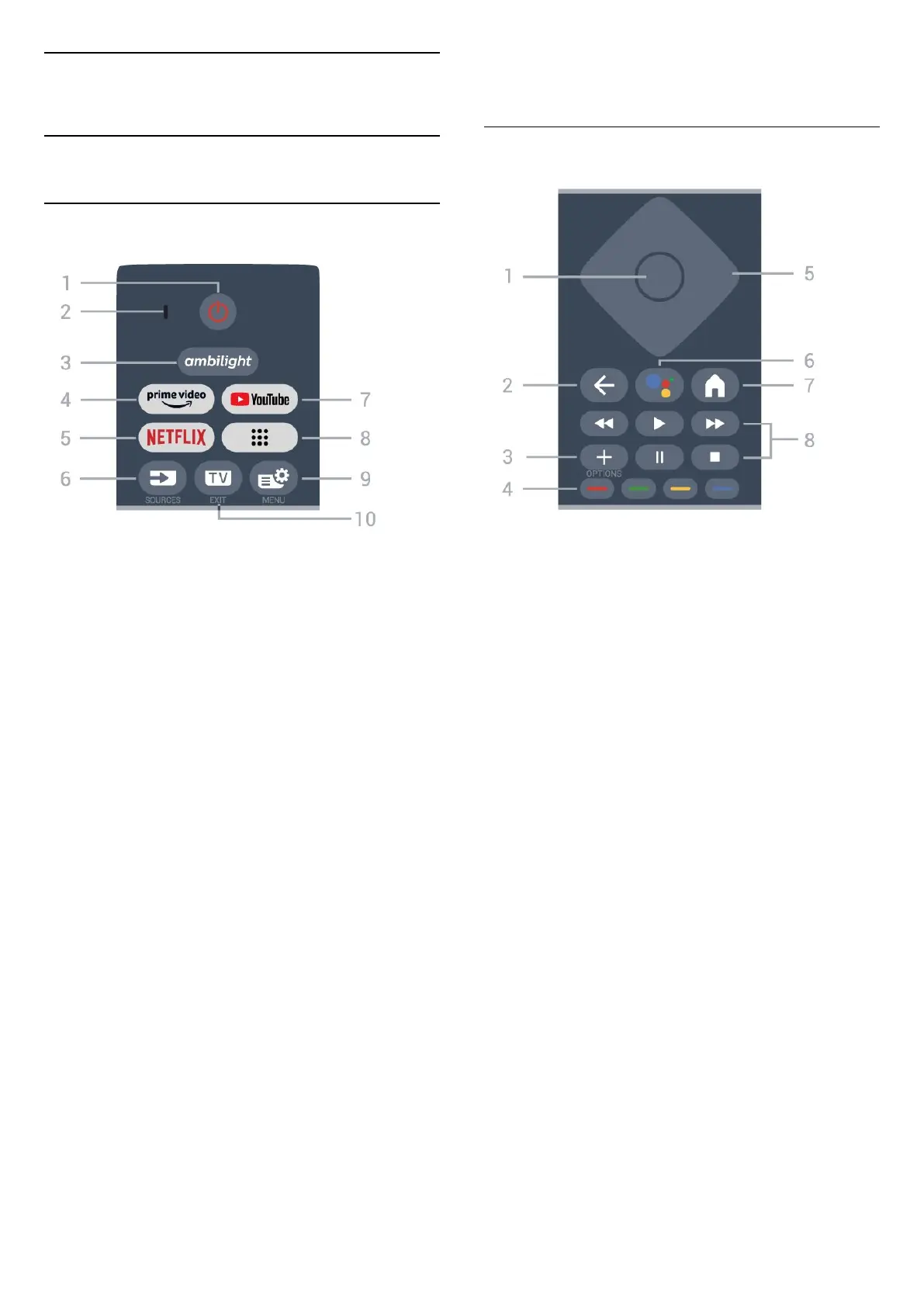
Key Overview (Type 1)
Top
1 - Standby / On
To switch the TV on or back to Standby.
2 - VOICE microphone
3 -
To select one of the Ambilight style.
4 -
To launch the Amazon prime video App.
5 -
To open the Netflix App directly. With the TV switched
on or from standby.
• If you have a Netflix membership subscription, you
can enjoy Netflix on this TV. Your TV must be
connected to the Internet.
• To open Netflix, press to open the Netflix
App. You can open Netflix immediately from a TV in
standby.
www.netflix.com
6 - SOURCES
To open or close the Sources menu.
7 - YouTube
To launch the YouTube App.
8 - Apps
To launch Your apps page to display the list of Apps
that are pre-installed, or installed by user.
9 - Quick Menu/MENU
To open the Quick Menu with typical TV functions.
Hold the MENU key to show the Gaming control bar
when game signal detected and game mode enabled.
10 - - EXIT
To switch back to watch TV or to stop an interactive
TV application.
Middle
1 - OK key
To confirm a selection or setting. To open the channel
list while watching TV.
2 - Back
To switch back to the previous channel you selected.
To return to previous menu.
To go back to the previous App/Internet page.
3 - OPTIONS
To open or close the options menu.
4 - Colour keys
Direct selection of options. Blue key , opens Help.
5 - Arrow / navigation keys
To navigate up, down, left or right.
6 - Google Assistant™
To launch the Google Assistant™.
7 - HOME
To open the Home menu.
8 - Playback
• Play , to playback.
• Pause , to pause playback
• Stop , to stop playback
• Rewind , to rewind
• Fast forward , to go fast forward
10




 To Next Page