3
Quick Guide
3.1
Remote Control
Batteries and Cleaning
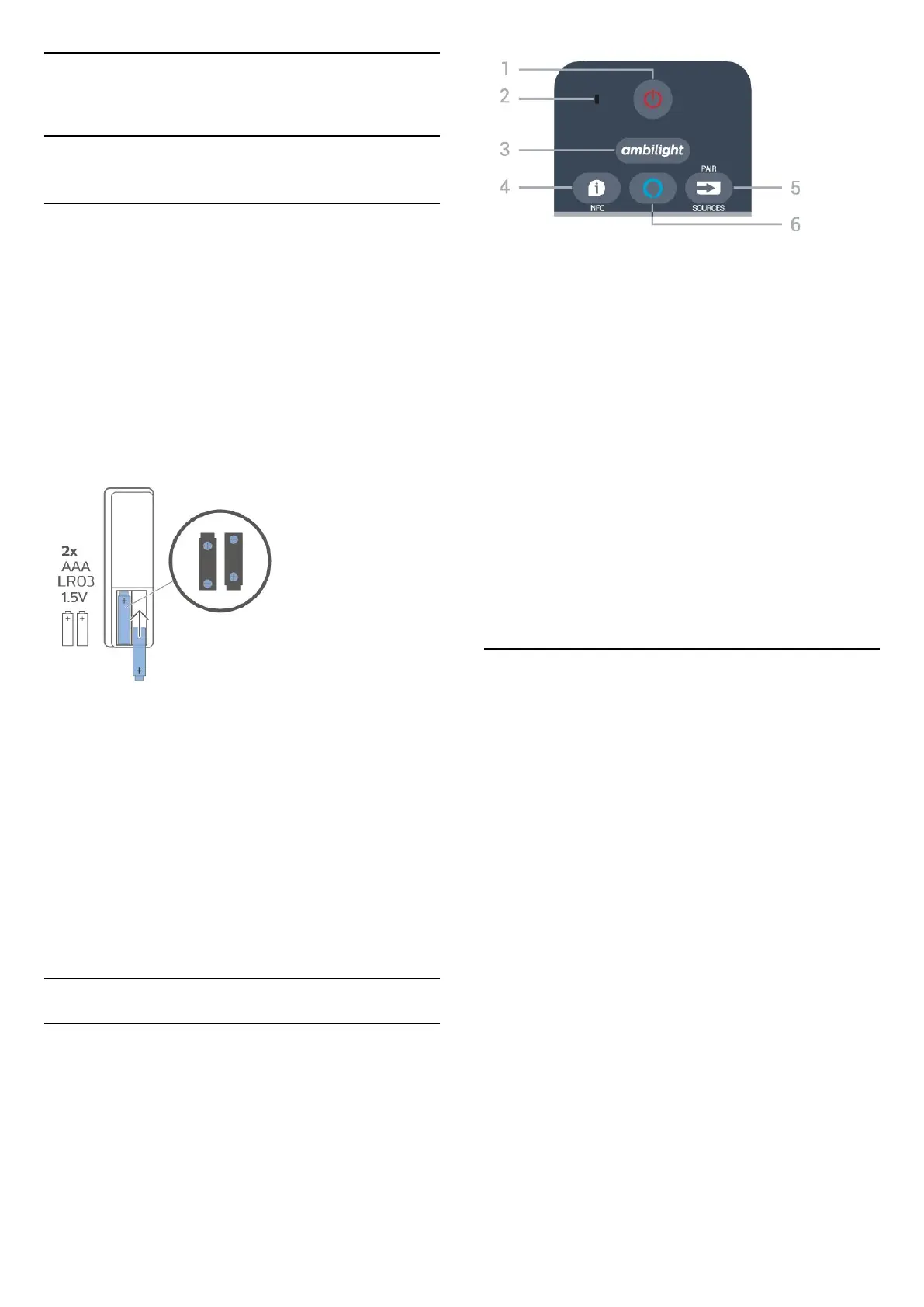
Replace batteries
If the TV does not react on a key press on the remote
control, the batteries might be empty.
To replace the batteries, open the battery
compartment on the back of the remote control.
1 - Slide the battery door in the direction shown by
the arrow.
2 - Replace the old batteries with 2 Alkaline
type AAA-LR03-1.5V batteries. Make sure the + and
the - ends of the batteries line up correctly.
3 - Reposition the battery door and slide it back until
it clicks.
• Remove the batteries if you are not using the remote
control for a long time.
• Safely dispose of your old batteries according to the
end of use directions.
Cleaning
Your remote control is treated with a scratch-resistant
coating.
To clean the remote control, use a soft damp cloth.
Never use substances such as alcohol, chemicals or
household cleaners on the remote control.
Key Overview
Top
1 - Standby / On
To switch the TV on or back to Standby.
2 - VOICE microphone
Speak near this hole during voice search.
3 -
To select one of the Ambilight style or switch off
Ambilight.
4 - INFO
To open or close programme info.
5 - SOURCES / PAIR
• To open or close the Sources menu.
• Mantenha pressionado para emparelhar o controle
remoto à TV.
6 - Alexa
To start Alexa voice control operations.
3.2
Pair Your Remote Control to
TV
This remote control uses both Bluetooth and IR
(infrared) to send its commands to the TV.
• You can use this remote control via IR (infrared) for
most operations.
• To use Alexa voice control operations, you need to
pair (link) the TV with the remote control.
When you started the initial TV installation, the TV
invited you to long press the PAIR key, and by
doing so, the pairing was done.
Note:
1 - Once the remote control has entered pairing
mode successfully, the blue LED indicator ring around
the microphone on the front side of the remote
control starts blinking.
2 - The remote control must be kept close to the TV
(within 1m distance) during pairing in order to ensure
success.
3 - If the TV does not launch the Alexa voice
control operations when press Alexa, pairing was
unsuccessful.
4 - It is advisable to wait until the set has fully started
up and launched all background processes before
5




 To Next Page