5 - Arrow / navigation keys
To navigate up, down, left or right.
6 - Home
To open the Home menu.
7 - OPTIONS
To open or close the Options menu.
Bottom
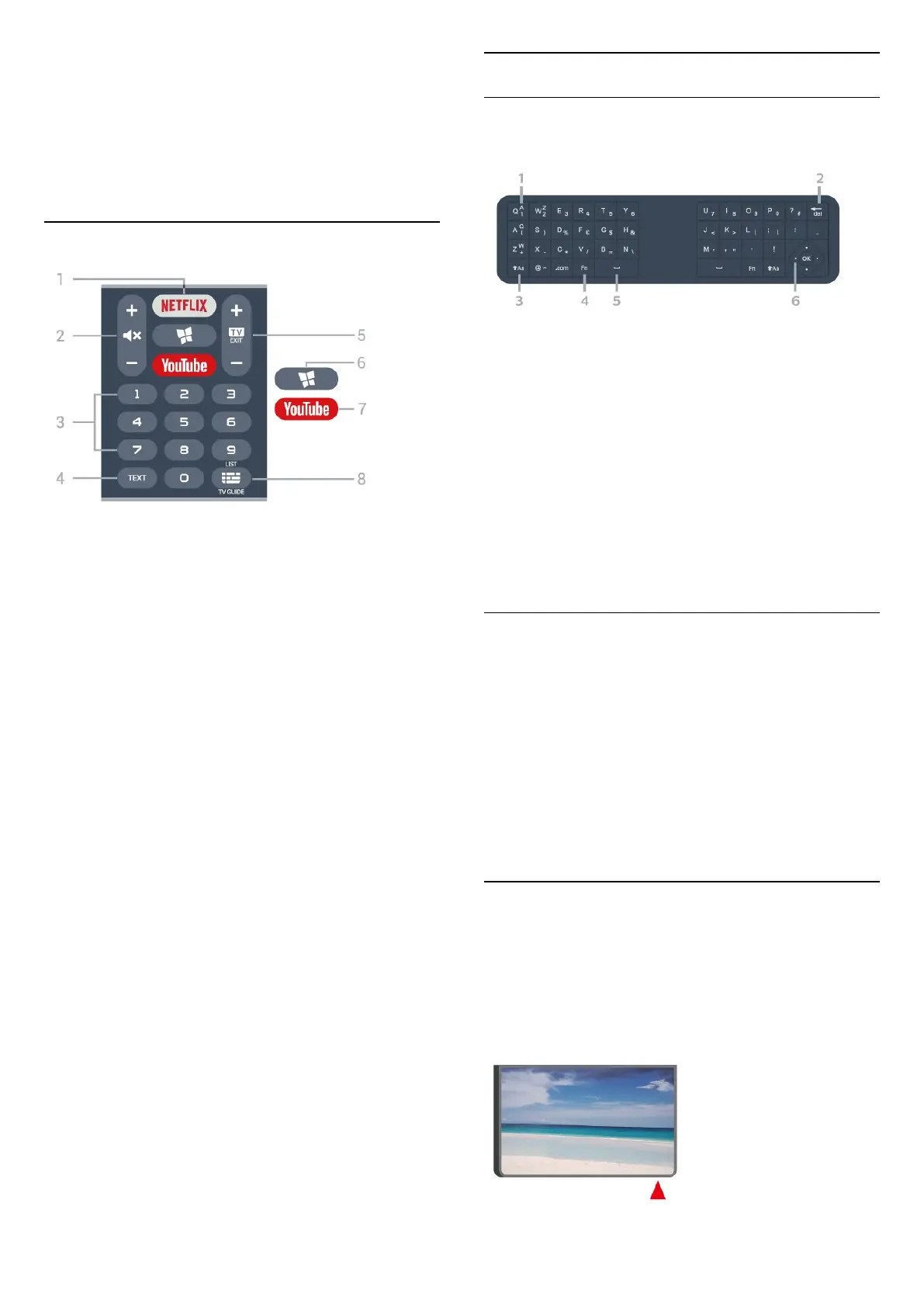
1 -
To open the Netflix App directly. With the TV switched
on or from standby.
• If you have a Netflix membership subscription, you
can enjoy Netflix on this TV. Your TV must be
connected to the Internet.
• To open Netflix, press to open the Netflix
App. You can open Netflix immediately from a TV in
standby.
www.netflix.com
2 - Mute / Volume
Press in middle to mute the sound or to restore it.
Prese + or - to adjust the volume level.
3 - Number keys
To select a channel directly.
4 - TEXT
To open or close Text/Teletext.
5 - - EXIT
Press in middle to switch back to watch TV. To stop
an interactive TV application. Prese + or - to switch to
the next or previous channel in the channel list. To
open the next or previous page in Text/Teletext.
6 - SMART TV
To open the Smart TV start page.
7 - YouTube
To open the YouTube App directly.
8 - TV Guide / Channel list
To open or close the TV Guide. Long press to open
the channel list.
Keyboard
Overview
Overview of a keyboard
1 - Character
Character position.
2 - Delete
To delete input characters.
3 - Shift
To type uppercase characters.
4 - Fn key
To type a number or punctuation character.
5 - Spacebar
6 - Navigation and OK
Writing Text
With the keyboard on the back of the remote control,
you can write text in any text field on screen.
To write text…
1 - Select a text field if it is not yet selected.
2 - Turn the remote control keyboard facing upwards
to activate the keyboard keys. Hold the remote
control with two hands and type with both thumbs.
3 - To hide the on screen keyboard, press BACK.
4 - Press OK to confirm the text.
3.2
IR sensor
The TV can receive commands from a remote control
that uses IR (infrared) to send commands. If you use
such a remote control, always make sure you point
the remote control at the infrared sensor on the front
of the TV.
7





 To Next Page