3. Quick Guide
3.1. Remote Control
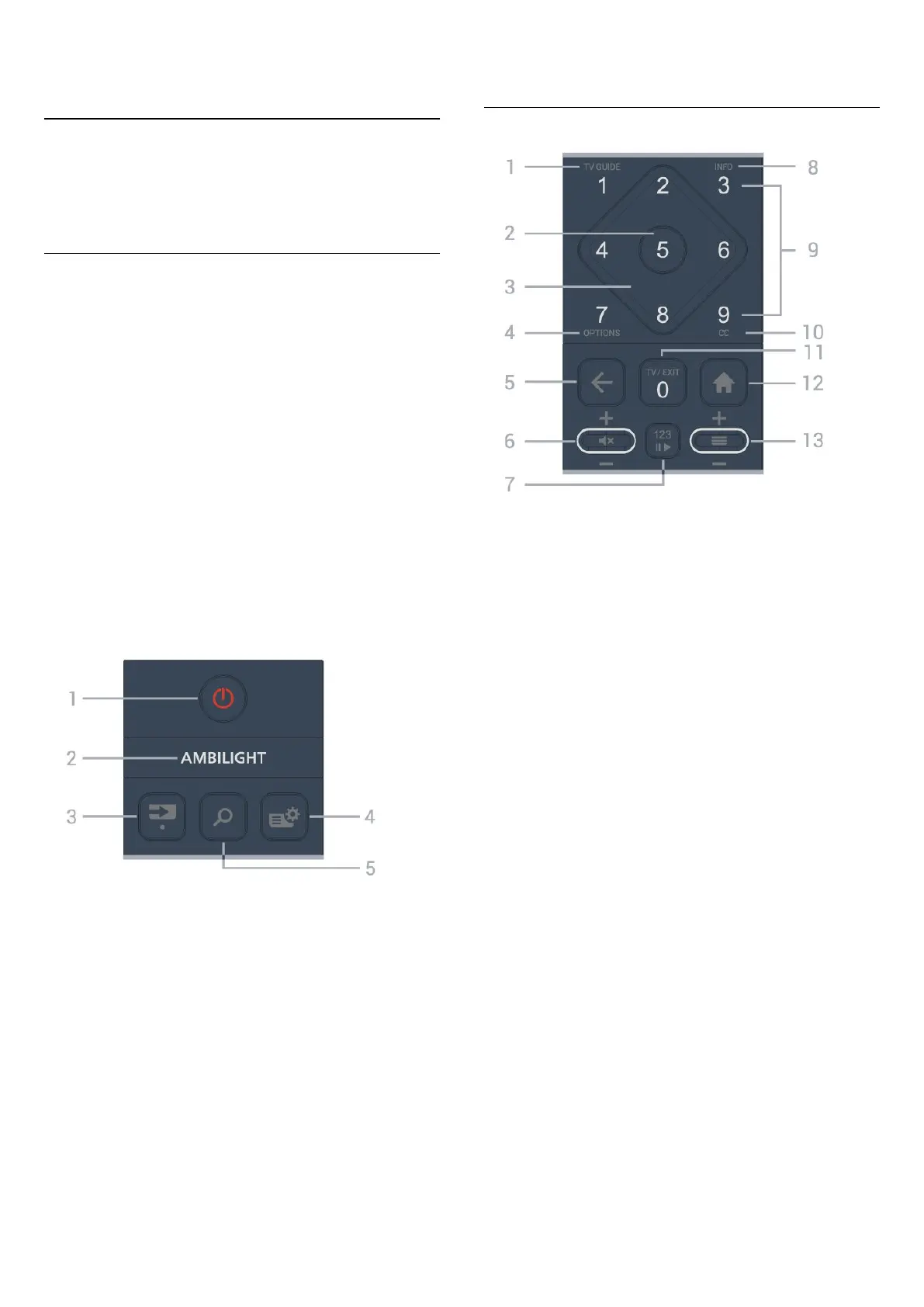
Key Overview (Type 1)
Top
Hidden keys feature
Hidden keys offer more control functions when
pressing the 123 key. The 123 key is in the middle of
the remote control and is used to turn on/off hidden
keys mode. When hidden key mode is turned on, the
Dot key, number keys 0 to 9 and media play control
keys will appear with backlight and trigger the
functions. When hidden keys mode is turned off by
pressing the 123 key again or is automatically turned
off, the remote control works with the normal keys.
Warning
Choking Hazard! This TV remote control contains small
parts not suitable for children under 5 years old.
1 - (Standby / On)
To switch the TV on or back to Standby.
2 -
To select one of the Ambilight styles.
* Ambilight setting is only for models which support
Ambilight function.
3 - (SOURCES) / Dot (hidden keys, available after 123
key is pressed)
• To open the Sources menu.
• To enter digital sub-channels.
4 - (Quick Menu/MENU)
To open the Quick Menu with typical TV functions.
5 - (Search)
• To open the Search tab on Home screen.
• To launch search interface for some supported apps.
Middle
1 - TV Guide
To open or close the TV Guide.
2 - OK key
To confirm a selection or setting. To open the channel
list while watching TV.
3 - Arrow/navigation keys
To navigate up, down, left or right.
4 - OPTIONS
To open or close the Options menu.
5 - (Back)
To switch back to the previous channel you selected.
To return to the previous menu.
To go back to the previous App/Internet page.
6 - Volume / (Mute)
Move down or up to adjust the volume level. Press the
middle of the key to mute the sound or to restore it.
7 - 123 key
To turn the hidden function keys on or off and switch
the keys between different sets of operations.
8 - INFO
To open or close program info.
9 - Number keys (hidden keys, available by pressing the
123 key)
To select a channel directly.
10 - CC
To open Closed Caption menu.
11 - TV / EXIT
To switch back to watch TV or to stop an interactive TV
application. However, it might not work with some
applications; behavior depends on third-party TV apps.
This key changes to Number key 0 after pressing the
7







 To Next Page