123 key.
12 - Home
To open the Home menu.
13 -
(Channel)
Move down or up to switch to the next or previous
channel in the channel list. Press the middle of the key
to open the channel list.
Bottom
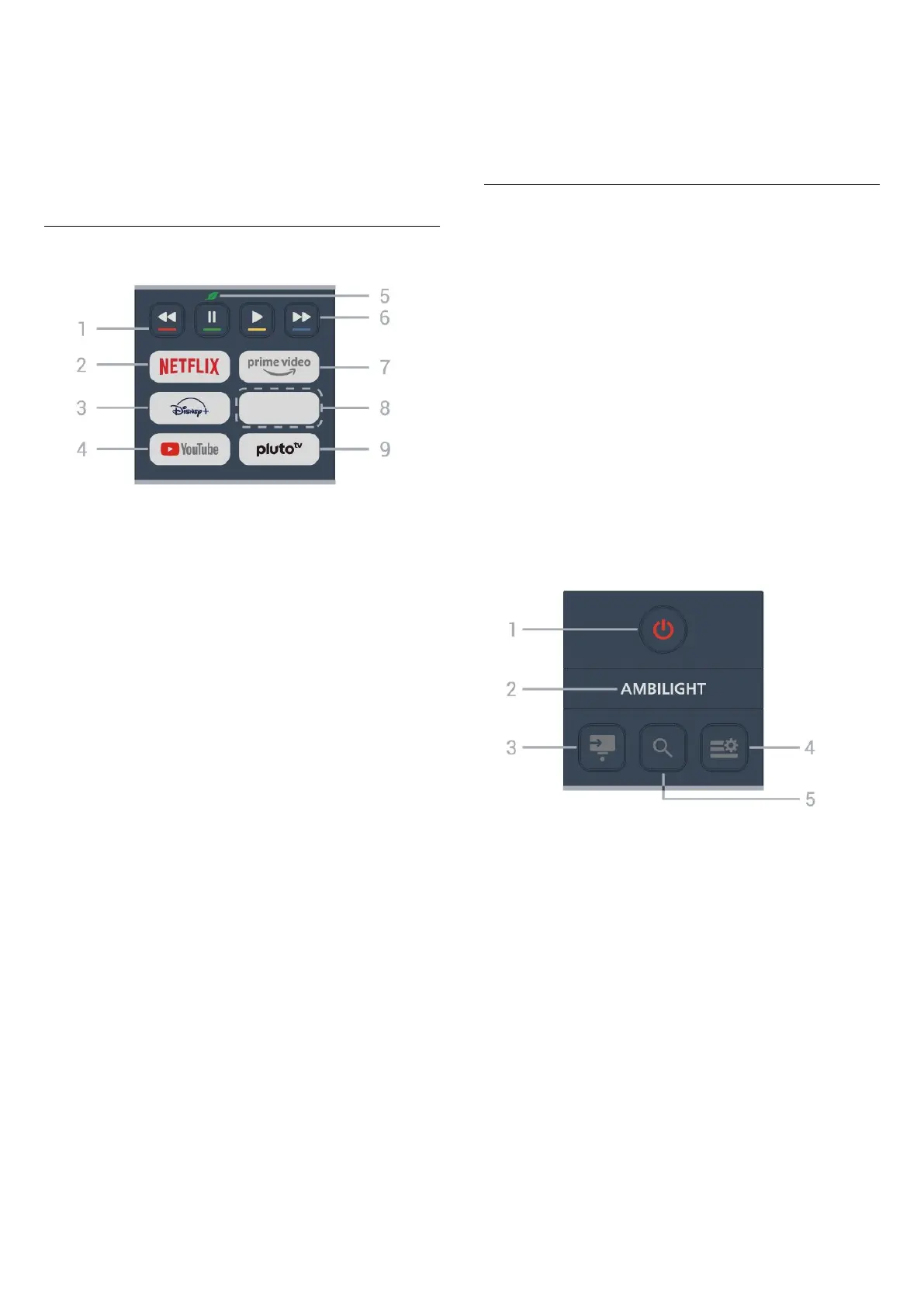
1 - Color keys
Direct selection of options. Press Blue key
to open
the Help.
2 -
• If you have a Netflix subscription, you can enjoy
Netflix on this TV. Your TV must be connected to the
Internet.
• To open Netflix, press to open the Netflix App.
You can open Netflix immediately from a TV in standby.
www.netflix.com
3
-
To launch the Disney+ App.
4 - YouTube
To launch the YouTube app.
5 -
Eco / Green key
Press to invoke a message to remind you to enter the
Eco settings menu; long press to invoke the Eco
settings menu directly. Once the Eco settings menu is
triggered by long pressing the key a few times, the
message will no longer appear.
6 - Playback (hidden keys, available after 123 key
is
pressed)
• Play , to playback.
• Pause , to pause playback
• Rewind , to rewind
• Fast forward , to forward quickly
7 -
To launch the Amazon prime video
App.
8 - Quick keys
Press the quick key to launch an app or stream media
directly. Quick keys vary between regions and
countries.
9 - Pluto TV
To launch the Pluto TV
app.
Key Overview (Type 2)
Top
Hidden keys
feature
Hidden keys offer more control functions when
pressing the 123 key. The
123 key is in the middle of
the remote control and is used to turn on/off hidden
keys mode. When hidden key mode is turned on, the
Dot key, number keys 0 to 9 and media play control
keys will appear with backlight and trigger the
functions. When hidden keys mode is turned off by
pressing the 123 key again or is automatically turned
off, the remote control works with the normal keys.
Warning
Choking Hazard! This TV remote control contains small
parts not suitable for children under 5 years old.
1 -
(Standby / On)
To switch the TV on or back to Standby.
2 -
To select one of the Ambilight styles.
*
Ambilight setting is only for models which support
Ambilight function.
3 -
(SOURCES) / Dot (hidden keys, available after 123
key is pressed)
• To open the Sources menu.
• To enter digital sub-channels.
4 - (Quick Menu/MENU)
To open the Quick Menu with typical TV functions.
5 -
(Search)
• To open the Search tab on Home screen.
• To launch search interface for some supported apps.
8





 To Next Page