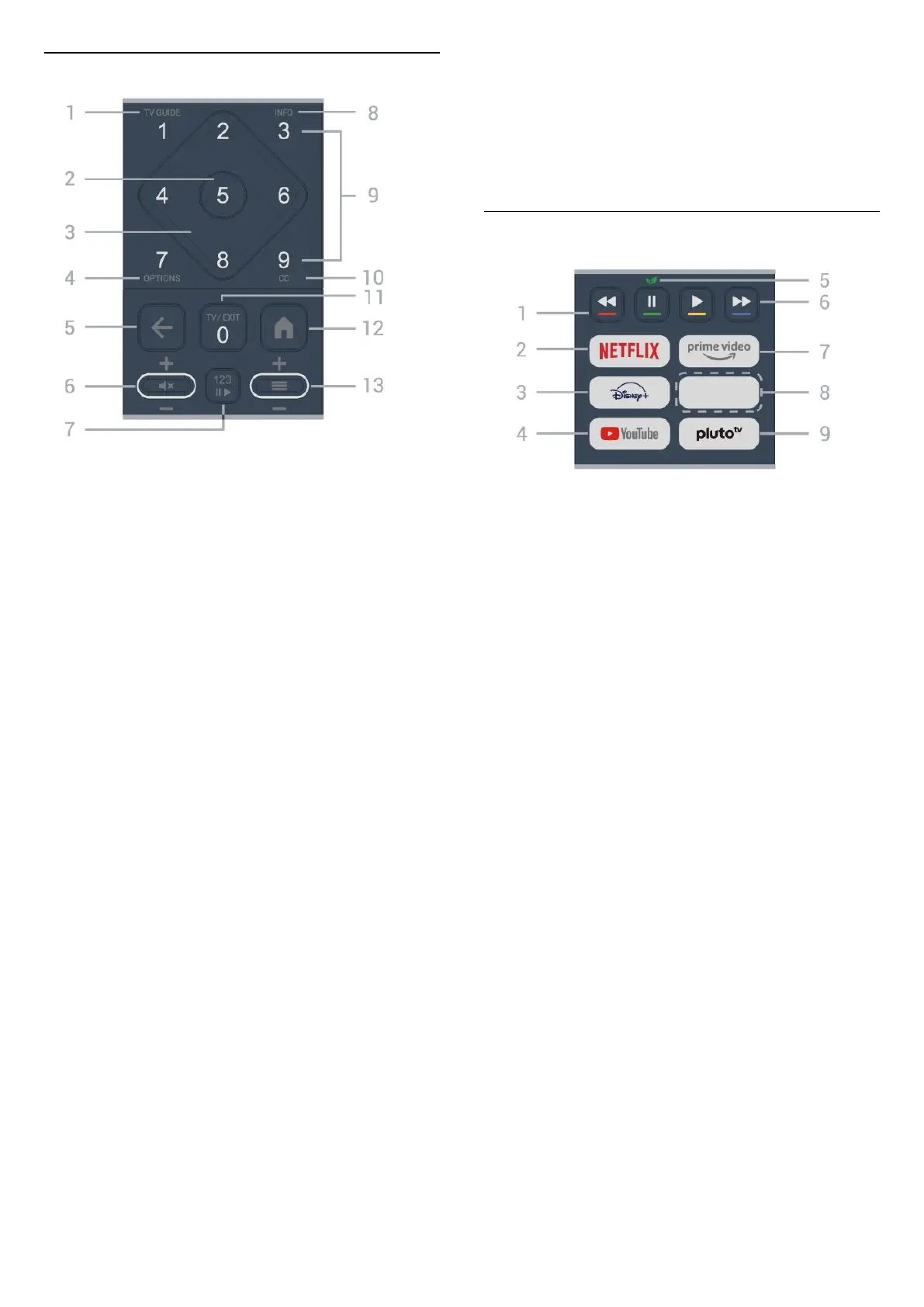
Middle
1 - TV Guide
To open or close the TV Guide.
2 - OK key
To confirm a selection or setting. To open the channel
list while watching TV.
3 - Arrow/navigation keys
To navigate up, down, left or right.
4 - OPTIONS
To open or close the Options menu.
5 - (Back)
To switch back to the previous channel you selected.
To return to the previous menu.
To go back to the previous App/Internet page.
6 - Volume / (Mute)
Move down or up to adjust the volume level. Press the
middle of the key to mute the sound or to restore it.
7 - 123 key
To turn the hidden function keys on or off and switch
the keys between different sets of operations.
8 - INFO
To open or close program info.
9 - Number keys (hidden keys, available by pressing the
123 key)
To select a channel directly.
10 - CC
To open Closed Caption menu.
11 - TV / EXIT
To switch back to watch TV or to stop an interactive TV
application. However, it might not work with some
applications; behavior depends on third-party TV apps.
This key changes to Number key 0 after pressing the
123 key.
To open the Home menu.
Bottom
1 - Color keys
Direct selection of options. Press Blue key to open
the Help.
2 -
• If you have a Netflix subscription, you can enjoy
Netflix on this TV. Your TV must be connected to the
Internet.
• To open Netflix, press to open the Netflix App.
You can open Netflix immediately from a TV in standby.
www.netflix.com
3 -
To launch the Disney+ App.
4 - YouTube
To launch the YouTube app.
5 - Eco / Green key
Press to invoke a message to remind you to enter the
Eco settings menu; long press to invoke the Eco
settings menu directly. Once the Eco settings menu is
triggered by long pressing the key a few times, the
message will no longer appear.
6 - Playback (hidden keys, available after 123 key is
pressed)
• Play , to playback.
• Pause , to pause playback
• Rewind , to rewind
• Fast forward , to forward quickly
9
To open the Home menu.
13 -
(Channel)
Move down or up to switch to the next or previous
channel in the channel list. Press the middle of the key
to open the channel list.
12 - Home
7 -
To launch the Amazon prime video App.
8 - Quick keys
Press the quick key to launch an app or stream media
directly. Quick keys vary between regions and countries.





 To Next Page