16 17ENEN
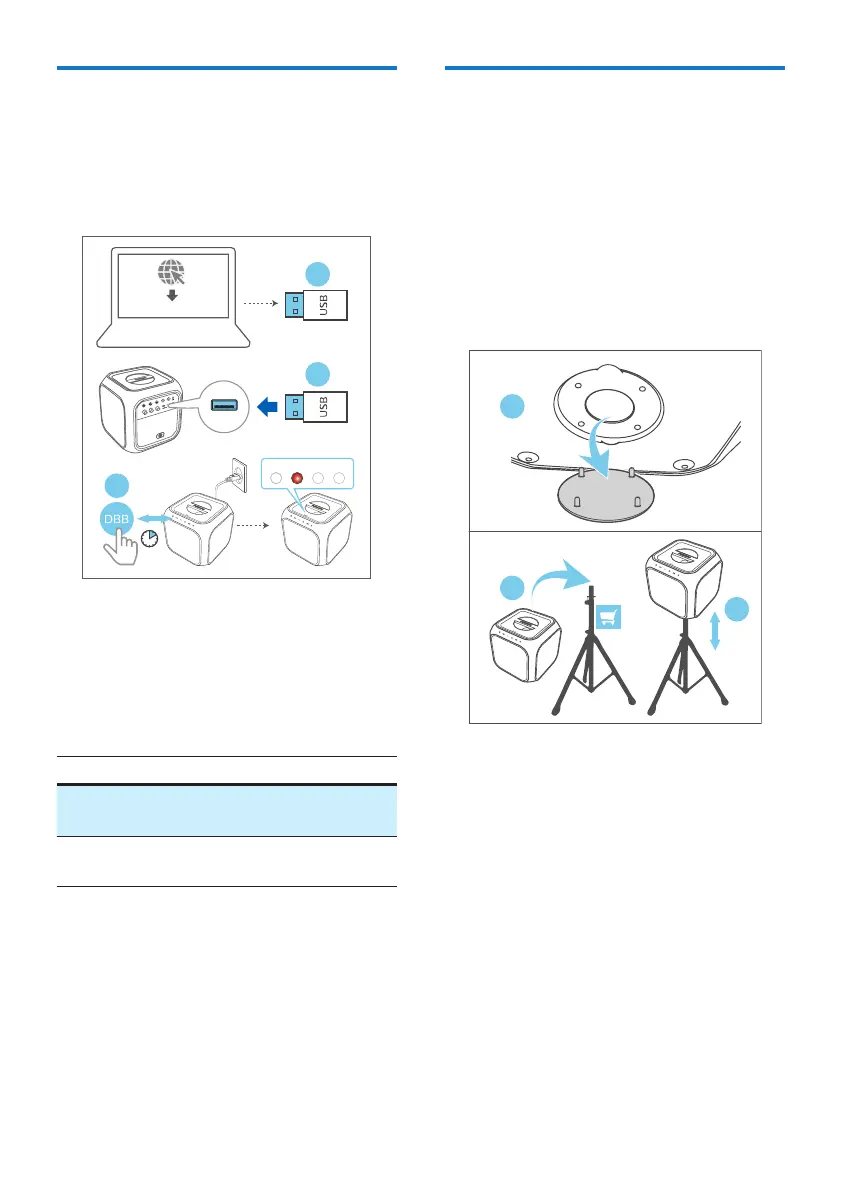
Update rmware via USB
1 Check if there is the latest rmware
version on www.philips.com/support.
Search for your model and click on
“Software and drivers”.
Red
1
2
3
Software update les
8sec
2 Copy the software update les into
USB ash drive, insert USB ash drive
on the unit.
3 Press and hold DBB key for 8 seconds
in power on state with power cable
plug.
LED2 (Red) Status
Slow blinking
Fast blinking
Enter upgrade mode
Upgrade start
LED o
Upgrade nished and
restart
Pole-mounting your
party speaker
1 Remove the cover from the bottom
of the party speaker (please keep the
cover).
2 Lift the party speaker to a speaker
tripod (sold separately).
3 Adjust the speaker tripod to the
appropriate height.
2
3
1
Bottom View



 To Next Page