EasyManua.ls Logo

Philips AC 914 - Page 10

Philips AC 914
42 pages
Print Icon
To Next Page IconTo Next Page
To Previous Page IconTo Previous Page
Loading...
5
6
/
8
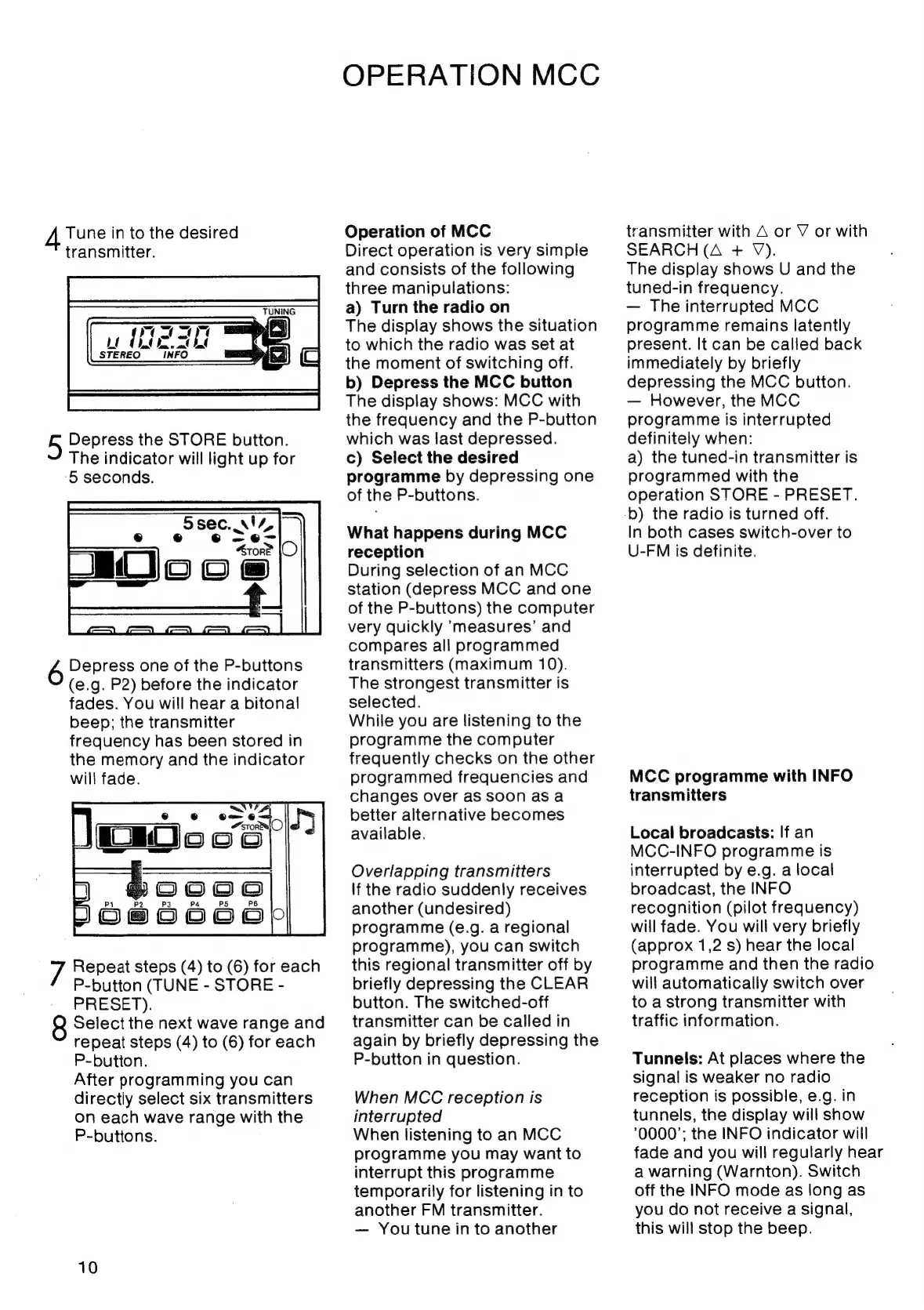
Tune
in
to
the
desired
transmitter.
Depress
the
STORE
button.
The
indicator
will
light
up
for
‘5
seconds.
Depress
one
of
the
P-buttons
(e.g.
P2)
before
the
indicator
fades.
You
will
hear
a
bitonal
beep;
the
transmitter
frequency
has
been
stored
in
the
memory
and
the
indicator
will
fade.
Repeat
steps
(4)
to
(6)
for
each
P-button
(TUNE
-
STORE
-
PRESET).
Select
the
next
wave
range
and
repeat
steps
(4)
to
(6)
for
each
P-button.
After
programming
you
can
directly
select
six
transmitters
on
each
wave
range
with
the
P-buttons.
10
OPERATION
MCC
Operation
of
MCC
Direct
operation
is
very
simple
and
consists
of
the
following
three
manipulations:
a)
Turn
the
radio
on
The
display
shows
the
situation
to
which
the
radio
was
set
at
the
moment
of
switching
off.
b)
Depress
the
MCC
button
The
display
shows:
MCC
with
the
frequency
and
the
P-button
which
was
last
depressed.
c)
Select
the
desired
programme
by
depressing
one
of
the
P-buttons.
What
happens
during
MCC
reception
During
selection
of
an
MCC
station
(depress
MCC
and
one
of
the
P-buttons)
the
computer
very
quickly
measures’
and
compares
all
programmed
transmitters
(maximum
10).
The
strongest
transmitter
is
selected.
While
you
are
listening
to
the
programme
the
computer
frequently
checks
on
the
other
programmed
frequencies
and
changes
over
aS
soon
asa
better
alternative
becomes
available.
Overlapping
transmitters
If
the
radio
suddenly
receives
another
(undesired)
programme
(e.g.
a
regional
programme),
you
can
switch
this
regional
transmitter
off
by
briefly
depressing
the
CLEAR
button.
The
switched-off
transmitter
can
be
called
in
again
by
briefly
depressing
the
P-button
in
question.
When
MCC
reception
is
interrupted
When
listening
to
an
MCC
programme
you
may
want
to
interrupt
this
programme
temporarily
for
listening
in
to
another
FM
transmitter.
You
tune
in
to
another
transmitter
with
A
or
V
or
with
SEARCH
(A
+
V).
The
display
shows
U
and
the
tuned-in
frequency.
The
interrupted
MCC
programme
remains
latently
present.
It
can
be
called
back
immediately
by
briefly
depressing
the
MCC
button.
However,
the
MCC
programme
is
interrupted
definitely
when:
a)
the
tuned-in
transmitter
is
programmed
with
the
operation
STORE
-
PRESET.
b)
the
radio
is
turned
off.
In
both
cases
switch-over
to
U-FM
is
definite.
MCC
programme
with
INFO
transmitters
Local
broadcasts:
If
an
MCC-INFO
programme
is
interrupted
by
e.g.
a
local
broadcast,
the
INFO
recognition
(pilot
frequency)
will
fade.
You
will
very
briefly
(approx
1,2
s)
hear
the
local
programme
and
then
the
radio
will
automatically
switch
over
to
a
strong
transmitter
with
traffic
information.
Tunnels:
At
places
where
the
signal
is
weaker
no
radio
reception
is
possible,
e.g.
in
tunnels,
the
display
will
show
0000’;
the
INFO
indicator
will
fade
and
you
will
regularly
hear
a
warning
(Warnton).
Switch
off
the
INFO
mode
as
long
as
you
do
not
receive
a
signal,
this
will
stop
the
beep.

Related product manuals