EasyManua.ls Logo

Philips AC 914 - Page 9

Philips AC 914
42 pages
Print Icon
To Next Page IconTo Next Page
To Previous Page IconTo Previous Page
Loading...
only
lights
up
if
the
radio
is
in
the
stereo
mode
and
if
you
are
receiving
a
stereo
transmitter.
(see
chapter
'FM
stereo’).
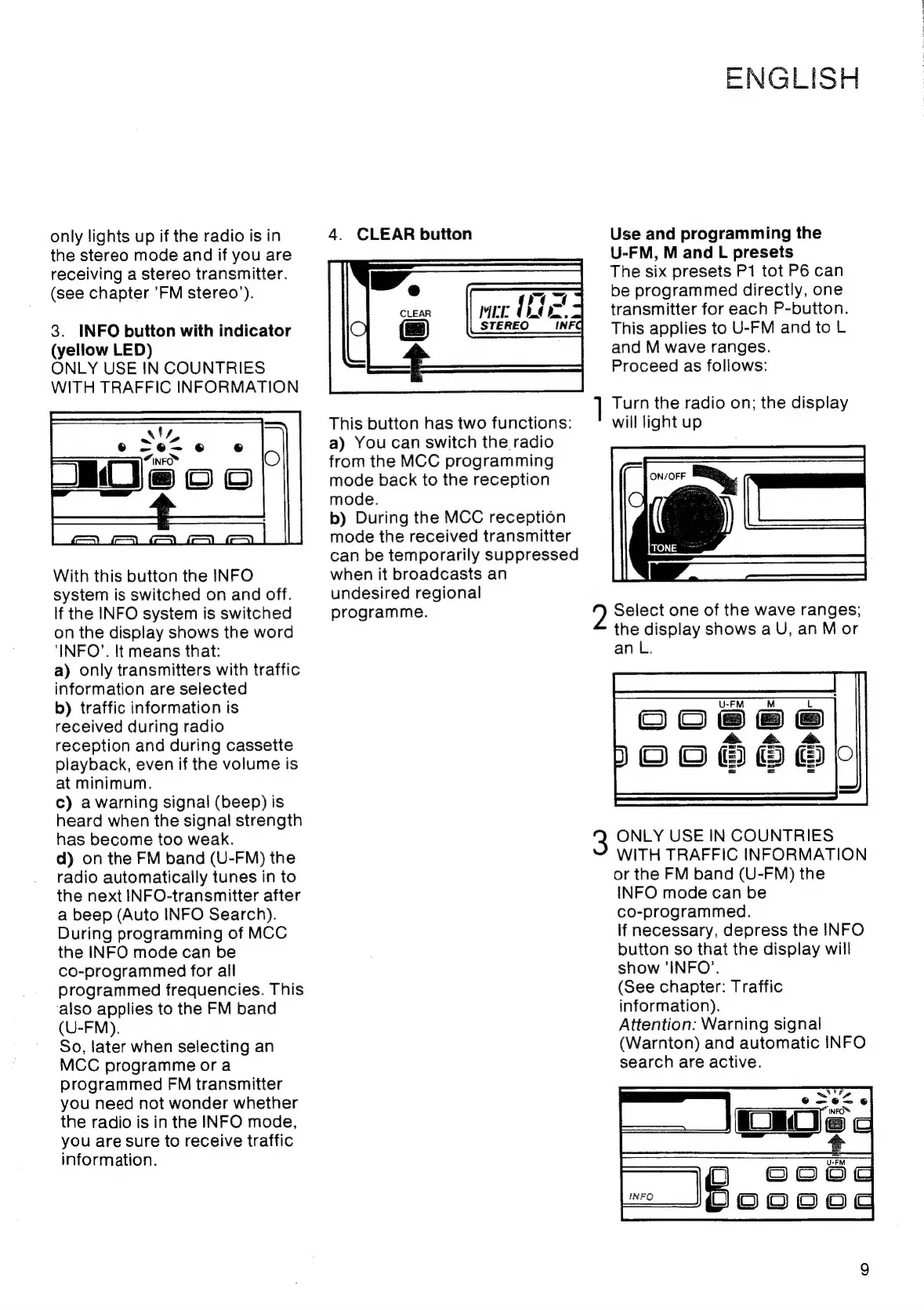
3.
INFO
button
with
indicator
(yellow
LED)
ONLY
USE
IN
COUNTRIES
WITH
TRAFFIC
INFORMATION
With
this
button
the
INFO
system
is
switched
on
and
off.
If
the
INFO
system
is
switched
on
the
display
shows
the
word
‘INFO’.
It
means
that:
a)
only
transmitters
with
traffic
information
are
selected
b)
traffic
information
is
received
during
radio
reception
and
during
cassette
playback,
even
if
the
volume
is
at
minimum.
c)
a
warning
signal
(beep)
is
heard
when
the
signal
strength
has
become
too
weak.
d)
on
the
FM
band
(U-FM)
the
radio
automatically
tunes
in
to
the
next
INFO-transmitter
after
a
beep
(Auto
INFO
Search).
During
programming
of
MCC
the
INFO
mode
can
be
co-programmed
for
all
programmed
frequencies.
This
‘also
applies
to
the
FM
band
(U-FM).
So,
later
when
selecting
an
MCC
programme
or
a
programmed
FM
transmitter
you
need
not
wonder
whether
the
radio
is
in
the
INFO
mode,
you
are
sure
to
receive
traffic
information.
4.
CLEAR
button
MEE
i
STEREO
NFG
This
button
has
two
functions:
a)
You
can
switch
the
radio
from
the
MCC
programming
mode
back
to
the
reception
mode.
b)
During
the
MCC
reception
mode
the
received
transmitter
can
be
temporarily
suppressed
when
it
broadcasts
an
undesired
regional
programme.
]
ENGLISH
Use
and
programming
the
U-FM,
M
and
L
presets
The
six
presets
P1
tot
P6
can
be
programmed
directly,
one
transmitter
for
each
P-button.
This
applies
to
U-FM
and
to
L
and
M
wave
ranges.
Proceed
as
follows:
Turn
the
radio
on;
the
display
will
light
up
Select
one
of
the
wave
ranges;
the
display
shows
a
U,
an
Mor
an
L.
500666
ONLY
USE
IN
COUNTRIES
WITH
TRAFFIC
INFORMATION
or
the
FM
band
(U-FM)
the
INFO
mode
can
be
co-programmed.
If
necessary,
depress
the
INFO
button
so
that
the
display
will
show
‘INFO’.
(See
chapter:
Traffic
information).
Attention:
Warning
signal
(Warnton)
and
automatic
INFO
search
are
active.

Related product manuals