EasyManua.ls Logo

Philips AC 914 - Page 8

Philips AC 914
42 pages
Print Icon
To Next Page IconTo Next Page
To Previous Page IconTo Previous Page
Loading...
OPERATION
Operating
possibilities
on
radio
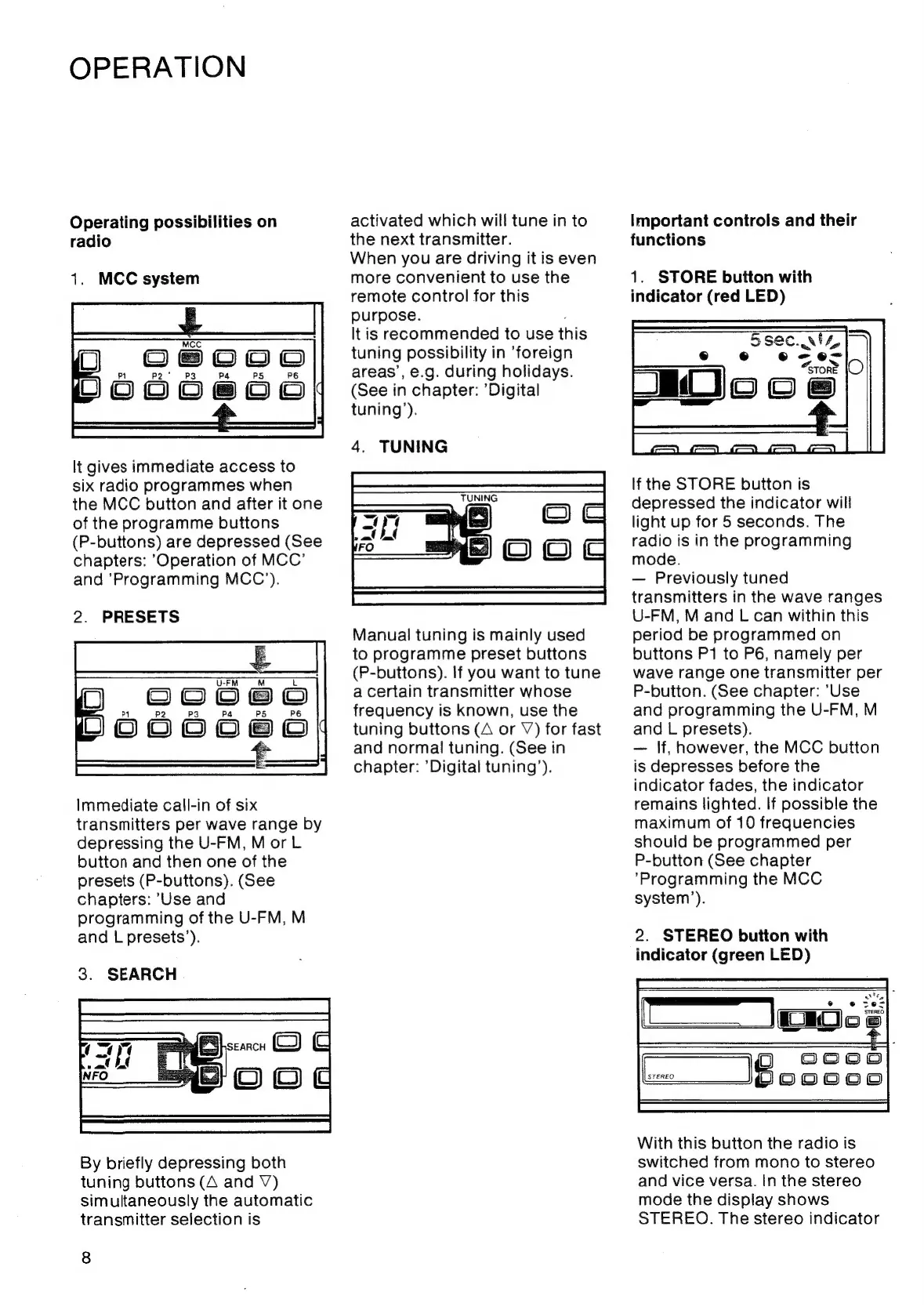
1.
MCC
system
podosce|
It
gives
immediate
access
to
six
radio
programmes
when
the
MCC
button
and
after
it
one
of
the
programme
buttons
(P-buttons)
are
depressed
(See
chapters:
Operation
of
MCC’
and
’Programming
MCC’).
2.
PRESETS
4
PS
pececee
Immediate
call-in
of
six
transmitters
per
wave
range
by
depressing
the
U-FM,
MorL
button
and
then
one
of
the
presets
(P-buttons).
(See
chapters:
’'Use
and
programming
of
the
U-FM,
M
and
L
presets’).
3.
SEARCH
By
briefly
depressing
both
tuning
buttons
(A
and
V)
simultaneously
the
automatic
transmitter
selection
is
8
activated
which
will
tune
in
to
the
next
transmitter.
When
you
are
driving
it
is
even
more
convenient
to
use
the
remote
control
for
this
purpose.
It
is
recommended
to
use
this
tuning
possibility
in
‘foreign
areas’,
e.g.
during
holidays.
(See
in
chapter:
’Digital
tuning’).
4.
TUNING
Manual
tuning
is
mainly
used
to
programme
preset
buttons
(P-buttons).
If
you
want
to
tune
a
certain
transmitter
whose
frequency
is
known,
use
the
tuning
buttons
(A
or
V)
for
fast
and
normal
tuning.
(See
in
chapter:
’Digital
tuning’).
Important
controls
and
their
functions
1.
STORE
button
with
indicator
(red
LED)
5sec.
vt4,
If
the
STORE
button
is
depressed
the
indicator
will
light
up
for
5
seconds.
The
radio
is
in
the
programming
mode.
Previously
tuned
transmitters
in
the
wave
ranges
U-FM,
M
and
L
can
within
this
period
be
programmed
on
buttons
P1
to
P6,
namely
per
wave
range
one
transmitter
per
P-button.
(See
chapter:
’Use
and
programming
the
U-FM,
M
and
L
presets).
If,
however,
the
MCC
button
is
depresses
before
the
indicator
fades,
the
indicator
remains
lighted.
If
possible
the
maximum
of
10
frequencies
should
be
programmed
per
P-button
(See
chapter
‘Programming
the
MCC
system’).
2.
STEREO
button
with
indicator
(green
LED)
ag
=
Sooe
STEREO
Ioooca
With
this
button
the
radio
is
switched
from
mono
to
stereo
and
vice
versa.
In
the
stereo
mode
the
display
shows
STEREO.
The
stereo
indicator

Related product manuals