EasyManua.ls Logo

Philips AC 914 - Page 12

Philips AC 914
42 pages
Print Icon
To Next Page IconTo Next Page
To Previous Page IconTo Previous Page
Loading...
ENGLISH
and
after
1,5
seconds
0000
or
(Warnton)
and
automatic
INFO
After
1,5
seconds
follows:
a
frequency
search
are
active!
‘0000’
or
a
frequency.
MEE
STEREO
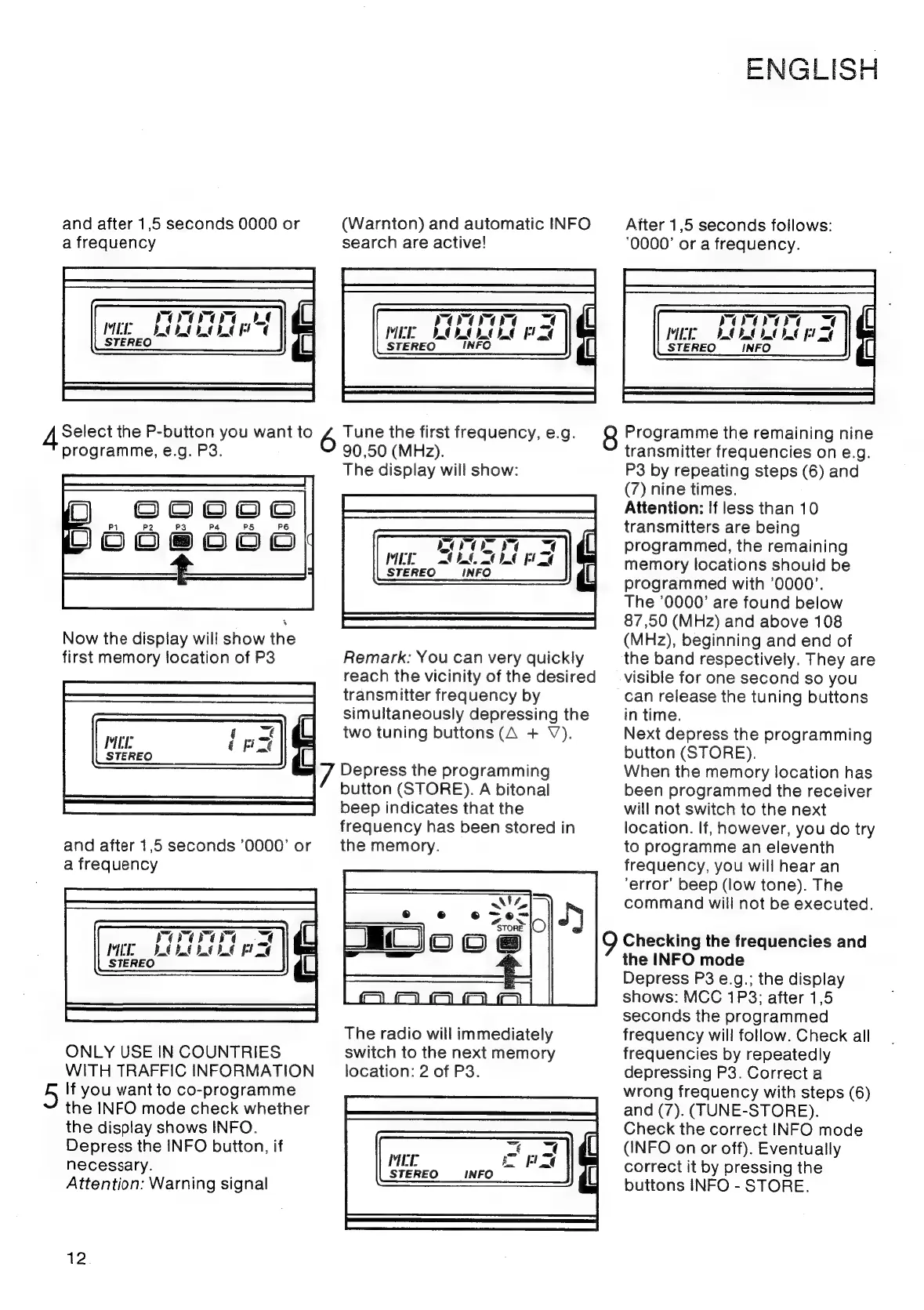
Select
the
P-button
you
want
to
6
Tune
the
first
frequency,
e.g.
8
Programme
the
remaining
nine
programme,
e.g.
P3.
90,50
(MHz).
transmitter
frequencies
on
e.g.
The
display
will
show:
P3
by
repeating
steps
(6)
and
(7)
nine
times.
Attention:
If
less
than
10
transmitters
are
being
programmed,
the
remaining
memory
locations
should
be
programmed
with
‘0000’.
The
'0000’
are
found
below
87,50
(MHz)
and
above
108
Now
the
display
will
show
the
(MHz),
beginning
and
end
of
Hooeedd}
first
memory
location
of
P3
Remark:
You
can
very
quickly
the
band
respectively.
They
are
reach
the
vicinity
of
the
desired
__
visible
for
one
second
so
you
transmitter
frequency
by
can
release
the
tuning
buttons
simultaneously
depressing
the
in
time.
MEL
ane
two
tuning
buttons
(A
+
V).
Next
depress
the
programming
STEREO
ion
button
(STORE).
7
Depress
the
programming
When
the
memory
location
has
button
(STORE).
A
bitonal
been
programmed
the
receiver
beep
indicates
that
the
will
not
switch
to
the
next
frequency
has
been
stored
in
location.
If,
however,
you
do
try
and
after
1,5
seconds
’0000’
or
the
memory.
to
programme
an
eleventh
a
frequency
frequency,
you
will
hear
an
‘error’
beep
(low
tone).
The
command
will
not
be
executed.
Checking
the
frequencies
and
the
INFO
mode
Depress
P3
e.g.;
the
display
shows:
MCC
1P3;
after
1,5
seconds
the
programmed
The
radio
will
immediately
frequency
will
follow.
Check
all
ONLY
USE
IN
COUNTRIES
switch
to
the
next
memory
frequencies
by
repeatedly
WITH
TRAFFIC
INFORMATION
_
location:
2
of
P3.
depressing
P3.
Correct
a
If
you
want
to
co-programme
the
INFO
mode
check
whether
the
display
shows
INFO.
Check
the
correct
INFO
mode
Depress
the
INFO
button,
if
me
:
(INFO
on
or
off).
Eventually
necessary.
AL
Se
correct
it
by
pressing
the
Attention:
Warning
signal
buttons
INFO
-
STORE.
wrong
frequency
with
steps
(6)
and
(7).
(TUNE-STORE).
12

Related product manuals