5EN
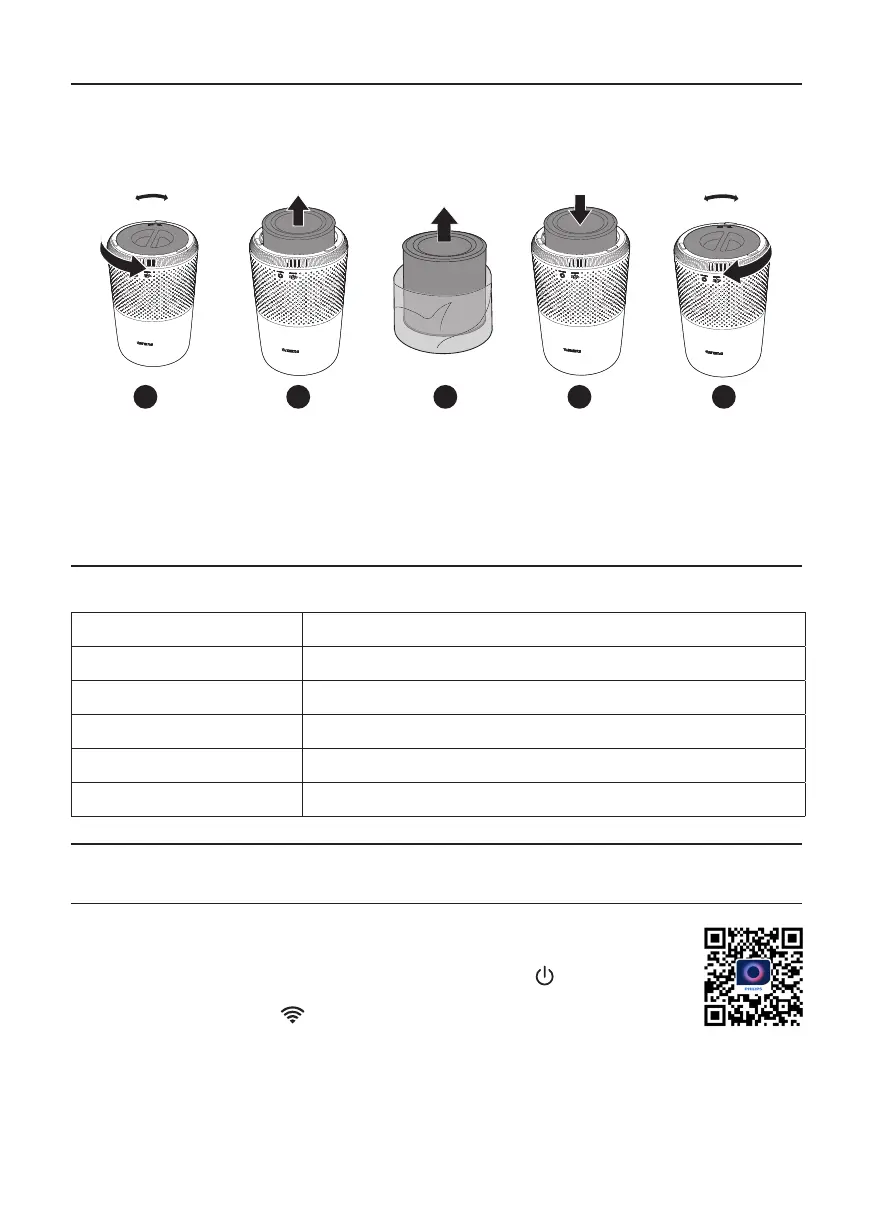
Remove all packaging of the lter before use.
Note: Make sure the air purier is unplugged from the electrical outlet before installing the lter.
CLOSEOPEN
CLOSEOPEN
1
2
3
4
5
1 Rotate the base anti-clockwise to remove it from the appliance�
2 Pull the lter out from the appliance.
3 Remove all packaging materials of the air purication lter.
4 Put the lter back into the appliance.
5 Reattach the base and rotate it clockwise to fasten the base�
Understanding Wi-Fi indicator
Wi-Fi icon status Wi-Fi connection status
Blink in orange Connecting to the smartphone
Stable in orange Connected to the smartphone
Blink in white Connecting to the server
Stable in white Connected to the server
O Wi-Fi function disabled
Wi-Fi connection
1 Download and install the Philips “Air+” app from the App Store or Google Play�
2 Put the plug of the air purier in the power socket and press to turn on the air
purier.
» The Wi-Fi indicator blinks orange for the rst time.
3 Make sure that your smartphone or tablet is successfully connected to your Wi-Fi
network�
4 Launch the Philips “Air+” app and click on “Connect a New Device” or press the “+” button on
the top of the screen. Follow the onscreen instructions to connect the air purier to your network.


 To Next Page