16
If the appliance is locked:
1 Check which lter needs to be replaced (see section ‘Filter
replacement lights’).
2 Switch o the appliance and unplug it.
3 Replace the appropriate lter (see section ‘Replacing the
lters’).
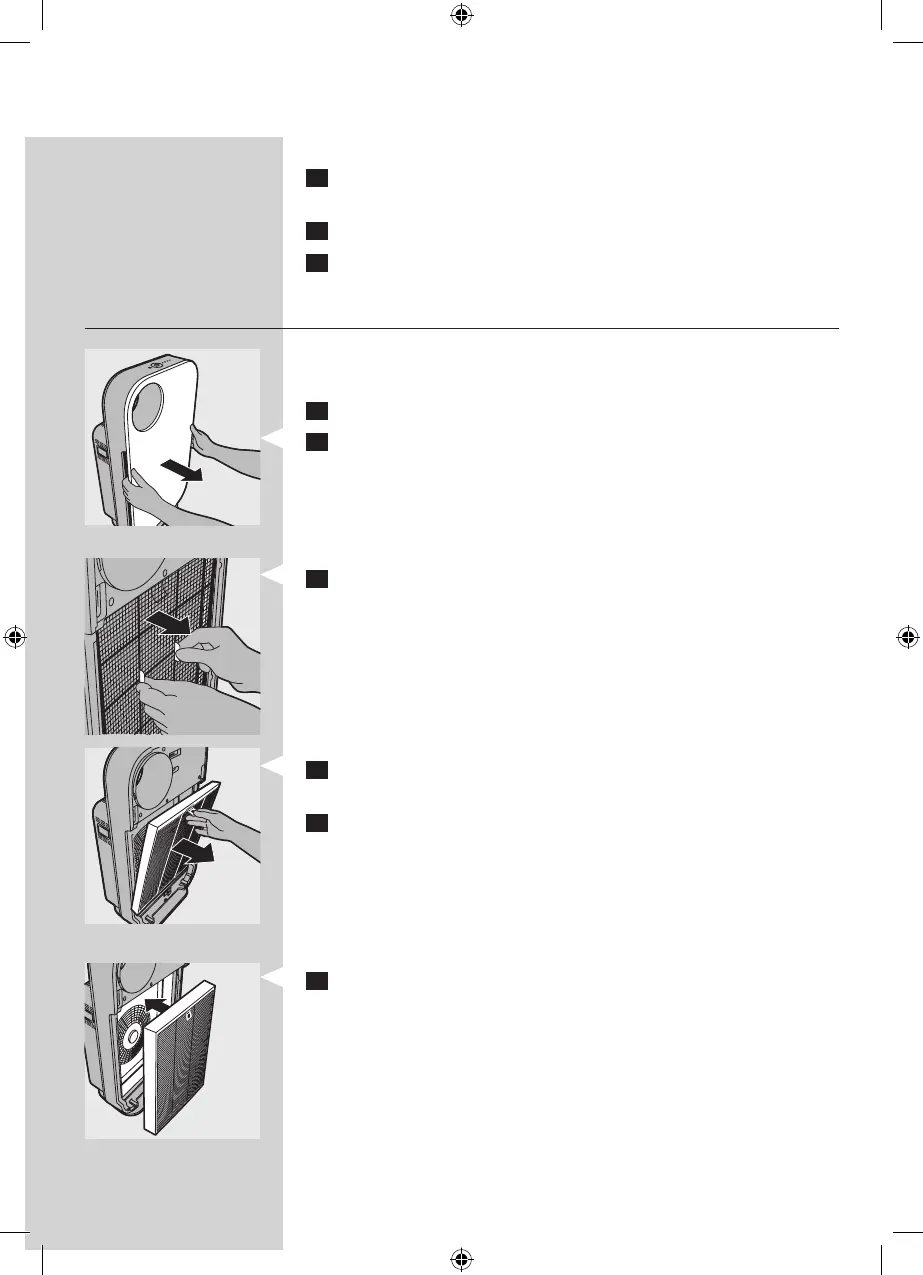
Replacing the lters
Tip: Place the appliance against a wall for more stability
when you remove or insert lters.
1 Switch o the appliance and unplug it.
2 Place your ngers in the recesses of the side panels and
gently pull the top part of the front panel towards you. Then
lift the hooks at the bottom of the panel out of the bottom
of the appliance.
3 To remove lter 1 (pre-lter), grab the two projections and
pull the lter towards you.
4 To remove lter 2 (high-eciency formaldehyde removal
HEPA lter), grab its tag and pull it towards you.
5 Discard the lter that needs to be replaced and unpack the
new lter.
Note: Do not touch the pleated lter surface, or smell the
lter as it has collected pollutants from the air.
Note: Wash your hands after disposing of the used lters.
6 Put lter 2 (high-eciency formaldehyde removal HEPA
lter) back into the appliance.
Note: Make sure that the side with the tag is pointing
towards you.



 To Next Page