EasyManua.ls Logo

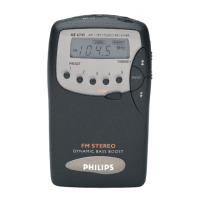
Philips AE 6745 - Tuning and Station Presets; Automatic and Manual Tuning Methods; Storing and Selecting Favorite Stations; Using the Button Hold Function

Philips AE 6745
10 pages
Print Icon
To Next Page IconTo Next Page
To Previous Page IconTo Previous Page
Loading...
Tuning
®
Presets
AUTOMATIC
TUNING
e
Press
TUNING
y
/
Ж
briefly
until
the
frequency
on
the
display
changes
rapidly;
then
release
the
TUNING
У
/
Ж
button.
e
Tuning
stops
when
a
strong
radio
signal
has
been
found.
You
can
interrupt
tuning
by
pressing
either
the
Y
or
4
button.
MANUAL
TUNING
Manual
tuning
15
useful
when
you
already
know
the
frequency
of
the
transmitter
(e.g.
from
your
programme
guide).
e
Press
TUNING
У
or
Ж
briefly
until
the
right
frequency
has
been
reached.
In
this
way
the
frequency
can
be
changed
step-by-step.
PRESETS
You
can
store
the
frequencies
of
10
radio
stations
in
the
memory,
5
on
each
wave
range.
А
stored
frequency
is
only
ега-
sed
from
the
memory
by
storing
another
frequency
in
its
place.
How
to
preset
a
radio
station
e
Select
the
wave
range
and
tune
to
the
desired
station.
e
To
store
the
radio
frequency
shown,
press
STORE.
In
the
display
‘MEMORY’
flashes
briefly.
e
Select
the
desired
memory
location
using
the
PRESET
buttons.
‘MEMORY’
stops
flashing.
The
selected
radio
station
is
now
stored
in
memory.
ЫЫ
nn
an
Selecting
PRESETS
e
To
select
a
preset
station,
first
select
the
required
wave
range
and
then
press
the
desired
PRESET
button.
The
preset
station
is
selected
and
the
display
briefly
shows
‘MEMORY’.
Notes:
e
Set
the
HOLD
switch
to
ON
to
disconnect
the
push
buttons.
Now
your
radio
programme
will
not
be
interrupted
if
you
accidentally
touch
a
button.
e
Set
the
HOLD
switch
to
OFF
to
re-activate
the
push
buttons.
m
m
ee
ee
er

Related product manuals